20

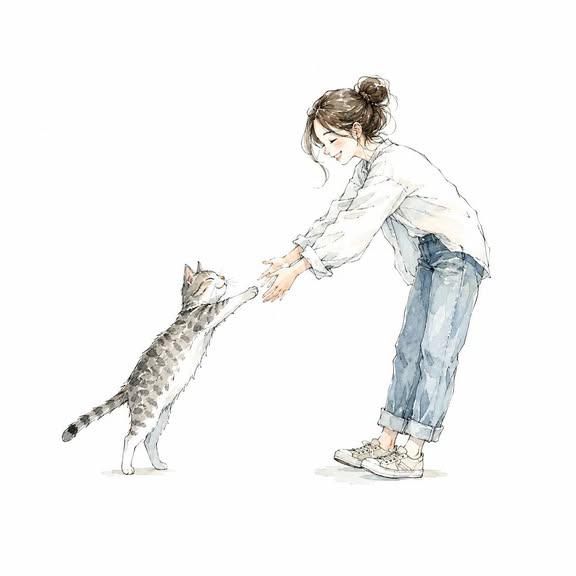
水彩水墨风格对视侧影插画
Enlarge

Example images

水彩水墨风格对视侧影插画

Prompt
Me and [XXX]" facing each other in profile, reaching out their hands toward one another. White background. Delicate watercolor and rich ink illustration style. Hand-drawn line art with a transparent watercolor aesthetic. Premium paper texture. Refined sketch-like brushwork. Automatically adjust the composition to suit the subjects. Everyone is smiling. Full-body view of all subjects. Soft color palette. Minimalist design with a subtle use of negative space. Background must be pure white. Large margins on all four sides. Subjects centered in the composition. No text, logos, or watermarks. Ultra-high resolution. Suitable for use as an icon. Square 1:1 aspect ratio.
Category
Charts & Infographics
Model
ChatGPT
Views43
Source ID
16543
Published
Jun 22, 2026

Guide

About "水彩水墨风格对视侧影插画"

What is this prompt for?

"水彩水墨风格对视侧影插画" AI image prompt for ChatGPT (Charts & Infographics). 我和[XXX]侧身面对面,伸手向对方。白色背景。精致的水彩和浓郁的水墨插画风格。具有透明水彩美感的手绘线条艺术。优质纸张纹理。精致的类草图笔触。自动调整构图以适应主体。每个人都在微笑…

The full copyable prompt and example visuals above are ready for AI image generation or one-click recreate in Picva.

How to use this prompt

  1. Step 1

    Open the prompt detail

    Review the example visuals, category, and full prompt text for "水彩水墨风格对视侧影插画".

  2. Step 2

    Copy the prompt

    Copy the prompt body from this page, or load it directly in Studio.

  3. Step 3

    Pick a model (ChatGPT)

    Prefer ChatGPT. If you switch models, keep subject and composition and tweak style terms.

  4. Step 4

    Generate and export

    Recreate the look in Picva, or export into your workflow for editing and publishing.

FAQ

What is the "水彩水墨风格对视侧影插画" prompt?
It is an AI image-generation prompt for ChatGPT in the Charts & Infographics category. This page includes the full prompt text, example visuals, and a one-click recreate path in Picva.
How do I use this prompt to generate an image?
Copy the prompt from this page, or use Generate / Studio. Paste it into a compatible image model, or recreate the look in Picva with optional reference images.
Which model is this prompt for?
This page lists ChatGPT. Most descriptive prompts also transfer to nearby image models such as GPT Image, Flux, or Midjourney with light style tweaks.
Can I use the result commercially?
You can usually copy the prompt for creation, but commercial use of the final image depends on the model terms, reference-image rights, and the generated content. Follow the source author and platform rules.