20

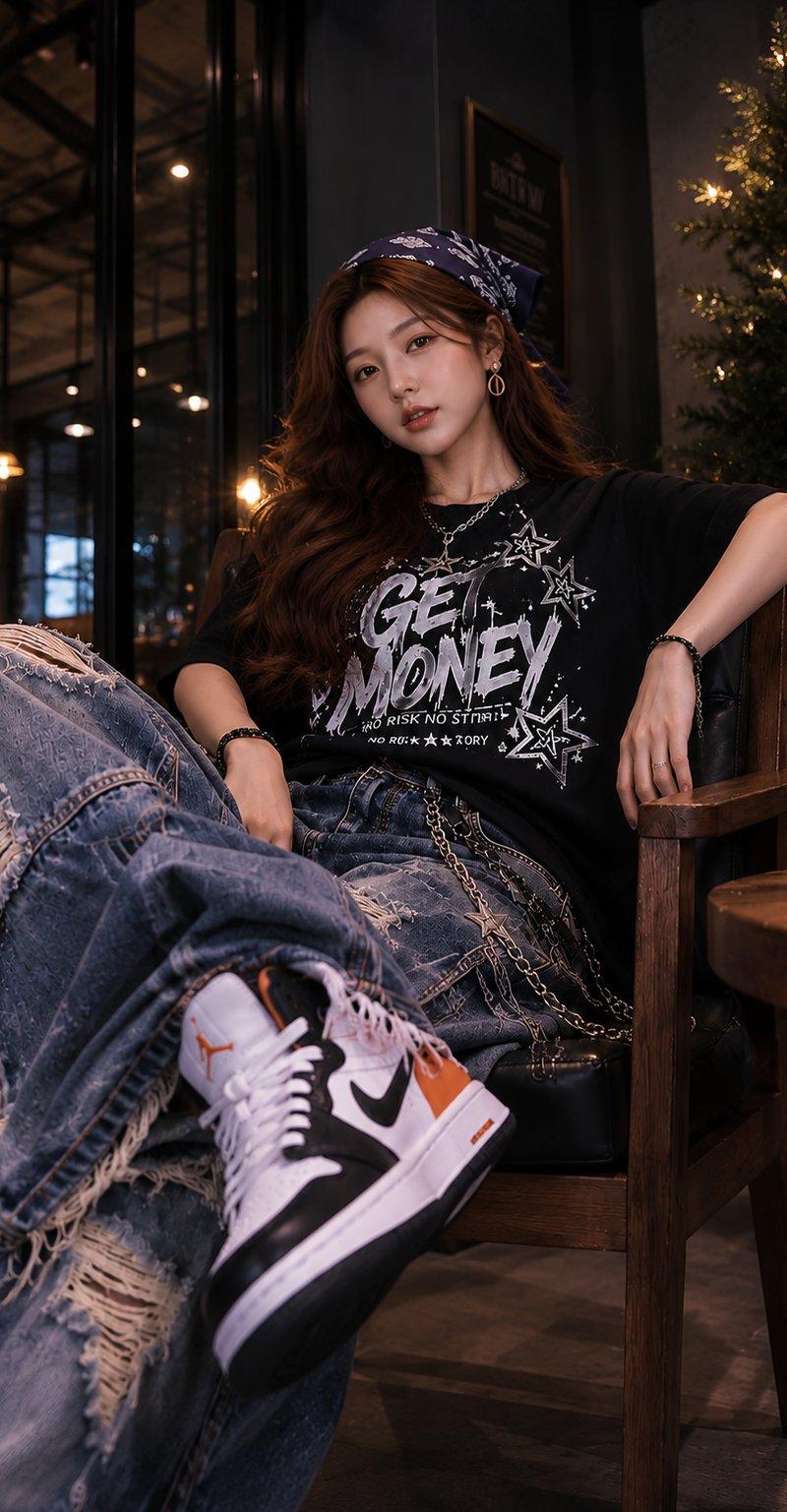
高级咖啡馆深夜时尚人像
Enlarge

Example images

高级咖啡馆深夜时尚人像

Prompt
Ultra-realistic fashion portrait of a stylish young woman relaxing in a premium café lounge at night, sitting deep in a black leather armchair with one leg crossed forward toward the camera, oversized distressed blue baggy jeans with heavy rips and frayed details, black oversized graphic t-shirt with bold white typography and star illustrations, white-black-orange high-top sneakers, long wavy dark brown hair, navy paisley bandana headscarf, silver necklace and bracelets, confident relaxed expression, warm cinematic café lighting, glowing bokeh lights in background, wooden furniture, Christmas tree with fairy lights beside her, shallow depth of field, low-angle perspective, foreground shoe enlarged by perspective, luxury streetwear editorial photography, ultra detailed skin texture, photorealistic, 85mm lens, f/1.8, warm amber tones, dramatic contrast, magazine-quality fashion campaign, 8K.
Category
Charts & Infographics
Model
ChatGPT
Creator
@auqibhabib
Source language
zh-CN
Views40
Source ID
16844
Published
Jun 28, 2026
Studio

Guide

About "高级咖啡馆深夜时尚人像"

What is this prompt for?

"高级咖啡馆深夜时尚人像" AI image prompt for ChatGPT (Charts & Infographics). 超逼真的时尚肖像,一位时髦的年轻女性在深夜的高级咖啡馆休息区放松,深坐在黑色皮革扶手椅上,一条腿向前交叉对着镜头,超大号做旧蓝色松垮牛仔裤,带有严重的破洞和磨损细节,黑色超大号印花T恤…

The full copyable prompt and example visuals above are ready for AI image generation or one-click recreate in Picva.

How to use this prompt

  1. Step 1

    Open the prompt detail

    Review the example visuals, category, and full prompt text for "高级咖啡馆深夜时尚人像".

  2. Step 2

    Copy the prompt

    Copy the prompt body from this page, or load it directly in Studio.

  3. Step 3

    Pick a model (ChatGPT)

    Prefer ChatGPT. If you switch models, keep subject and composition and tweak style terms.

  4. Step 4

    Generate and export

    Recreate the look in Picva, or export into your workflow for editing and publishing.

FAQ

What is the "高级咖啡馆深夜时尚人像" prompt?
It is an AI image-generation prompt for ChatGPT in the Charts & Infographics category. This page includes the full prompt text, example visuals, and a one-click recreate path in Picva.
How do I use this prompt to generate an image?
Copy the prompt from this page, or use Generate / Studio. Paste it into a compatible image model, or recreate the look in Picva with optional reference images.
Which model is this prompt for?
This page lists ChatGPT. Most descriptive prompts also transfer to nearby image models such as GPT Image, Flux, or Midjourney with light style tweaks.
Can I use the result commercially?
You can usually copy the prompt for creation, but commercial use of the final image depends on the model terms, reference-image rights, and the generated content. Follow the source author and platform rules.