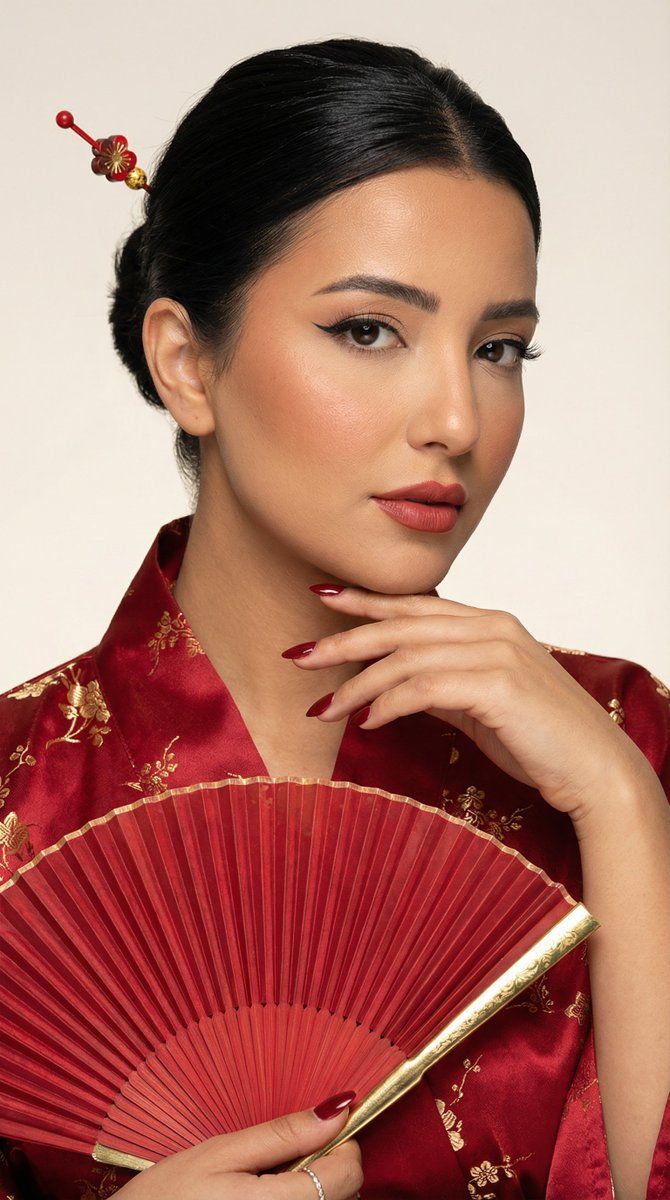
超逼真编辑级美妆转换(图像到图像)
Prompt
{
 "generation_request": {
 "meta_data": {
 "tool": "NanoBanana Pro",
 "task_type": "ultra_photoreal_editorial_beauty_transformation",
 "version": "v1.0_RED_KIMONO_FAN_HAIRPIN_BEAUTY_EN",
 "priority": "highest",
 "language": "en"
 },

 "input": {
 "mode": "image_to_image",
 "reference_image_usage": "very_high",
 "preserve_pose": true,
 "preserve_hand_structure": true,
 "notes": "Use the uploaded reference image as the composition anchor. Keep the same close-up beauty framing and the hand near the face. Transform wardrobe and styling to a red kimono theme with a matching fan and hair accessory. No text."
 },

 "output_settings": {
 "aspect_ratio": "4:5",
 "orientation": "portrait",
 "resolution_target": "ultra_high_res",
 "render_style": "luxury_editorial_beauty",
 "sharpness": "editorial_crisp_with_real_skin",
 "film_grain": "subtle_or_none",
 "color_grade": "warm_red_lacquer_tones",
 "dynamic_range": "natural_not_hdr",
 "skin_rendering": "real_pores_soft_glow_no_plastic"
 },

 "global_rules": {
 "camera_language": "85mm beauty lens equivalent, tight close-up framing, shallow depth of field, editorial precision",
 "lighting_language": "soft diffused beauty key light + gentle specular highlights on skin + controlled shadow shaping",
 "authenticity_markers": "natural skin texture, visible pores, no AI glow, no HDR, no over-smoothing"
 },

 "creative_prompt": {
 "scene_summary": "High-end editorial beauty portrait with a Japanese-inspired red kimono styling. A matching folding fan and elegant hairpin accessory. Harmonized makeup and nails.",

 "environment": {
 "background": "minimal studio backdrop in warm off-white or very light beige, with a subtle red lacquer ambience clean",
 "lighting": "soft beauty lighting with a slight warm rim light; balanced highlights, no harsh shine"
 },

 "subject": {
 "person": "adult woman",
 "expression": "calm confident editorial gaze",
 "hair": "sleek dark hair styled neatly with a red-and-gold hairpin (kanzashi-inspired), a few soft face-framing strands",
 "makeup": {
 "eyes": "clean winged eyeliner, soft neutral-brown shadow, subtle shimmer on inner corners",
 "brows": "natural defined brows",
 "cheeks": "soft warm blush, slightly rosy but refined",
 "lips": "muted red/rose lacquer lip not overly glossy, lips closed"
 },
 "nails": "short elegant manicure in deep red (wine red) to match the kimono and fan"
 },

 "wardrobe": {
 "kimono": "red silk kimono with subtle tone-on-tone pattern (floral or geometric), premium fabric folds, elegant collar line, no logos",
 "details": "optional thin gold accent trim, tasteful and minimal"
 },

 "props": {
 "fan": "folding hand fan in matching red with gold accents, held near the face/hand area, elegant and harmonious"
 },

 "composition": "tight beauty close-up similar to reference, hand near face visible, jewelry minimal (one statement ring allowed), shallow depth of field, ultra detailed skin and makeup texture"
 },

"negative_"- Category
- 创意图片
- Model
- Nano Banana Pro
- Creator
- Özge Döner
- Source ID
- f3468a63-cb78-4530-bf0f-f698d26bd9fa
- Published
- Mar 8, 2026
Views0