20

{"image_description":{"face":{"preserve_original":true,"reference_match":true,"description":"Use ...
Enlarge

Example images

{"image_description":{"face":{"preserve_original":true,"reference_match":true,"description":"Use ...

Prompt
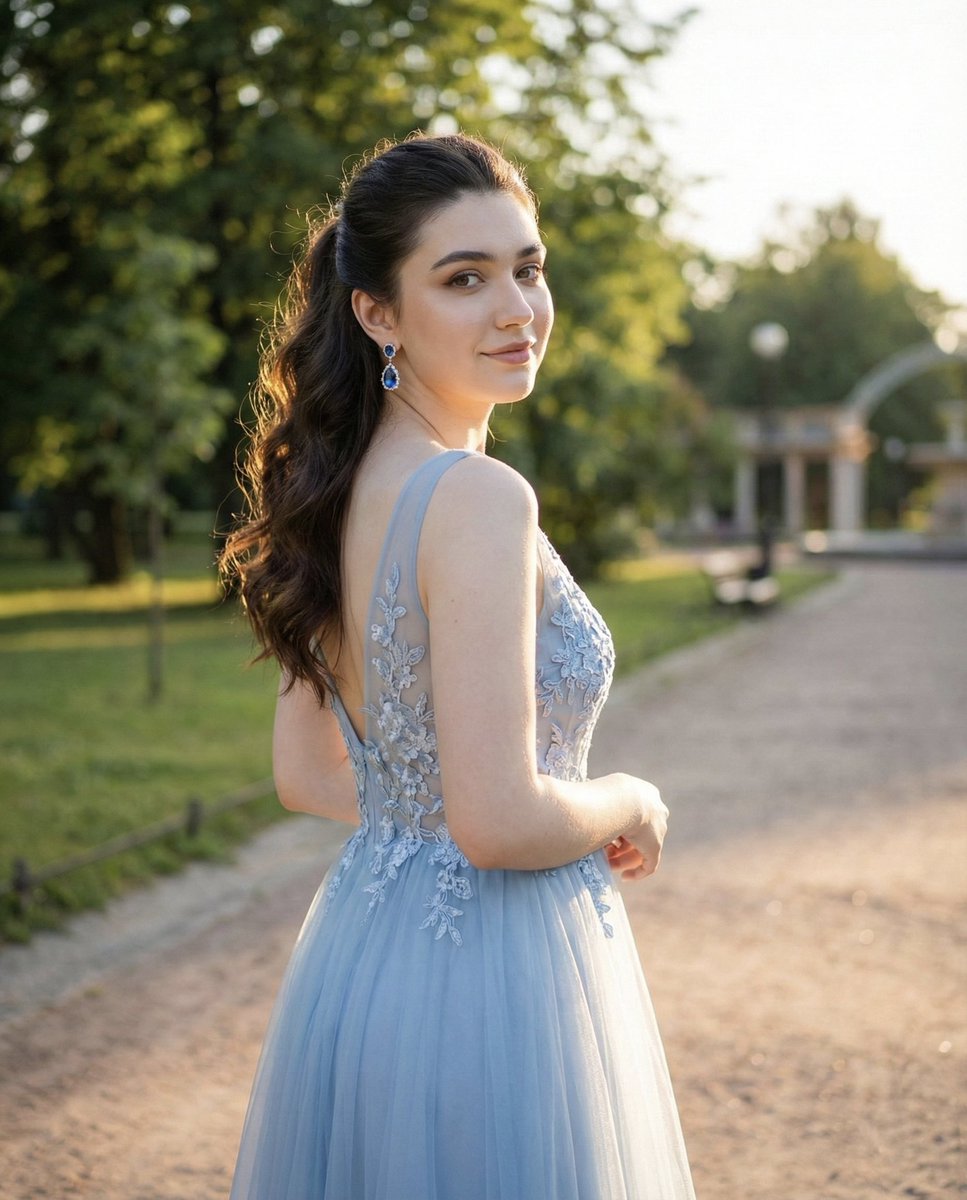
{"image_description":{"face":{"preserve_original":true,"reference_match":true,"description":"Use the same facial features, identity, and soft expression from the uploaded image without altering proportions or structure."},"photo_style":{"type":"outdoor portrait","camera_angle":"three-quarter back-angle shot, subject turning head toward the camera","lighting":"warm golden-hour sunlight with natural highlights on skin and dress","mood":"elegant, serene, romantic","depth_of_field":"sharp background, no blur—preserve full detail of trees, grass, and park setting"},"subject":{"pose":"standing with her back partly toward the camera, turning her head gracefully to the side","expression":"soft, calm, gentle smile","hair":{"style":"long loose waves, half-up ponytail","details":"dark brown hair reflecting warm sunlight"},"clothing":{"type":"light blue embroidered formal gown","details":["delicate floral lace embroidery on bodice","transparent lace back design with lacing","sparkling tulle skirt","thin shoulder straps"]},"accessories":{"earrings":"blue gemstone drop earrings"}},"environment":{"setting":"outdoor park during golden hour","background":["green grass","trees with sunlight filtering through","walking path","buildings in the distance","park lights and poles"],"background_clarity":"maintain full sharpness, no bokeh, no blur","atmosphere":"warm, fresh, natural"},"aesthetic":{"style":"romantic golden-hour portrait","features":["clear and sharp background","warm sunlight glow","natural color tones","blue dress shimmer","soft shadows and highlights"]}}}
Category
creative_scene
Model
Nano Banana Pro
Creator
Pixshop
Views5
Source ID
5a8e990b-7815-415b-aae7-25f873e80fce
Published
Jan 14, 2026

Guide

About "{"image_description":{"face":{"preserve_original":true,"reference_match":true,"description":"Use ..."

What is this prompt for?

"{"image_description":{"face":{"preserve_original":true,"reference_match":true,"description":"Use ..." AI image prompt for Nano Banana Pro (creative_scene). cr…

The full copyable prompt and example visuals above are ready for AI image generation or one-click recreate in Picva.

How to use this prompt

  1. Step 1

    Open the prompt detail

    Review the example visuals, category, and full prompt text for "{"image_description":{"face":{"preserve_original":true,"reference_match":true,"description":"Use ...".

  2. Step 2

    Copy the prompt

    Copy the prompt body from this page, or load it directly in Studio.

  3. Step 3

    Pick a model (Nano Banana Pro)

    Prefer Nano Banana Pro. If you switch models, keep subject and composition and tweak style terms.

  4. Step 4

    Generate and export

    Recreate the look in Picva, or export into your workflow for editing and publishing.

FAQ

What is the "{"image_description":{"face":{"preserve_original":true,"reference_match":true,"description":"Use ..." prompt?
It is an AI image-generation prompt for Nano Banana Pro in the creative_scene category. This page includes the full prompt text, example visuals, and a one-click recreate path in Picva.
How do I use this prompt to generate an image?
Copy the prompt from this page, or use Generate / Studio. Paste it into a compatible image model, or recreate the look in Picva with optional reference images.
Which model is this prompt for?
This page lists Nano Banana Pro. Most descriptive prompts also transfer to nearby image models such as GPT Image, Flux, or Midjourney with light style tweaks.
Can I use the result commercially?
You can usually copy the prompt for creation, but commercial use of the final image depends on the model terms, reference-image rights, and the generated content. Follow the source author and platform rules.