17

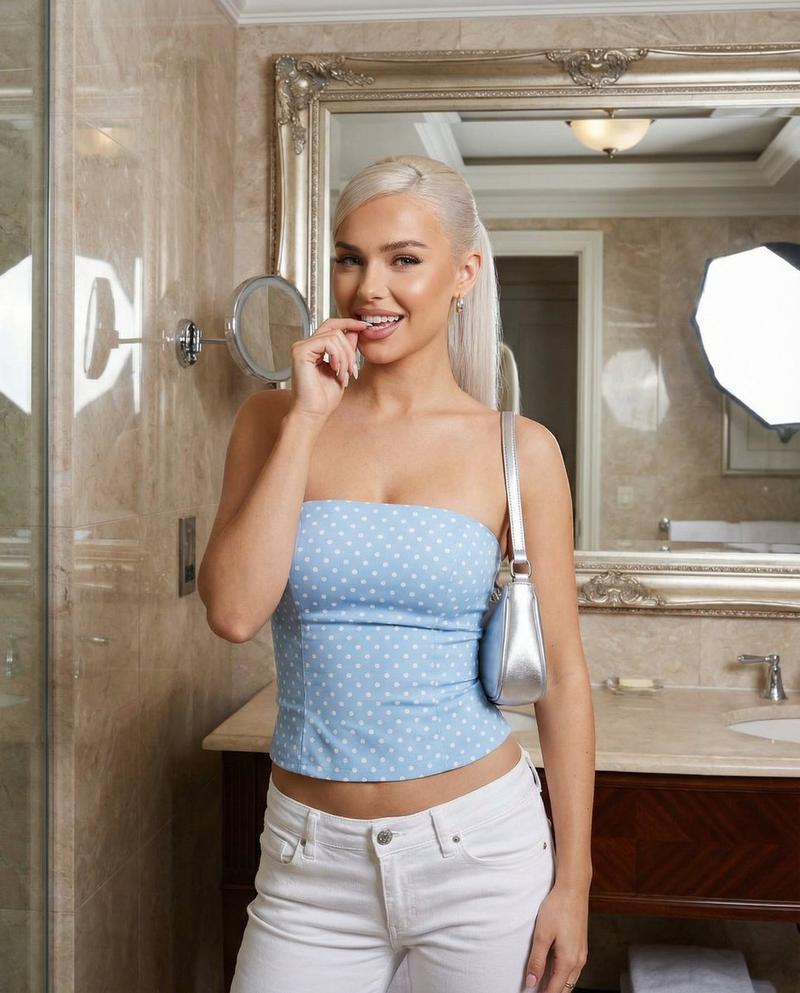
淡蓝色波点上衣浴室自拍提示
Enlarge

淡蓝色波点上衣浴室自拍提示

Prompt
{
  "aspect_ratio": "4:5",
  "scene_type": "indoor fashion snapshot",
  "environment": {
    "location": "luxurious bathroom",
    "background": {
      "wall": "marble wall",
      "mirror": "large mirror edge visible"
    }
  },
  "subject": {
    "hair": {
      "color": "platinum blonde",
      "length": "long",
      "style": "high sleek ponytail"
    },
    "wardrobe": {
      "top": {
        "item": "strapless fitted top",
        "color": "{argument name=\"top color\" default=\"baby blue\"}",
        "pattern": "small black polka dots"
      },
      "bottom": {
        "item": "low-rise white denim jeans"
      }
    },
    "accessories": {
      "bag": {
        "type": "small silver shoulder bag"
      },
      "nails": {
        "color": "soft blue"
      }
    },
    "pose": {
      "hand near mouth, direct teasing gaze"
    }
  },
  "mood": {
    "vibe": "confident, glamorous, flirtatious"
  }
}
Category
创意图片
Model
Nano Banana Pro
Creator
Sienna
Views0
Source ID
f1f1acf0-5b78-454d-a33c-d02e135e4eab
Published
Mar 8, 2026

Guide

About "淡蓝色波点上衣浴室自拍提示"

What is this prompt for?

"淡蓝色波点上衣浴室自拍提示" AI image prompt for Nano Banana Pro (创意图片). 生成一张迷人、妩媚时尚快照的提示词。主体留着铂金色头发,扎着光滑的高马尾,身穿淡蓝色波点露肩上衣和低腰白色牛仔裤,在奢华的大理石浴室中摆拍,眼神中带着一丝挑逗。 --- ```json { "asp…

The full copyable prompt and example visuals above are ready for AI image generation or one-click recreate in Picva.

How to use this prompt

  1. Step 1

    Open the prompt detail

    Review the example visuals, category, and full prompt text for "淡蓝色波点上衣浴室自拍提示".

  2. Step 2

    Copy the prompt

    Copy the prompt body from this page, or load it directly in Studio.

  3. Step 3

    Pick a model (Nano Banana Pro)

    Prefer Nano Banana Pro. If you switch models, keep subject and composition and tweak style terms.

  4. Step 4

    Generate and export

    Recreate the look in Picva, or export into your workflow for editing and publishing.

FAQ

What is the "淡蓝色波点上衣浴室自拍提示" prompt?
It is an AI image-generation prompt for Nano Banana Pro in the 创意图片 category. This page includes the full prompt text, example visuals, and a one-click recreate path in Picva.
How do I use this prompt to generate an image?
Copy the prompt from this page, or use Generate / Studio. Paste it into a compatible image model, or recreate the look in Picva with optional reference images.
Which model is this prompt for?
This page lists Nano Banana Pro. Most descriptive prompts also transfer to nearby image models such as GPT Image, Flux, or Midjourney with light style tweaks.
Can I use the result commercially?
You can usually copy the prompt for creation, but commercial use of the final image depends on the model terms, reference-image rights, and the generated content. Follow the source author and platform rules.