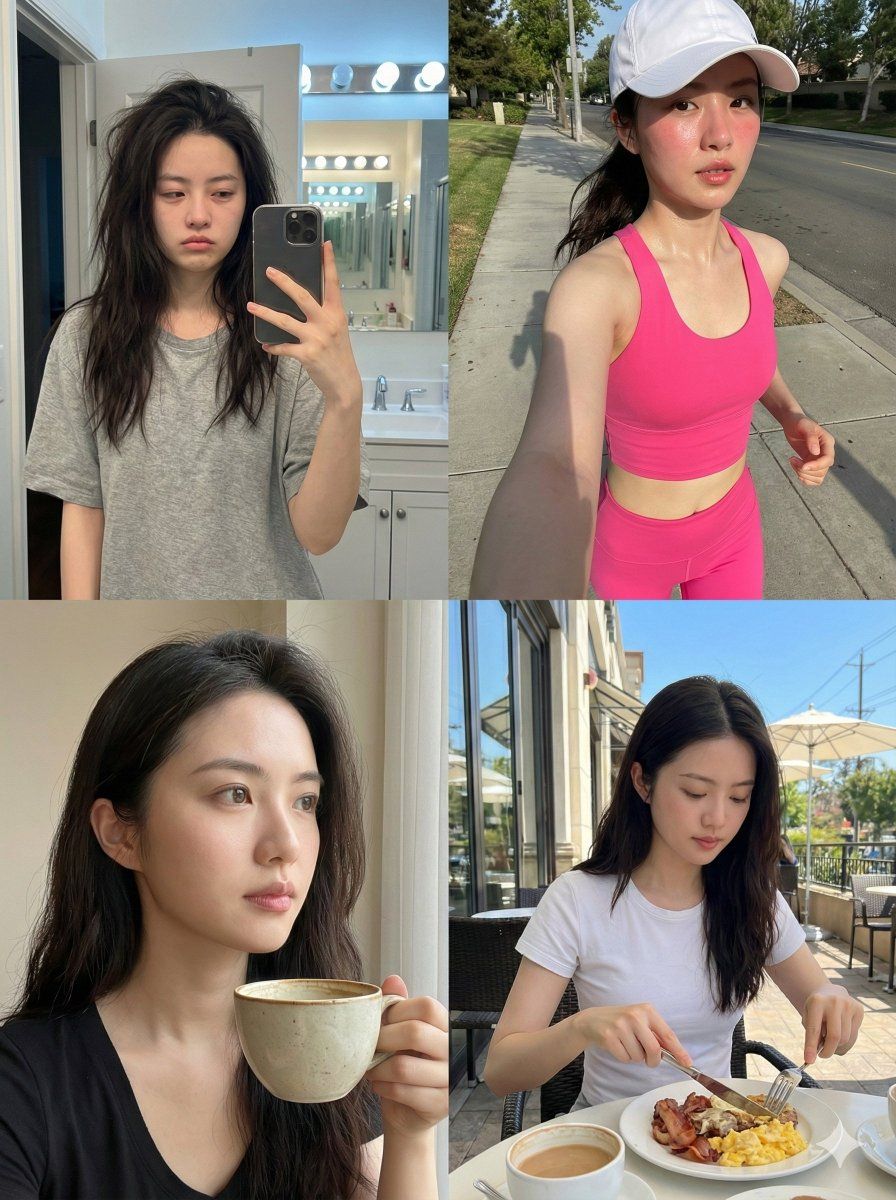
一致性身份日常日志提示(四象限)
Prompt
{
  "system_architecture": {
    "version": "22.0_terminal_logic_grid",
    "project_id": "Consistent_Identity_Daily_Routine_Log",
    "framework": {
      "format": "2x2 Quadrant Grid",
      "aspect_ratio": "3:4",
      "engine_mode": "Hyper-Realistic Neural Synthesis",
      "fidelity_tier": "8K RAW / Zero-Retouch / Authentic"
    }
  },
  "biometric_anchor": {
    "subject_id": "the woman I uploaded",
    "identity_logic": {
      "fidelity_index": 1.0,
      "consistency_lock": "100% Geometry Match across all quadrants",
      "surface_parameters": [
        "Natural skin texture (pores, vellus hair)",
        "Zero beauty-filter smoothing",
        "Sub-surface scattering (SSS) enabled",
        "Authentic facial contours and proportions"
      ]
    }
  },
  "quadrant_temporal_logic": {
    "quadrant_01": {
      "id": "MORNING_WAKEUP",
      "perspective": "Mirror Reflection / Bathroom Selfie",
      "state_logic": {
        "facial": "Sleepy / Puffy eyelids / Subtle soft morning smile",
        "hair": "Unstyled bedhead / Natural morning volume / Messy",
        "apparel": "Loose-fit random cotton T-shirt"
      },
      "environmental_logic": {
        "location": "Domestic Bathroom",
        "lighting": "Standard cool-white overhead bulb",
        "composition": "Imperfect framing / Phone visible in reflection"
      }
    },
    "quadrant_02": {
      "id": "MID_ACTION_RUN",
      "perspective": "Arm-Extension / High-Motion Selfie",
      "state_logic": {
        "facial": "Focused intensity / Labored breathing / Flushed skin",
        "apparel": {
          "primary": "{argument name="running outfit color" default="Hot-pink"} shimmery athletic set",
          "accessory": "White technical running cap"
        }
      },
      "environmental_logic": {
        "location": "Sidewalk / Running Path",
        "lighting": "Natural morning sunlight / Sharp highlights",
        "dynamics": "Motion energy / Hair tucked under cap"
      }
    },
    "quadrant_03": {
      "id": "COFFEE_REST",
      "perspective": "Close-Proximity / Handheld Selfie",
      "state_logic": {
        "facial": "Thoughtful / Relaxed / Averted gaze",
        "interaction": "Holding ceramic coffee cup mid-sip"
      },
      "environmental_logic": {
        "location": "Indoor Cafe / Table Setting",
        "lighting": "Soft window-diffused daylight",
        "composition": "Deep focus / Minimal background separation"
      }
    },
    "quadrant_04": {
      "id": "OBSERVED_BREAKFAST",
      "perspective": "Third-Person Candid / Non-Selfie",
      "state_logic": {
        "facial": "Off-guard / Natural / No camera awareness",
        "interaction": "Using cutlery / Eating breakfast naturally"
      },
      "environmental_logic": {
        "location": "Outdoor Breakfast Patio",
        "lighting": "Bright overhead noon daylight",
        "composition": "Off-center framing / Rea"
      }
    }
}- Category
- 创意图片
- Model
- Nano Banana Pro
- Creator
- Adam也叫吉米
- Source ID
- ab41c0a8-9cef-4842-8d15-ea7c3432f5a2
- Published
- Mar 8, 2026
Views0



















