20

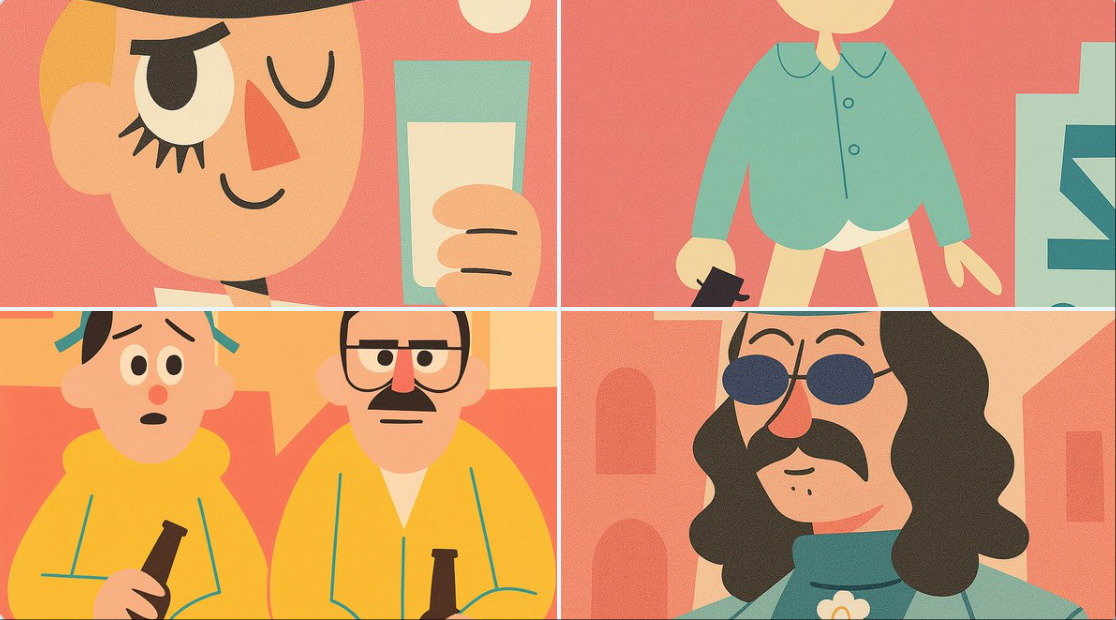
卡通现代风格插画
Enlarge

Example images

卡通现代风格插画

Prompt
Transform this image into a Cartoon Modern Style illustration, inspired by classic UPA animation like Mr. Magoo and The Jetsons.
Redesign the character using flat, geometric shapes: ovals, rectangles, simple curves and angles. Avoid realistic proportions — the design should be stylized and abstract.
Use a limited color palette, preferably soft pastels or bold contrasts (e.g. mint green, salmon, sky blue, mustard yellow), with flat tones and no gradients.
Simplify facial features and body structure to be iconic and minimalist — large heads, small limbs, expressive poses, but with minimal detail.
The background should be minimal or symbolic, using basic shapes or abstract scenery (floating stairs, blocky furniture, stylized trees or stars).
The final image should look like a frame from a 1950s or 1960s modernist cartoon — playful, graphic, and highly stylized.
Category
创意图片
Model
Nano Banana Pro
Views3
Source ID
d5f4604c-f1ad-432b-895b-68a0fb0b5bb1
Published
Dec 27, 2025

Guide

About "卡通现代风格插画"

What is this prompt for?

"卡通现代风格插画" AI image prompt for Nano Banana Pro (创意图片). 创意图片 Copy it on Picva and recreate the look in one click.

The full copyable prompt and example visuals above are ready for AI image generation or one-click recreate in Picva.

How to use this prompt

  1. Step 1

    Open the prompt detail

    Review the example visuals, category, and full prompt text for "卡通现代风格插画".

  2. Step 2

    Copy the prompt

    Copy the prompt body from this page, or load it directly in Studio.

  3. Step 3

    Pick a model (Nano Banana Pro)

    Prefer Nano Banana Pro. If you switch models, keep subject and composition and tweak style terms.

  4. Step 4

    Generate and export

    Recreate the look in Picva, or export into your workflow for editing and publishing.

FAQ

What is the "卡通现代风格插画" prompt?
It is an AI image-generation prompt for Nano Banana Pro in the 创意图片 category. This page includes the full prompt text, example visuals, and a one-click recreate path in Picva.
How do I use this prompt to generate an image?
Copy the prompt from this page, or use Generate / Studio. Paste it into a compatible image model, or recreate the look in Picva with optional reference images.
Which model is this prompt for?
This page lists Nano Banana Pro. Most descriptive prompts also transfer to nearby image models such as GPT Image, Flux, or Midjourney with light style tweaks.
Can I use the result commercially?
You can usually copy the prompt for creation, but commercial use of the final image depends on the model terms, reference-image rights, and the generated content. Follow the source author and platform rules.










