14

Using the BTS logo, generate a premium brand identity system poster
Enlarge

Using the BTS logo, generate a premium brand identity system poster

Prompt
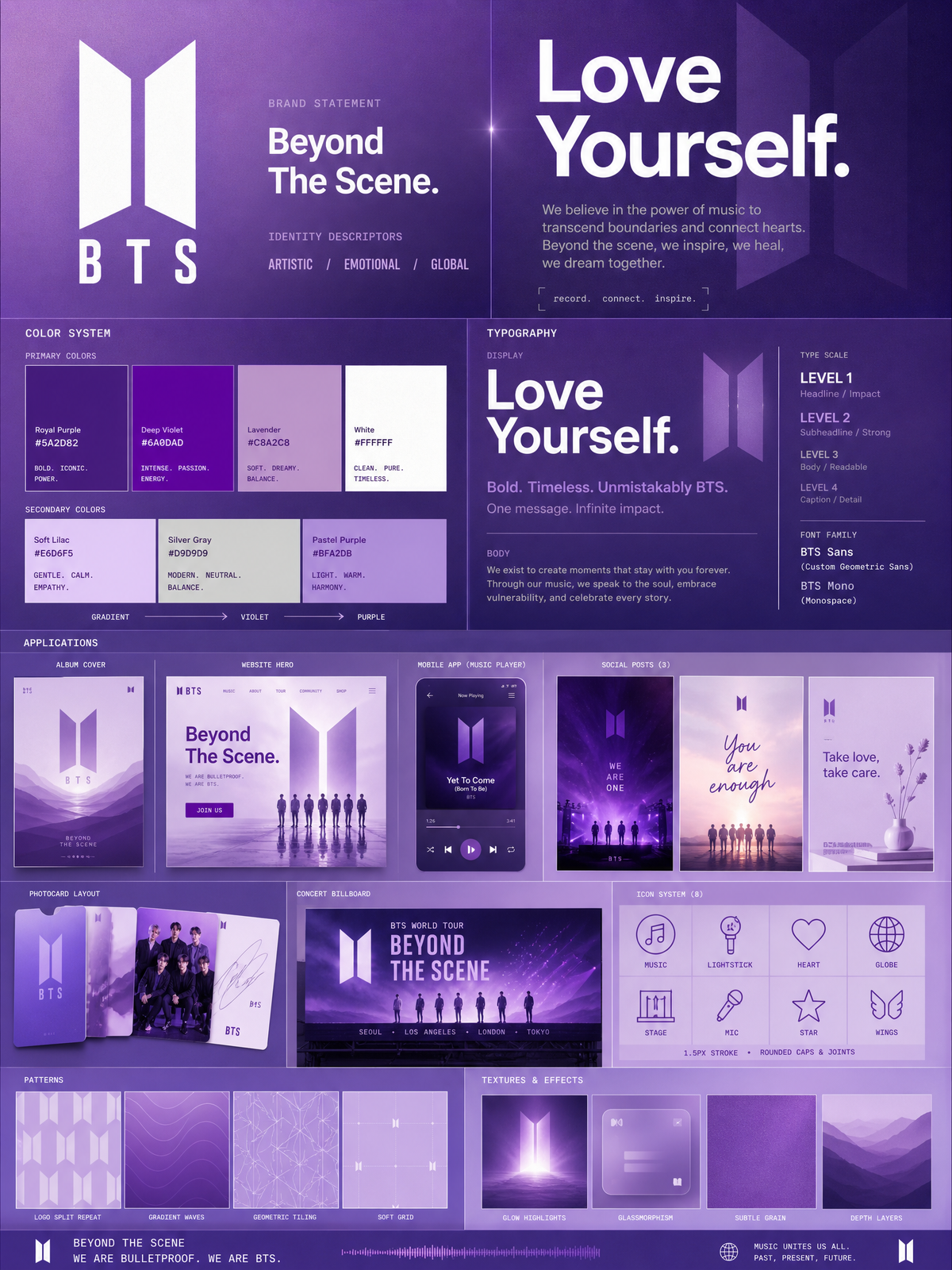
Using the BTS logo, generate a premium brand identity system poster. Every element — color, tone, texture, and composition — must be derived directly from the logo. No generic outputs. Structure: Vertical 4:5 poster. Soft lavender to deep purple gradient background. Multi-layered grid. Dense, clean, zero dead space. Violet rule lines separate sections. Top: BTS logo in bold clean type. Brand statement: "Beyond The Scene." Identity descriptors: ARTISTIC / EMOTIONAL / GLOBAL. Colors: Primary — Royal Purple #5A2D82, Deep Violet #6A0DAD, Lavender #C8A2C8, White #FFFFFF. Secondary — Soft Lilac #E6D6F5, Silver Gray #D9D9D9, Pastel Purple #BFA2DB. Show large color blocks, HEX codes, usage labels, and a Lavender→Violet→Purple gradient bar. Typography: Display headline "Love Yourself." in white. Purple sans-serif subhead. Soft gray body text. Tiny monospaced caption. Clear 4-level hierarchy. Applications: Album cover mockup. Bright website hero with purple CTA. Mobile app music player UI. Three social posts — bold purple performance, soft emotional pastel, clean lavender lifestyle. Photocard layout. Purple gradient concert billboard. Icons: 8 line icons — music note, lightstick, heart, globe, stage, mic, star, wings. Purple 1.5px strokes. Consistent style. Patterns: Logo split repeat, gradient waves, geometric tiling, soft grid. Micro details: Glow highlights, glassmorphism panels, subtle grain, depth layers. Final feel: Behance top project. Agency-quality. Unmistakably BTS.
Category
UI & Interfaces
Model
GPT Image 2
Views104
Source ID
2724
Published
May 7, 2026

Guide

About "Using the BTS logo, generate a premium brand identity system poster"

What is this prompt for?

"Using the BTS logo, generate a premium brand identity system poster" AI image prompt for GPT Image 2 (UI & Interfaces). Using the BTS logo, generate a premium…

The full copyable prompt and example visuals above are ready for AI image generation or one-click recreate in Picva.

How to use this prompt

  1. Step 1

    Open the prompt detail

    Review the example visuals, category, and full prompt text for "Using the BTS logo, generate a premium brand identity system poster".

  2. Step 2

    Copy the prompt

    Copy the prompt body from this page, or load it directly in Studio.

  3. Step 3

    Pick a model (GPT Image 2)

    Prefer GPT Image 2. If you switch models, keep subject and composition and tweak style terms.

  4. Step 4

    Generate and export

    Recreate the look in Picva, or export into your workflow for editing and publishing.

FAQ

What is the "Using the BTS logo, generate a premium brand identity system poster" prompt?
It is an AI image-generation prompt for GPT Image 2 in the UI & Interfaces category. This page includes the full prompt text, example visuals, and a one-click recreate path in Picva.
How do I use this prompt to generate an image?
Copy the prompt from this page, or use Generate / Studio. Paste it into a compatible image model, or recreate the look in Picva with optional reference images.
Which model is this prompt for?
This page lists GPT Image 2. Most descriptive prompts also transfer to nearby image models such as GPT Image, Flux, or Midjourney with light style tweaks.
Can I use the result commercially?
You can usually copy the prompt for creation, but commercial use of the final image depends on the model terms, reference-image rights, and the generated content. Follow the source author and platform rules.