"prompt": { "title": "Agency-Grade Brand Identity System Poster", "trigger": "Up
Prompt
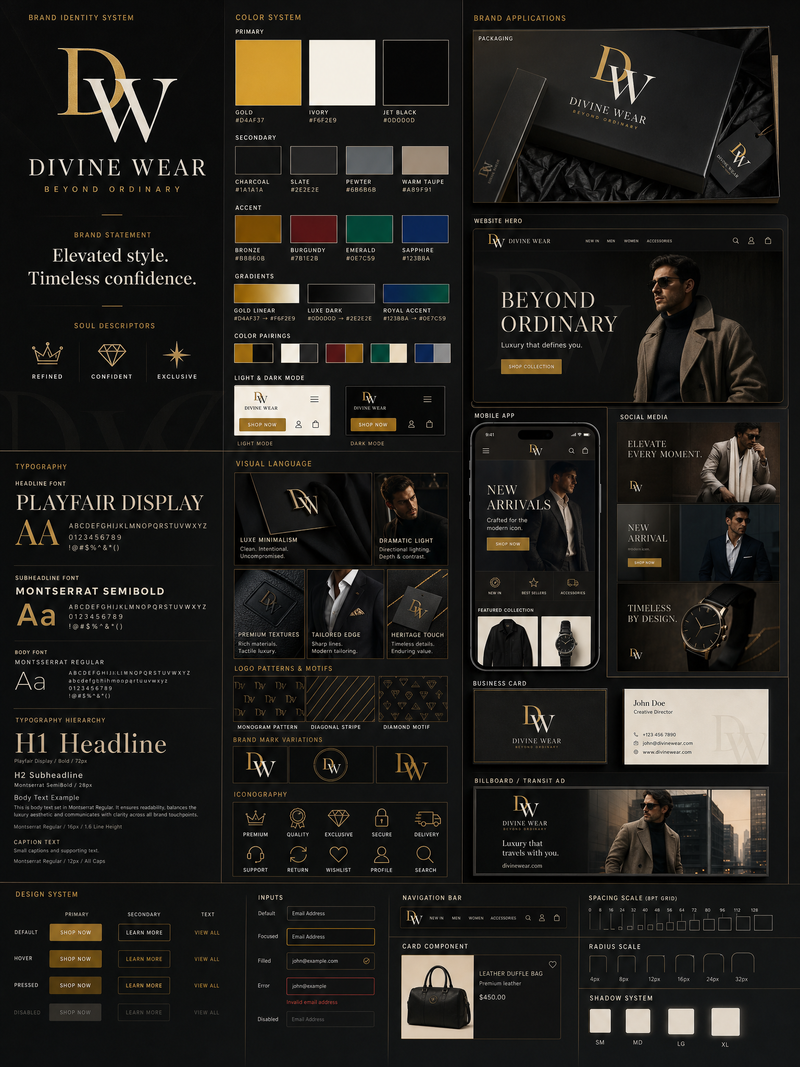
"prompt": {
 "title": "Agency-Grade Brand Identity System Poster",
 "trigger": "Upload a logo. From it, construct a complete, investment-worthy brand identity system poster — the kind that closes client deals and dominates Behance front pages.",
 "prime_directive": {
 "rule": "Every element — color, tone, shape, texture, personality — must be extracted directly from the uploaded logo.",
 "enforcement": "Nothing generic. Nothing templated. Nothing borrowed. Strip the logo. Decode it. Build an entire visual universe from its DNA."
 },
 "format": {
 "orientation": "Vertical",
 "aspect_ratio": "4:5",
 "layout": "Multi-column grid",
 "composition": "Layered, dense, intentional — zero wasted space"
 },
"sections": {
 "01_brand_header": {
 "label": "Open With Authority",
 "elements": [
 "Brand name in commanding, high-hierarchy typography",
 "Brand statement — 6 words maximum, razor-sharp",
 "Three soul descriptors (e.g. Raw / Futuristic / Grounded)"
 ]
 },

 "02_color_system": {
 "label": "Build The Color World",
 "palettes": {
 "primary": "3–5 colors extracted from logo",
 "secondary": "3–5 supporting colors",
 "accent": "High-impact hit colors"
 },
 "per_color_display": [
 "Wide swatch block",
 "HEX code",
 "Role label: foundation / emphasis / atmosphere"
 ],
 "extras": [
 "Gradient blends",
 "Color-on-color pairings",
 "Light mode vs dark mode behavior"
 ]
 },

 "03_typography_system": {
 "label": "Establish The Type Voice",
 "tiers": {
 "headline": "Commanding, bold — show a punchy title example",
 "subheadline": "Structured, clear — show a descriptive line example",
 "body": "Readable, intentional — show a paragraph fragment example"
 },
 "requirement": "Hierarchy must be undeniable at a glance"
 }, "04_visual_language": {
 "label": "Define The Visual World",
 "define": [
 "Image style (editorial / industrial / cinematic / organic / etc.)",
 "Lighting quality and direction",
 "Texture references and material moods"
 ],
 "visual_tiles": {
 "count": "3–5 tiles",
 "style": "Art-directed style previews — mood board squares from a real shoot brief"
 }
 } "05_brand_applications": {
 "label": "Bring The Brand To Life",
 "rule": "Every mockup must feel like the same brand. Same DNA. Zero inconsistency.",
 "mockups": [
 {
 "type": "Product Packaging",
 "detail": "Dimensional, realistic render"
 },
 {
 "type": "Website Hero",
 "detail": "Full desktop viewport"
 },
 {
 "type": "Mobile App Screen",
 "detail": "One key UI moment"
 },
 {
 "type": "Social Media Posts",
 "detail": "3 formats — square, story, banner"
 },
 {
 "type": "Business Card",
 "detail": "Front and back"
 },
 {
 "type": "Out-of-Home Ad",
 "detail": "Billboard or transit panel"
 } "06_design_system": {
 "label": "Show The System Working",
 "components": [
 "Buttons — default, hover, disabled states",
 "Cards",
 "Input fields",
 "Navigation bar",
 "Spacing scale"
 ],
 "requirement": "Must resemble a real design system handoff document"
 }, "07_iconography": {
 "label": "Iconography",
 "count": "6–10 icons",
 "style_rule": "Same visual grammar as the logo — geometric, organic, sharp, or soft",
"consistency": "Uniform stroke weight or fill logic throughou- Category
- UI & Interfaces
- Model
- GPT Image 2
- Creator
- Dgv Fhc
- Source language
- en
- Source ID
- 3051
- Published
- May 10, 2026
Views127