18

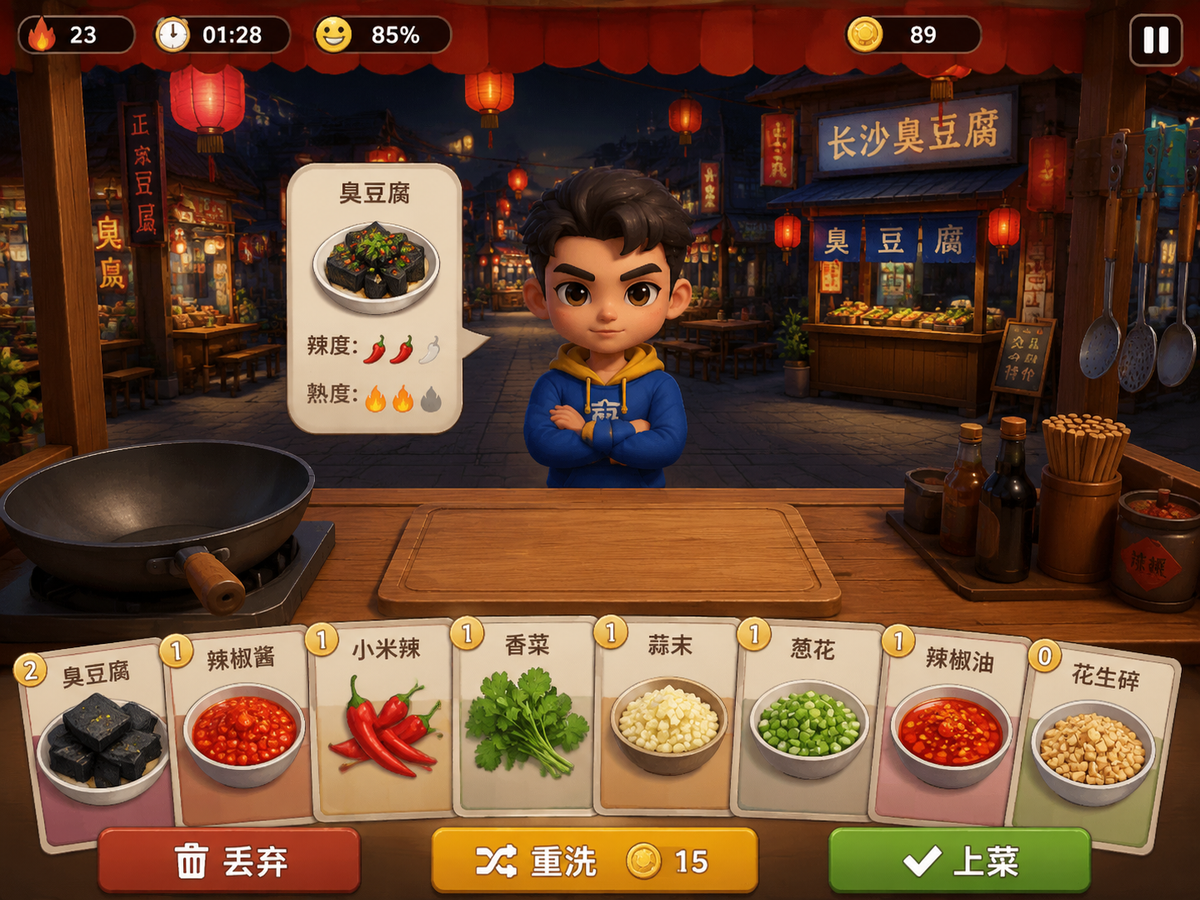
A screenshot from a real mobile card game about Chinese street food cooking
Enlarge

A screenshot from a real mobile card game about Chinese street food cooking

Prompt
A screenshot from a real mobile card game about Chinese street food cooking. The game is currently running on a device. 16:9 landscape, 1280x720.

The screen composition from back to front:
- Background (60%): a clear, sharp night market street with red lanterns and wooden stalls, stylized 3D environment
- Middle: a customer character (stylized 3D, cel-shaded, large head) standing across the counter with a floating order UI panel next to them
- Stall frame: red canopy at top, wooden poles on sides, tool rack on right with hanging utensils
- Counter (bottom 30%): wooden surface with a wok on the left, empty cutting board in center
- Cards (bottom edge): 8 ingredient cards in a slight arc, each showing a 3D food icon
- UI overlays: thin status bar at top, three action buttons at bottom

The entire image looks like a REAL GAME that is actually playable — clean UI elements, consistent art style across all elements, readable at mobile resolution. The style is cohesive: everything uses the same cel-shaded 3D look with hand-painted textures and flat lighting.

Style: actual mobile game screenshot, NOT concept art, NOT AI art, NOT illustration
Reference games: Overcooked, Plate Up, Cooking Fever — but as a card game hybrid
Category
UI & Interfaces
Model
GPT Image 2
Creator
solo solo
Views51
Source ID
3105
Published
May 12, 2026

Guide

About "A screenshot from a real mobile card game about Chinese street food cooking"

What is this prompt for?

"A screenshot from a real mobile card game about Chinese street food cooking" AI image prompt for GPT Image 2 (UI & Interfaces). A screenshot from a real mobil…

The full copyable prompt and example visuals above are ready for AI image generation or one-click recreate in Picva.

How to use this prompt

  1. Step 1

    Open the prompt detail

    Review the example visuals, category, and full prompt text for "A screenshot from a real mobile card game about Chinese street food cooking".

  2. Step 2

    Copy the prompt

    Copy the prompt body from this page, or load it directly in Studio.

  3. Step 3

    Pick a model (GPT Image 2)

    Prefer GPT Image 2. If you switch models, keep subject and composition and tweak style terms.

  4. Step 4

    Generate and export

    Recreate the look in Picva, or export into your workflow for editing and publishing.

FAQ

What is the "A screenshot from a real mobile card game about Chinese street food cooking" prompt?
It is an AI image-generation prompt for GPT Image 2 in the UI & Interfaces category. This page includes the full prompt text, example visuals, and a one-click recreate path in Picva.
How do I use this prompt to generate an image?
Copy the prompt from this page, or use Generate / Studio. Paste it into a compatible image model, or recreate the look in Picva with optional reference images.
Which model is this prompt for?
This page lists GPT Image 2. Most descriptive prompts also transfer to nearby image models such as GPT Image, Flux, or Midjourney with light style tweaks.
Can I use the result commercially?
You can usually copy the prompt for creation, but commercial use of the final image depends on the model terms, reference-image rights, and the generated content. Follow the source author and platform rules.