20

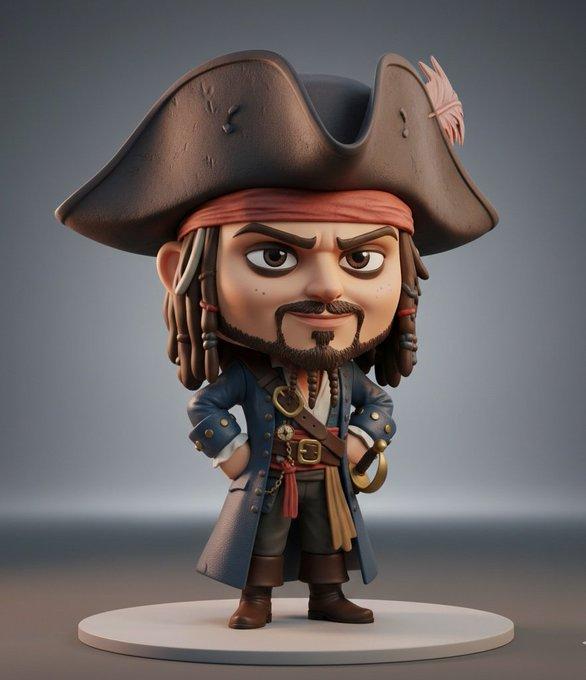
角色变成3D收藏级Q版人偶
Enlarge

Example images

角色变成3D收藏级Q版人偶

Prompt
3D collectible chibi-style figure of [insert celebrity or character name], ultra-detailed, stylized proportions (large head, small body), expressive face, cinematic lighting, soft shadows, Pixar-quality realism, glossy vinyl toy texture, standing pose, high detail clothing, character-accurate outfit, professional product photography, rendered in Unreal Engine 5, on a minimal studio background, toy display aesthetic, 8K ultra realistic
3D 收藏级 Q 版人偶,原型为[插入名人或角色名称],细节丰富,比例协调(大头小身),面部表情生动,采用电影级光影效果,阴影柔和,呈现皮克斯级别的逼真度,触感光滑如乙烯基玩具,采用站姿,服装细节丰富,还原角色造型,专业产品摄影,使用虚幻引擎 5 渲染,背景简洁,呈现玩具展示美感,8K 超高清画质。
Category
Photography & Realism
Model
Unknown
Creator
aleenaamiir
Source language
zh-CN
Views0
Source ID
3d-q-character-fashion
Studio

Guide

About "角色变成3D收藏级Q版人偶"

What is this prompt for?

"角色变成3D收藏级Q版人偶" AI image prompt for Unknown (Photography & Realism). 3D collectible chibi-style figure of [insert celebrity or character name], ultra-detailed,…

The full copyable prompt and example visuals above are ready for AI image generation or one-click recreate in Picva.

How to use this prompt

  1. Step 1

    Open the prompt detail

    Review the example visuals, category, and full prompt text for "角色变成3D收藏级Q版人偶".

  2. Step 2

    Copy the prompt

    Copy the prompt body from this page, or load it directly in Studio.

  3. Step 3

    Pick a model (Unknown)

    Prefer Unknown. If you switch models, keep subject and composition and tweak style terms.

  4. Step 4

    Generate and export

    Recreate the look in Picva, or export into your workflow for editing and publishing.

FAQ

What is the "角色变成3D收藏级Q版人偶" prompt?
It is an AI image-generation prompt for Unknown in the Photography & Realism category. This page includes the full prompt text, example visuals, and a one-click recreate path in Picva.
How do I use this prompt to generate an image?
Copy the prompt from this page, or use Generate / Studio. Paste it into a compatible image model, or recreate the look in Picva with optional reference images.
Which model is this prompt for?
This page lists Unknown. Most descriptive prompts also transfer to nearby image models such as GPT Image, Flux, or Midjourney with light style tweaks.
Can I use the result commercially?
You can usually copy the prompt for creation, but commercial use of the final image depends on the model terms, reference-image rights, and the generated content. Follow the source author and platform rules.