20

Anthropic/Claude风格PPT设计:Nano Banana Pro生成中文演示文稿
Enlarge

Example images

Anthropic/Claude风格PPT设计:Nano Banana Pro生成中文演示文稿

Prompt
有的朋友可能觉得有点花哨
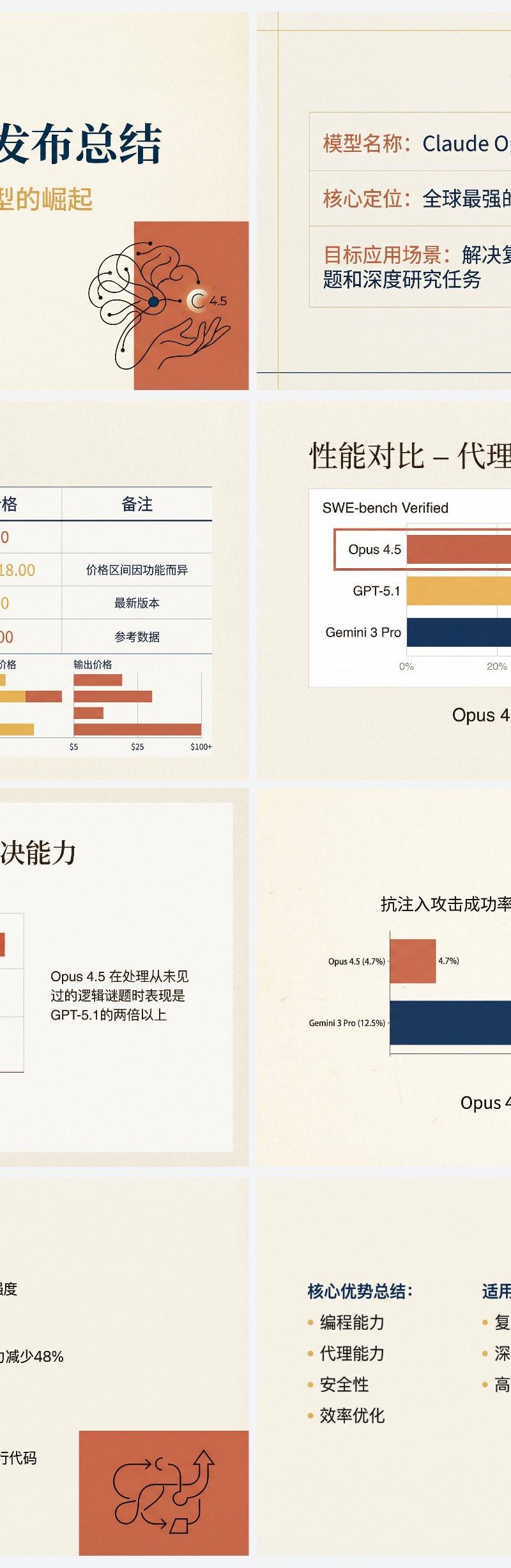
迭代了一下这个 Anthropic 风格的 Nano Banana Pro PPT 提示词。
现在会非常克制的使用插图元素,以及严格遵循网格布局,少用圆润的卡片。
下面是迭代后的提示词👇
帮我根据下面这个文章做一套专业的的中文PPT。
先写1个PPT大纲,规划出每一页的PPT的内容。
然后将每一页的PPT内容分别扔给Nana Banana pro生成对应页面的PPT,需要确保风格一致。
PPT的具体风格应该为“Anthropic/Claude 风格”的“温暖学术人文主义”设计。
背景:使用暖米色/奶油色 (# F3F0E9) 作为纯色底色,略微高级纸张质感。
字体:标题使用优雅的衬线体(Serif),正文使用现代无衬线体(Sans-serif)。
配色:主色调为赤陶红 (# D67052) 和芥末黄 (# F0B857),搭配深海军蓝作为点缀。避免使用霓虹色或纯黑色。
视觉元素:使用注重排版的网格布局,插图风格应为抽象的、有机的黑色手绘线条画,置于赤陶红纯色色块之上,你需要非常克制的使用插图和点缀类的插图元素,插图需要为内容服务。
图表:扁平化、极简的图表,强调数据对比,去除多余边框。
文字和图像都由 Nano Banana Pro 生成,另外不要将PPT 变成一整张图,一页一张图。
文章内容为:
Category
Charts & Infographics
Model
Nano Banana Pro
Creator
歸藏(guizang.ai)
Source language
zh-CN
Views0
Source ID
anthropic-claude-style-ppt-design-nano-banana-pro-generated-chinese-presentation
Studio

Guide

About "Anthropic/Claude风格PPT设计:Nano Banana Pro生成中文演示文稿"

What is this prompt for?

"Anthropic/Claude风格PPT设计:Nano Banana Pro生成中文演示文稿" AI image prompt for Nano Banana Pro (Charts & Infographics). 有的朋友可能觉得有点花哨 迭代了一下这个 Anthropic 风格的 Nano Banana P…

The full copyable prompt and example visuals above are ready for AI image generation or one-click recreate in Picva.

How to use this prompt

  1. Step 1

    Open the prompt detail

    Review the example visuals, category, and full prompt text for "Anthropic/Claude风格PPT设计:Nano Banana Pro生成中文演示文稿".

  2. Step 2

    Copy the prompt

    Copy the prompt body from this page, or load it directly in Studio.

  3. Step 3

    Pick a model (Nano Banana Pro)

    Prefer Nano Banana Pro. If you switch models, keep subject and composition and tweak style terms.

  4. Step 4

    Generate and export

    Recreate the look in Picva, or export into your workflow for editing and publishing.

FAQ

What is the "Anthropic/Claude风格PPT设计:Nano Banana Pro生成中文演示文稿" prompt?
It is an AI image-generation prompt for Nano Banana Pro in the Charts & Infographics category. This page includes the full prompt text, example visuals, and a one-click recreate path in Picva.
How do I use this prompt to generate an image?
Copy the prompt from this page, or use Generate / Studio. Paste it into a compatible image model, or recreate the look in Picva with optional reference images.
Which model is this prompt for?
This page lists Nano Banana Pro. Most descriptive prompts also transfer to nearby image models such as GPT Image, Flux, or Midjourney with light style tweaks.
Can I use the result commercially?
You can usually copy the prompt for creation, but commercial use of the final image depends on the model terms, reference-image rights, and the generated content. Follow the source author and platform rules.