20

钩针玩偶
Click to enlarge

Example images

Photography & RealismXCbotaiart.picsUnknown图片

钩针玩偶

Prompt
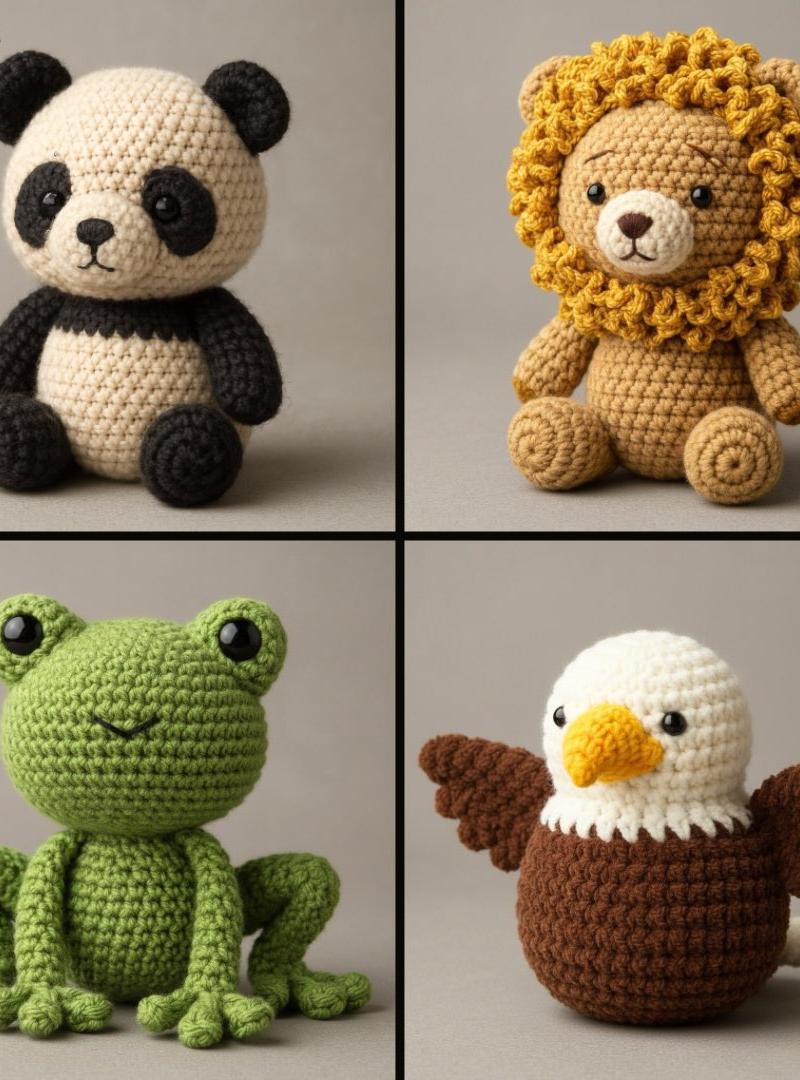
Create a 3D photorealistic and highly detailed poster in amigurumi style. The design should imitate a real handmade crochet [ANIMAL], with visible thread texture, stitching details, and soft, felted proportions. Use realistic fabric shading, subtle fuzz, and natural lighting to achieve depth. The amigurumi should have small embroidered eyes and a simplified face. Represent it in a neutral studio environment with soft shadows for a professional presentation. Gray toned background.
制作一张 3D 超写实风格、细节丰富的阿米古米(Amigurumi,即钩针玩偶)风格海报。设计需模拟手工钩织的 [动物名称] 造型,呈现出清晰可见的毛线纹理、钩针缝线细节,以及柔软蓬松的整体比例。\n运用写实的织物阴影效果、细微的毛绒质感与自然光线,打造画面层次感。该阿米古米玩偶需搭配小巧的刺绣眼睛与简约的面部造型,置于中性风格的工作室场景中,辅以柔和阴影,呈现专业的展示效果。背景:灰色调
Category
Photography & Realism
Model
Unknown
Creator
TechieSA
Source language
zh-CN
Views0
Source ID
crochet-doll
Studio

Guide

About "钩针玩偶"

What is this prompt for?

"钩针玩偶" AI image prompt for Unknown (Photography & Realism). Create a 3D photorealistic and highly detailed poster in amigurumi style. The design should imitate…

The full copyable prompt and example visuals above are ready for AI image generation or one-click recreate in Picva.

How to use this prompt

  1. Step 1

    Open the prompt detail

    Review the example visuals, category, and full prompt text for "钩针玩偶".

  2. Step 2

    Copy the prompt

    Copy the prompt body from this page, or load it directly in Studio.

  3. Step 3

    Pick a model (Unknown)

    Prefer Unknown. If you switch models, keep subject and composition and tweak style terms.

  4. Step 4

    Generate and export

    Recreate the look in Picva, or export into your workflow for editing and publishing.

FAQ

What is the "钩针玩偶" prompt?
It is an AI image-generation prompt for Unknown in the Photography & Realism category. This page includes the full prompt text, example visuals, and a one-click recreate path in Picva.
How do I use this prompt to generate an image?
Copy the prompt from this page, or use Generate / Studio. Paste it into a compatible image model, or recreate the look in Picva with optional reference images.
Which model is this prompt for?
This page lists Unknown. Most descriptive prompts also transfer to nearby image models such as GPT Image, Flux, or Midjourney with light style tweaks.
Can I use the result commercially?
You can usually copy the prompt for creation, but commercial use of the final image depends on the model terms, reference-image rights, and the generated content. Follow the source author and platform rules.