20

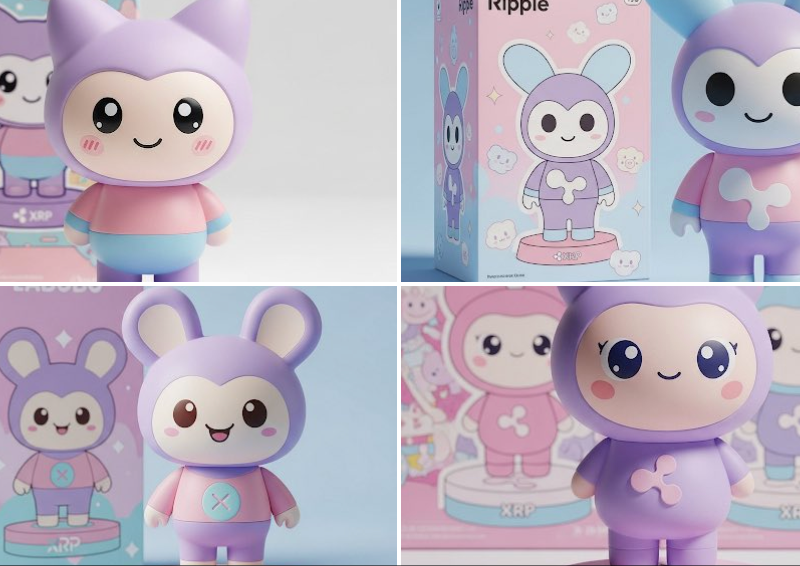
可爱粉彩乙烯基人物
Click to enlarge

Example images

Photography & RealismXCbotaiart.picsUnknown图片

可爱粉彩乙烯基人物

Prompt
A cute pastel vinyl figure of [INSERT YOUR CHARACTER OR OBJECT], pastel colors (lavender, soft pink, baby blue), kawaii style with big round eyes and friendly smile, simple rounded shapes, stylized “RIP” detail somewhere on the figure or base, matching toy packaging in the background with themed art, studio product photo with soft lighting, minimal shadows
一个可爱的粉彩乙烯基人物 [插入您的角色或对象],柔和的颜色(薰衣草色、柔和的粉红色、婴儿蓝色)、卡哇伊风格、圆圆的大眼睛和友好的微笑、简单的圆形形状、人物或底座上某处的程式化“RIP”细节、背景中的玩具包装与主题艺术相匹配、具有柔和灯光的工作室产品照片,最小的阴影
Category
Photography & Realism
Model
Unknown
Creator
TheRelianceAI
Source language
zh-CN
Views0
Source ID
cute-pastel-vinyl-character
Studio

Guide

About "可爱粉彩乙烯基人物"

What is this prompt for?

"可爱粉彩乙烯基人物" AI image prompt for Unknown (Photography & Realism). A cute pastel vinyl figure of [INSERT YOUR CHARACTER OR OBJECT], pastel colors (lavender, soft…

The full copyable prompt and example visuals above are ready for AI image generation or one-click recreate in Picva.

How to use this prompt

  1. Step 1

    Open the prompt detail

    Review the example visuals, category, and full prompt text for "可爱粉彩乙烯基人物".

  2. Step 2

    Copy the prompt

    Copy the prompt body from this page, or load it directly in Studio.

  3. Step 3

    Pick a model (Unknown)

    Prefer Unknown. If you switch models, keep subject and composition and tweak style terms.

  4. Step 4

    Generate and export

    Recreate the look in Picva, or export into your workflow for editing and publishing.

FAQ

What is the "可爱粉彩乙烯基人物" prompt?
It is an AI image-generation prompt for Unknown in the Photography & Realism category. This page includes the full prompt text, example visuals, and a one-click recreate path in Picva.
How do I use this prompt to generate an image?
Copy the prompt from this page, or use Generate / Studio. Paste it into a compatible image model, or recreate the look in Picva with optional reference images.
Which model is this prompt for?
This page lists Unknown. Most descriptive prompts also transfer to nearby image models such as GPT Image, Flux, or Midjourney with light style tweaks.
Can I use the result commercially?
You can usually copy the prompt for creation, but commercial use of the final image depends on the model terms, reference-image rights, and the generated content. Follow the source author and platform rules.