20

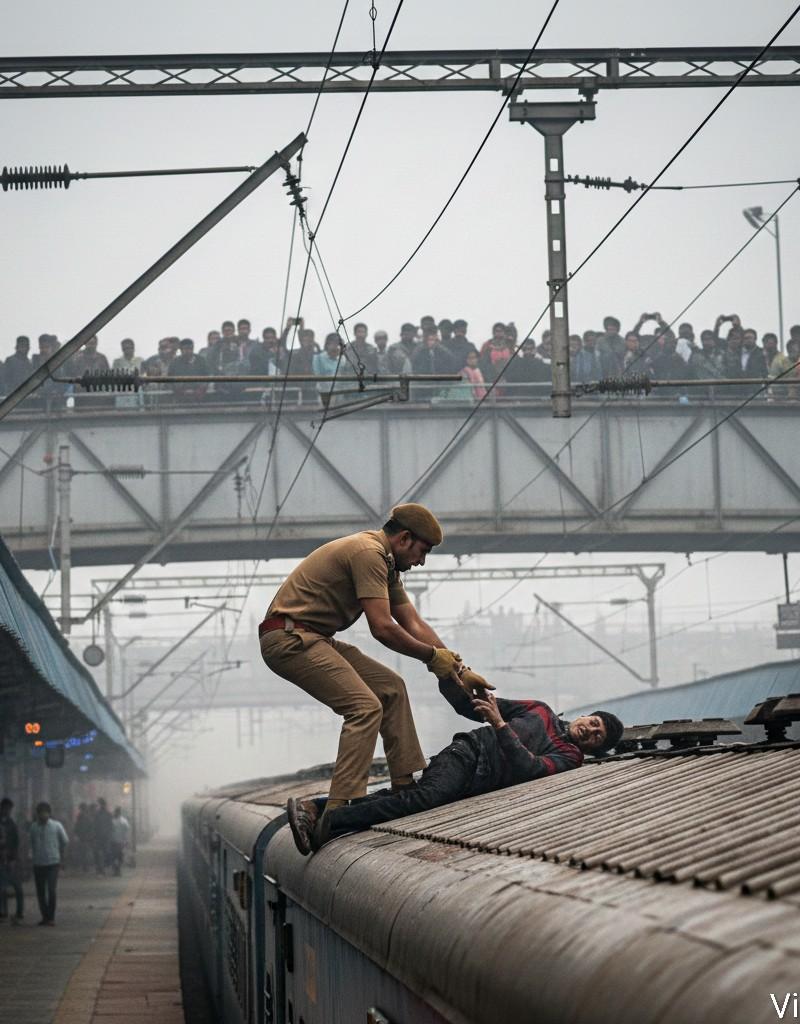
戏剧性电影式救援场景
Click to enlarge

Example images

Photography & RealismXCbotaiart.picsNano Banana Pro图片

戏剧性电影式救援场景

Prompt
Google Gemini Nano banana Pro
Dramatic cinematic rescue scene.
Prompt ⤵️
{
 "style": "Dramatic cinematic rescue scene, ultra-realistic, 4K",
 "camera": {
 "angle": "Low-angle dynamic shot from the side of the train",
 "lens": "35mm action perspective",
 "motion": "Slight action blur for intensity",
 "lighting": "Foggy daylight, soft diffused light"
 },
 "scene": {
 "location": "Railway station platform with overhead wires and metal structures",
 "environment": "Light fog, high tension wires above, station bridge with people watching",
 "vibe": "Urgent rescue moment, high-risk situation"
 },
 "subjects": [
 {
 "role": "Police officer",
 "pose": "Climbing on top of a moving or halted train, pulling a person to safety",
 "expression": "Focused, determined",
 "outfit": "Brown uniform, tactical gloves, utility belt"
 },
 {
 "role": "Civilian in distress",
 "pose": "Lying on the train roof, about to slip, being lifted by the officer",
 "expression": "Weak, struggling"
 }
 ],
 "details": {
 "background_action": "Crowd watching from overhead bridge, some filming with phones",
 "elements": "Realistic textures of train roof, high-tension cables, metal frames",
 "tone": "Heroic, intense, life-saving moment",
 "composition": "Wide frame capturing both subjects, overhead wires and bridge visible"
 }
}
Category
Photography & Realism
Model
Nano Banana Pro
Creator
Vivek HY
Source language
zh-CN
Views0
Source ID
dramatic-cinematic-rescue-scene
Studio

Guide

About "戏剧性电影式救援场景"

What is this prompt for?

"戏剧性电影式救援场景" AI image prompt for Nano Banana Pro (Photography & Realism). Google Gemini Nano banana Pro Dramatic cinematic rescue scene. Prompt ⤵️ { "style": "…

The full copyable prompt and example visuals above are ready for AI image generation or one-click recreate in Picva.

How to use this prompt

  1. Step 1

    Open the prompt detail

    Review the example visuals, category, and full prompt text for "戏剧性电影式救援场景".

  2. Step 2

    Copy the prompt

    Copy the prompt body from this page, or load it directly in Studio.

  3. Step 3

    Pick a model (Nano Banana Pro)

    Prefer Nano Banana Pro. If you switch models, keep subject and composition and tweak style terms.

  4. Step 4

    Generate and export

    Recreate the look in Picva, or export into your workflow for editing and publishing.

FAQ

What is the "戏剧性电影式救援场景" prompt?
It is an AI image-generation prompt for Nano Banana Pro in the Photography & Realism category. This page includes the full prompt text, example visuals, and a one-click recreate path in Picva.
How do I use this prompt to generate an image?
Copy the prompt from this page, or use Generate / Studio. Paste it into a compatible image model, or recreate the look in Picva with optional reference images.
Which model is this prompt for?
This page lists Nano Banana Pro. Most descriptive prompts also transfer to nearby image models such as GPT Image, Flux, or Midjourney with light style tweaks.
Can I use the result commercially?
You can usually copy the prompt for creation, but commercial use of the final image depends on the model terms, reference-image rights, and the generated content. Follow the source author and platform rules.