20

幽灵形态
Click to enlarge

Example images

Photography & RealismXCbotaiart.picsUnknown图片

幽灵形态

Prompt
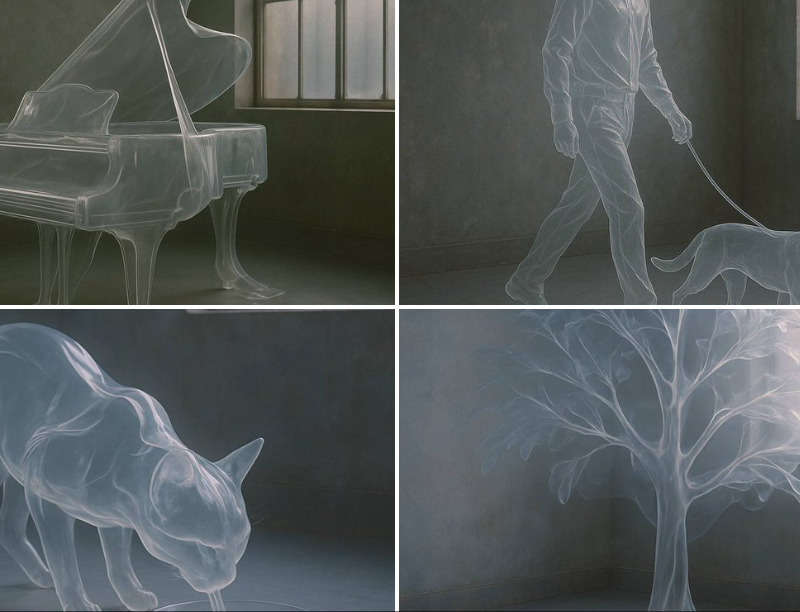
A hyper-realistic photograph of a [SUBJECT] entirely made from a single, semi-rigid transparent material that drapes and folds like sheer plastic or molten glass. The object is fully recognizable in shape, yet ghostly and fluid, as if sculpted from air and frozen in motion. Set in a moody, industrial interior with aged concrete walls and diffused daylight from metal-barred windows. The lighting gently highlights the reflections, edges, and flowing curves of the transparent form. Dreamlike, minimalist, surreal design aesthetic.
一张 [SUBJECT] 的超写实照片,完全由单一的、半刚性的透明材料制成,像纯粹的塑料或熔融玻璃一样悬垂和折叠。这个物体的形状是完全可识别的,但又幽灵般流动,仿佛从空气中雕刻出来,在运动中冻结。坐落在喜怒无常的工业室内,拥有老化的混凝土墙和从金属栅栏窗户射出的日光。灯光柔和地突出了透明形式的反射、边缘和流动曲线。梦幻般的、极简主义的、超现实主义的设计美学。
Category
Photography & Realism
Model
Unknown
Creator
TheRelianceAI
Source language
zh-CN
Views0
Source ID
ghost-form
Studio

Guide

About "幽灵形态"

What is this prompt for?

"幽灵形态" AI image prompt for Unknown (Photography & Realism). A hyper-realistic photograph of a [SUBJECT] entirely made from a single, semi-rigid transparent mat…

The full copyable prompt and example visuals above are ready for AI image generation or one-click recreate in Picva.

How to use this prompt

  1. Step 1

    Open the prompt detail

    Review the example visuals, category, and full prompt text for "幽灵形态".

  2. Step 2

    Copy the prompt

    Copy the prompt body from this page, or load it directly in Studio.

  3. Step 3

    Pick a model (Unknown)

    Prefer Unknown. If you switch models, keep subject and composition and tweak style terms.

  4. Step 4

    Generate and export

    Recreate the look in Picva, or export into your workflow for editing and publishing.

FAQ

What is the "幽灵形态" prompt?
It is an AI image-generation prompt for Unknown in the Photography & Realism category. This page includes the full prompt text, example visuals, and a one-click recreate path in Picva.
How do I use this prompt to generate an image?
Copy the prompt from this page, or use Generate / Studio. Paste it into a compatible image model, or recreate the look in Picva with optional reference images.
Which model is this prompt for?
This page lists Unknown. Most descriptive prompts also transfer to nearby image models such as GPT Image, Flux, or Midjourney with light style tweaks.
Can I use the result commercially?
You can usually copy the prompt for creation, but commercial use of the final image depends on the model terms, reference-image rights, and the generated content. Follow the source author and platform rules.