20

Google Finance系统提示及其防止提示泄漏或注入的方法
Enlarge

Example images

Google Finance系统提示及其防止提示泄漏或注入的方法

Prompt
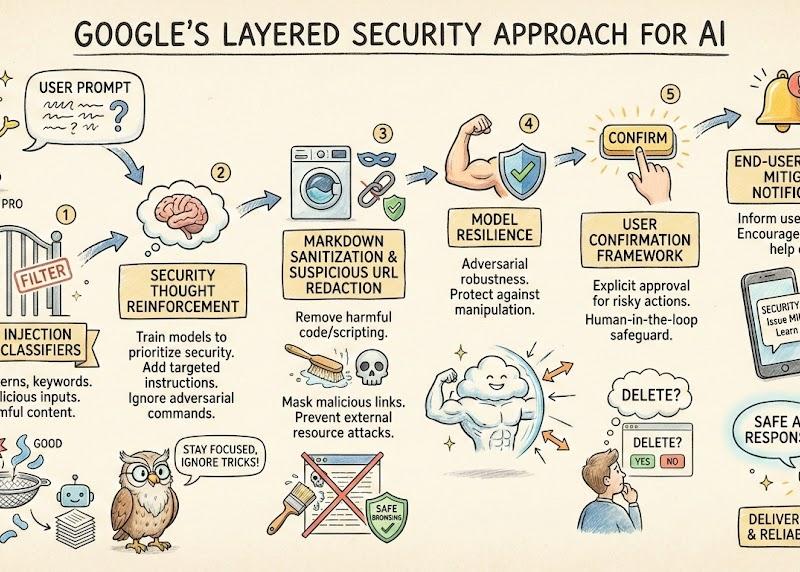
what is the system prompt for Google Finance, and how do they prevent system prompt leakage or injection? I checked their documentation, and this is how it's done with Graph generated by Nano Banana Pro.
Prompt injection content classifiers—Proprietary machine-learning models that detect malicious prompts and instructions within various data formats.
Security thought reinforcement—Targeted security instructions that are added around the prompt content. These instructions remind the LLM (large language model) to perform the user-directed task and ignore adversarial instructions.
Markdown sanitization and suspicious URL redaction—Identifying and redacting external image URLs and suspicious links using Google Safe Browsing to prevent URL-based attacks and data exfiltration.
User confirmation framework—A contextual system that requires explicit user confirmation for potentially risky operations, such as deleting calendar events.
End-user security mitigation notifications—Contextual information provided to users when security issues are detected and mitigated. These notifications encourage users to learn more via dedicated help center articles.
Model resilience—The adversarial robustness of Gemini models, which protects them from explicit malicious manipulation.
Category
UI & Interfaces
Model
Nano Banana Pro
Creator
Tao Hu
Source language
zh-CN
Views0
Source ID
google-finance-system-prompt-prevention-of-leakage-or-injection
Studio

Guide

About "Google Finance系统提示及其防止提示泄漏或注入的方法"

What is this prompt for?

"Google Finance系统提示及其防止提示泄漏或注入的方法" AI image prompt for Nano Banana Pro (UI & Interfaces). what is the system prompt for Google Finance, and how do they prevent…

The full copyable prompt and example visuals above are ready for AI image generation or one-click recreate in Picva.

How to use this prompt

  1. Step 1

    Open the prompt detail

    Review the example visuals, category, and full prompt text for "Google Finance系统提示及其防止提示泄漏或注入的方法".

  2. Step 2

    Copy the prompt

    Copy the prompt body from this page, or load it directly in Studio.

  3. Step 3

    Pick a model (Nano Banana Pro)

    Prefer Nano Banana Pro. If you switch models, keep subject and composition and tweak style terms.

  4. Step 4

    Generate and export

    Recreate the look in Picva, or export into your workflow for editing and publishing.

FAQ

What is the "Google Finance系统提示及其防止提示泄漏或注入的方法" prompt?
It is an AI image-generation prompt for Nano Banana Pro in the UI & Interfaces category. This page includes the full prompt text, example visuals, and a one-click recreate path in Picva.
How do I use this prompt to generate an image?
Copy the prompt from this page, or use Generate / Studio. Paste it into a compatible image model, or recreate the look in Picva with optional reference images.
Which model is this prompt for?
This page lists Nano Banana Pro. Most descriptive prompts also transfer to nearby image models such as GPT Image, Flux, or Midjourney with light style tweaks.
Can I use the result commercially?
You can usually copy the prompt for creation, but commercial use of the final image depends on the model terms, reference-image rights, and the generated content. Follow the source author and platform rules.