20

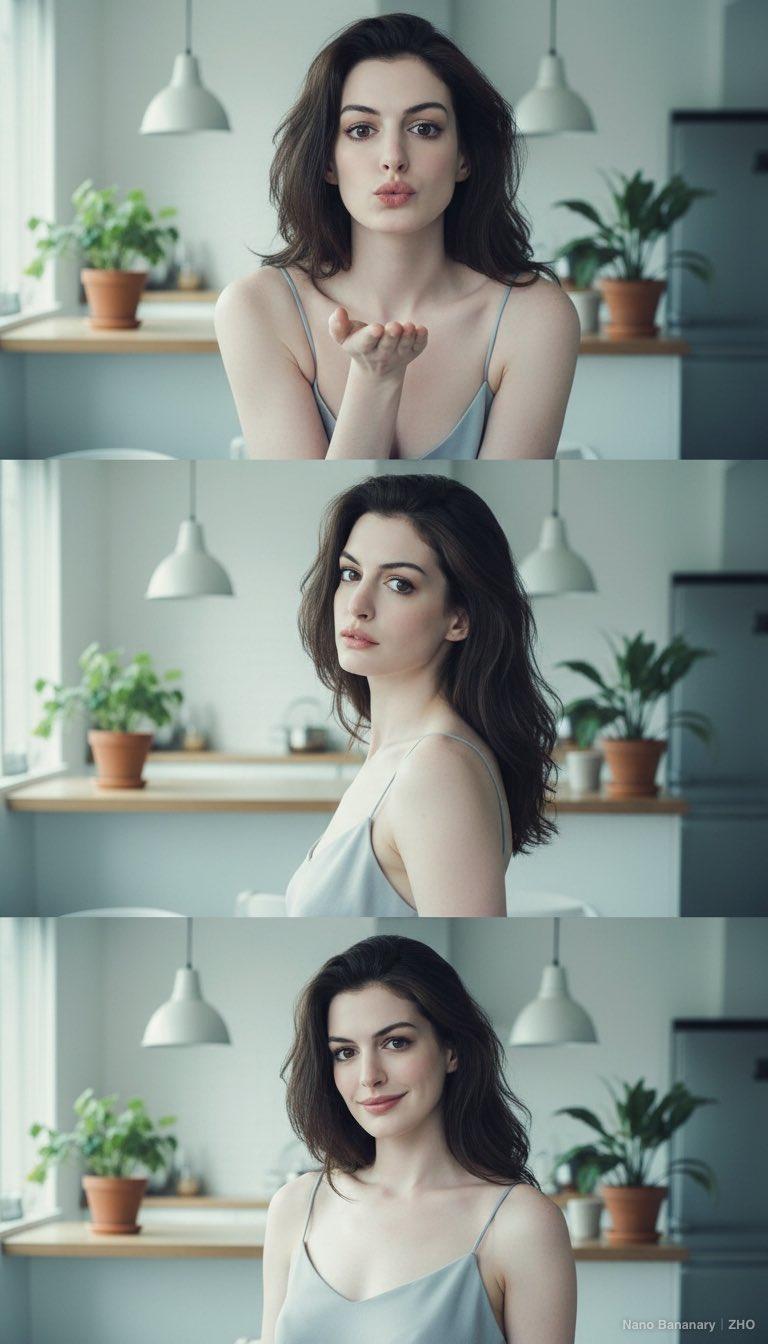
居家光影三联画
Enlarge

Example images

居家光影三联画

Prompt
整体构图与画面氛围\n\n三张图垂直排列,呈连续性肖像摄影的视觉叙事。环境是温暖、生活化的宜家风室内空间,背景有厨房、灯饰与家居物件,带有日常感与柔和自然光的氛围。光线从侧前方照射,亮度柔和,使皮肤质感呈现出细腻、自然的光泽。\n\n整体色调偏冷白色,营造出轻快、清新且柔软的情绪。\n\n人物姿态与表情变化\n\n三张图记录了同一个人物在不同瞬间的表情变化,整体呈现:\n1.第一张:表情略带可爱与调皮,冲镜头飞吻。肩膀自然放松,呈正面角度。\n2.第二张:人物略侧身,头微微倾斜,眼神柔软而带有轻微情绪暗示,像是从静止过渡到微笑之间的瞬间。\n3.第三张:人物更加放松,露出温柔的笑容。头发自然散落,姿态轻松,呈现出自信与自在的状态。\n\n这种 “从冷静 → 轻松 → 微笑” 的表情变化,让整组照片呈现出一种动态叙事感。\n\n光影与肤质表现\n•光线均匀柔和,无明显强阴影。\n•光照角度使脸颊与鼻梁形成非常轻微的立体阴影,突显面部轮廓但不过度锐利。\n•肤色自然,有细腻的反光,呈现柔焦般的质感,带一点胶片或日系滤镜效果。\n\n服装与材质表现\n\n人物穿着浅灰蓝色吊带上衣,肩带纤细,布料柔软且贴身,反射柔和的光泽。在光线下呈现轻柔的高光,强调曲线线条。色彩与背景保持低饱和度一致,画面显得干净。\n\n头发自然散落,有轻微的蓬松与空气感,质地柔软,有光线透过发丝的柔和层次。\n\n五官比例与视线表达\n•眼睛略大,眼型柔和,眼尾微微延展,眼神富有交流感;\n•鼻梁细直且自然;\n•唇部丰润,唇色浅粉,随着表情变化在不同图中呈现不同质感;\n•面部比例均衡,视觉重心集中在眼神与微笑的变化。\n\n整体呈现一种亲和、明亮、带情绪表达的肖像风格。\n\n情绪与风格总结\n\n这组照片像是在记录一个人在阳光午后、刚睡醒或者刚准备开始一天时的松弛瞬间。\n氛围是自然、温暖、轻松、无防备感的美。\n\n画面没有刻意摆拍或华丽修饰,而是以光线和表情捕捉真实与柔软的瞬间。
Category
Photography & Realism
Model
Unknown
Creator
-Zho-
Source language
zh-CN
Views0
Source ID
home-light-and-shadow-triptych
Studio

Guide

About "居家光影三联画"

What is this prompt for?

"居家光影三联画" AI image prompt for Unknown (Photography & Realism). 整体构图与画面氛围\n\n三张图垂直排列,呈连续性肖像摄影的视觉叙事。环境是温暖、生活化的宜家风室内空间,背景有厨房、灯饰与家居物件,带有日常感与柔和自然光的氛围。光线从侧前方照射,亮度柔和,…

The full copyable prompt and example visuals above are ready for AI image generation or one-click recreate in Picva.

How to use this prompt

  1. Step 1

    Open the prompt detail

    Review the example visuals, category, and full prompt text for "居家光影三联画".

  2. Step 2

    Copy the prompt

    Copy the prompt body from this page, or load it directly in Studio.

  3. Step 3

    Pick a model (Unknown)

    Prefer Unknown. If you switch models, keep subject and composition and tweak style terms.

  4. Step 4

    Generate and export

    Recreate the look in Picva, or export into your workflow for editing and publishing.

FAQ

What is the "居家光影三联画" prompt?
It is an AI image-generation prompt for Unknown in the Photography & Realism category. This page includes the full prompt text, example visuals, and a one-click recreate path in Picva.
How do I use this prompt to generate an image?
Copy the prompt from this page, or use Generate / Studio. Paste it into a compatible image model, or recreate the look in Picva with optional reference images.
Which model is this prompt for?
This page lists Unknown. Most descriptive prompts also transfer to nearby image models such as GPT Image, Flux, or Midjourney with light style tweaks.
Can I use the result commercially?
You can usually copy the prompt for creation, but commercial use of the final image depends on the model terms, reference-image rights, and the generated content. Follow the source author and platform rules.