Photography & RealismXCbotaiart.picsUnknown图片
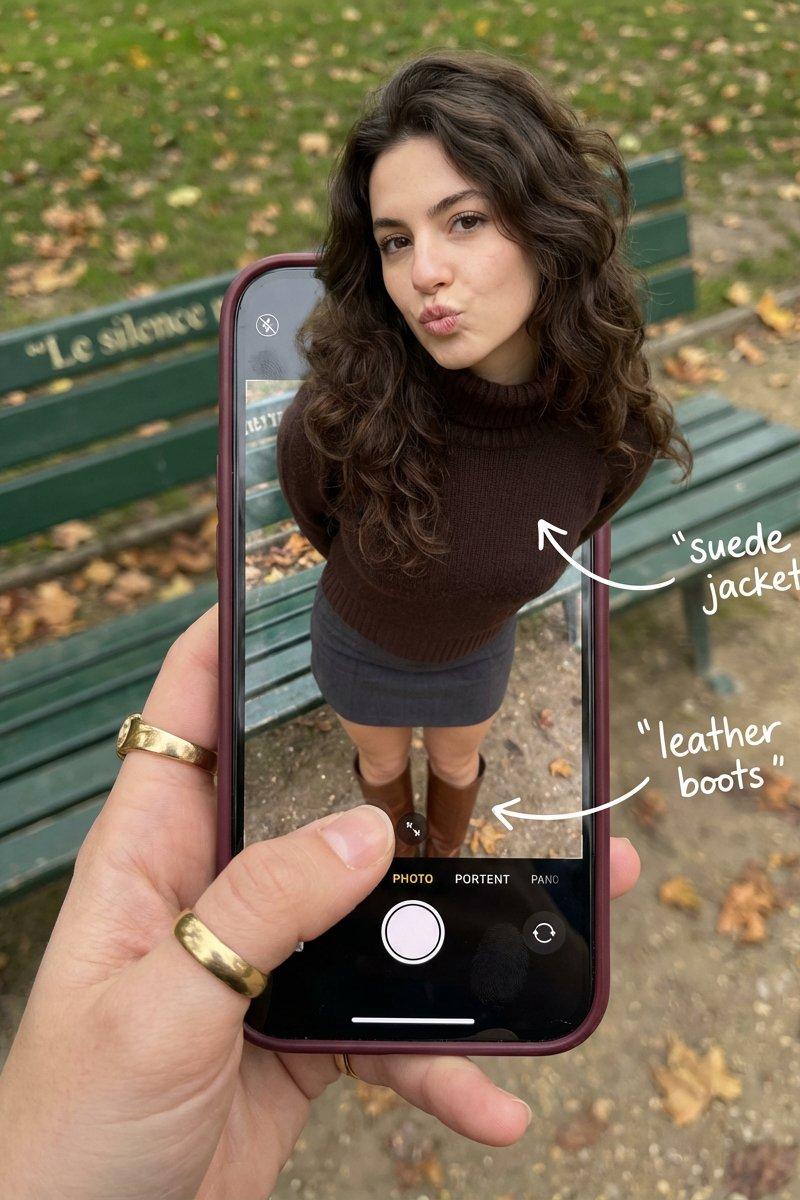
超现实主义光学错觉摄影
Prompt
Create some interesting image effects
{
"subject": {
"description": "A hyper-realistic optical illusion photograph. A young Caucasian woman appears to be stepping out of a smartphone screen held in a hand. The screen displays the camera interface, capturing her boots, while her real upper body extends out of the phone into reality.",
"mirror_rules": "Ensure the phone screen clearly shows the iOS Camera UI (shutter button, mode text). Handwritten annotations must be legible and not mirrored.",
"age": "20s",
"expression": {
"eyes": {
"look": "Alluring and playful",
"energy": "Confident, direct",
"direction": "Looking at the viewer"
},
"mouth": {
"position": "Blowing a kiss or pouting",
"energy": "Chic and charming"
},
"overall": "Lifelike, engaging interaction"
},
"face": {
"preserve_original": "false",
"makeup": "Natural glam, matte foundation, defined European features",
"features": "High nose bridge, double eyelids, defined jawline"
},
"hair": {
"color": "Dark brown",
"style": "Long, loose waves, voluminous",
"effect": "Realistic shine, wind-blown effect"
},
"body": {
"frame": "Petite but proportionally realistic",
"waist": "Defined",
"chest": "Covered by turtleneck",
"legs": "Visible INSIDE the phone screen interface wearing boots",
"skin": {
"visible_areas": "Face, hands",
"tone": "Fair Caucasian skin",
"texture": "Ultra-realistic skin texture, visible pores, natural imperfections",
"lighting_effect": "Soft daylight"
}
},
"pose": {
"position": "Torso and head emerging vertically from the phone, legs displayed on the screen",
"base": "Dynamic standing pose",
"overall": "充满活力的随机姿势,让人感觉生命力满满"
},
"clothing": {
"top": {
"effect": "精致的穿搭,High-quality textile photography"
},
"bottom": {
"type": "Mini Skirt and Leather Boots",
"color": "Dark Grey (skirt), Brown (boots)",
"details": "Boots visible on the screen beneath the UI elements"
}
}
},
"accessories": {
"jewelry": "Gold rings on the photographer\'s hand (foreground)",
"device": "Smartphone with burgundy case. The screen is ACTIVE and DETAILED: it displays the IOS Camera App Interface (white circular shutter button at bottom, \'PHOTO\' text).",
"prop": "On the phone screen: White handwritten-style text overlays with arrows pointing to the outfit elements (e.g., text \'suede jacket\' with arrow, \'leather boots\' with arrow)."
},
"photography": {
"camera_style": "DSLR photography, Macro lens for phone details",
"angle": "POV, High angle looking down at hand",
"shot_type": "Composite photography",
"aspect_ratio": "3:4",
"texture": "Sharp screen pixels, fingerprint smudges on screen, realistic fabric texture",
"lighting": "Overcast soft natural light",
"depth_of_field": "Background bench blurred (Bokeh), Phone screen UI and subject sharp"
},
"background": {
"setting": "Parisian Park in Autumn",
"wall_color": "Green bench, grey ground",
"elements": [
"Green park bench with text \'Le silence\'",
"Autumn leaves"
],
"atmosphere": "Cinematic, realistic",
"lighting": "Natural ambient light"
},
"the_vibe": {
"energy": "Sophisticated, viral social media content",
"mood": "Fashion forward",
"aesthetic": "OOTD breakdown, creative edit",
"authenticity": "Photorealistic texture, not CGI",
"intimacy": "POV",
"story": "Fashion styling breakdown",
"caption_energy": "Styling brown suede & leather"
},
"constraints": {
"must_keep": [
"Caucasian ethnicity",
"Photorealistic skin",
"Camera UI elements on screen (shutter button)",
"Handwritten text annotations on screen",
"Pop-out effect"
],
"avoid": [
"Transparent phone screen",
"Blank screen",
"3D render style",
"Cartoon",
"Plastic skin"
]
},
"negative_prompt": [
"transparent screen",
"blank screen",
"glass phone",
"3d",
"render",
"cartoon",
"anime",
"plastic",
"drawing",
"illustration"
]
}- Category
- Photography & Realism
- Model
- Unknown
- Creator
- underwood
- Source language
- zh-CN
- Source ID
- hyper-realistic-optical-illusion-photography
Views0