20

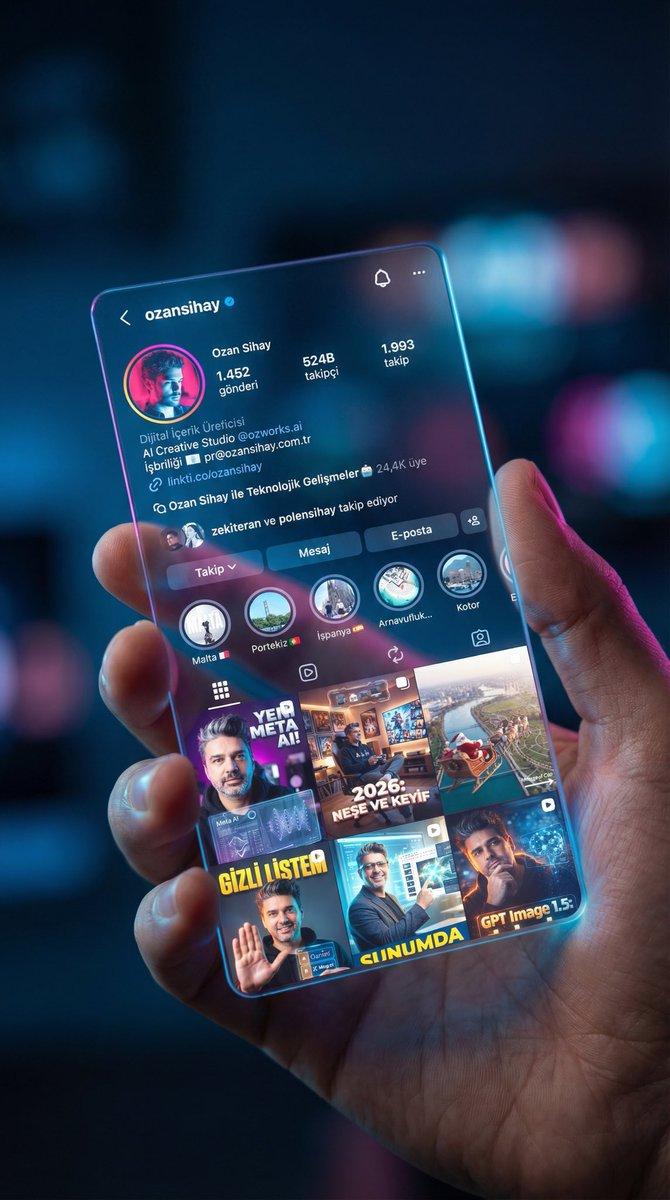
社交媒体界面全息卡片特写
Enlarge

Example images

社交媒体界面全息卡片特写

Prompt
Hologram ekran promptu;
(Sosyal medya profilinin SS’ini referans vererek)
Using the provided image of the Instagram profile interface as a reference, create a cinematic close-up shot of a human hand holding a sleek, semi-transparent holographic card. The holographic card should display the exact UI, profile details, and grid posts from the provided image, rendered with a glowing glassmorphism effect and vibrant light refractions. The scene is set in a dimly lit, high-tech minimalist studio with soft volumetric blue and magenta ambient lighting creating a smooth bokeh background. Captured with an 85mm macro lens at f/1.8 to focus sharply on the intricate glowing details of the hologram and the realistic skin texture of the hand. 4K resolution, photorealistic, highly detailed digital art style.
Category
Photography & Realism
Model
Unknown
Creator
Ozan Sihay
Source language
zh-CN
Views0
Source ID
instagram-profile-holographic-card-close-up
Studio

Guide

About "社交媒体界面全息卡片特写"

What is this prompt for?

"社交媒体界面全息卡片特写" AI image prompt for Unknown (Photography & Realism). Hologram ekran promptu; (Sosyal medya profilinin SS’ini referans vererek) Using the provide…

The full copyable prompt and example visuals above are ready for AI image generation or one-click recreate in Picva.

How to use this prompt

  1. Step 1

    Open the prompt detail

    Review the example visuals, category, and full prompt text for "社交媒体界面全息卡片特写".

  2. Step 2

    Copy the prompt

    Copy the prompt body from this page, or load it directly in Studio.

  3. Step 3

    Pick a model (Unknown)

    Prefer Unknown. If you switch models, keep subject and composition and tweak style terms.

  4. Step 4

    Generate and export

    Recreate the look in Picva, or export into your workflow for editing and publishing.

FAQ

What is the "社交媒体界面全息卡片特写" prompt?
It is an AI image-generation prompt for Unknown in the Photography & Realism category. This page includes the full prompt text, example visuals, and a one-click recreate path in Picva.
How do I use this prompt to generate an image?
Copy the prompt from this page, or use Generate / Studio. Paste it into a compatible image model, or recreate the look in Picva with optional reference images.
Which model is this prompt for?
This page lists Unknown. Most descriptive prompts also transfer to nearby image models such as GPT Image, Flux, or Midjourney with light style tweaks.
Can I use the result commercially?
You can usually copy the prompt for creation, but commercial use of the final image depends on the model terms, reference-image rights, and the generated content. Follow the source author and platform rules.