20

将漫画人物融入你的真人照片
Enlarge

Example images

将漫画人物融入你的真人照片

Prompt
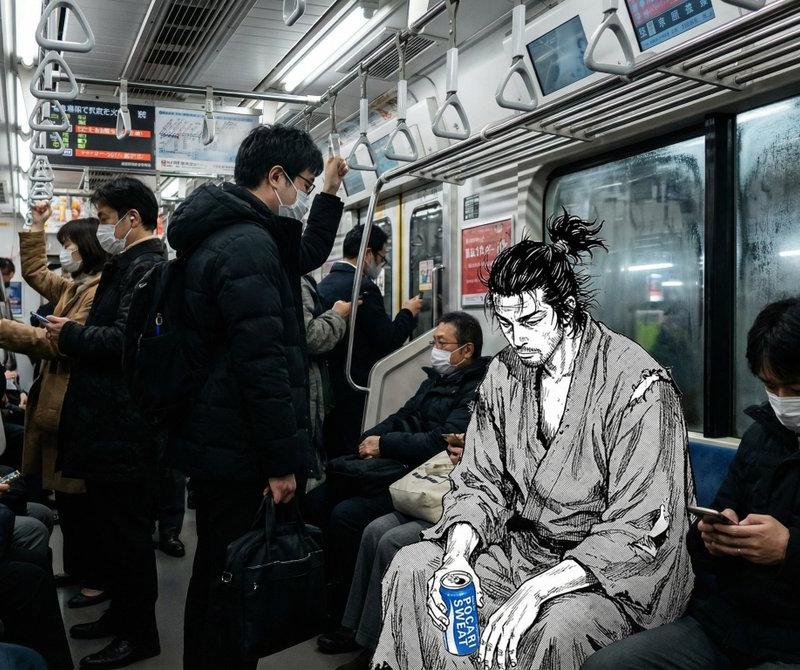
A photograph of a crowded subway train in Tokyo, hyper-realistic style. Sitting on one of the seats is a 2D black-and-white manga illustration of a tired samurai. The character is drawn with clean ink lines and cross-hatching shading. The lighting from the subway car hits the 2D drawing correctly, creating realistic highlights on the ink. The character holds a real photographic soda can, blending the 2D and 3D worlds. 4k, cinematic composition.
一张东京拥挤地铁车厢的超写实照片。车厢里,一个疲惫的武士坐在一个二维黑白漫画人物上。人物线条干净利落,运用了交叉阴影技法。地铁车厢的灯光恰到好处地照射在二维画面上,在墨线处营造出逼真的高光。人物手中拿着一个真实的汽水罐,巧妙地将二维和三维世界融合在一起。4K分辨率,电影级构图。
Category
Photography & Realism
Model
Unknown
Creator
Amira Zairi
Source language
zh-CN
Views0
Source ID
integrate-comic-characters-into-real-photos
Studio

Guide

About "将漫画人物融入你的真人照片"

What is this prompt for?

"将漫画人物融入你的真人照片" AI image prompt for Unknown (Photography & Realism). A photograph of a crowded subway train in Tokyo, hyper-realistic style. Sitting on one of…

The full copyable prompt and example visuals above are ready for AI image generation or one-click recreate in Picva.

How to use this prompt

  1. Step 1

    Open the prompt detail

    Review the example visuals, category, and full prompt text for "将漫画人物融入你的真人照片".

  2. Step 2

    Copy the prompt

    Copy the prompt body from this page, or load it directly in Studio.

  3. Step 3

    Pick a model (Unknown)

    Prefer Unknown. If you switch models, keep subject and composition and tweak style terms.

  4. Step 4

    Generate and export

    Recreate the look in Picva, or export into your workflow for editing and publishing.

FAQ

What is the "将漫画人物融入你的真人照片" prompt?
It is an AI image-generation prompt for Unknown in the Photography & Realism category. This page includes the full prompt text, example visuals, and a one-click recreate path in Picva.
How do I use this prompt to generate an image?
Copy the prompt from this page, or use Generate / Studio. Paste it into a compatible image model, or recreate the look in Picva with optional reference images.
Which model is this prompt for?
This page lists Unknown. Most descriptive prompts also transfer to nearby image models such as GPT Image, Flux, or Midjourney with light style tweaks.
Can I use the result commercially?
You can usually copy the prompt for creation, but commercial use of the final image depends on the model terms, reference-image rights, and the generated content. Follow the source author and platform rules.