20

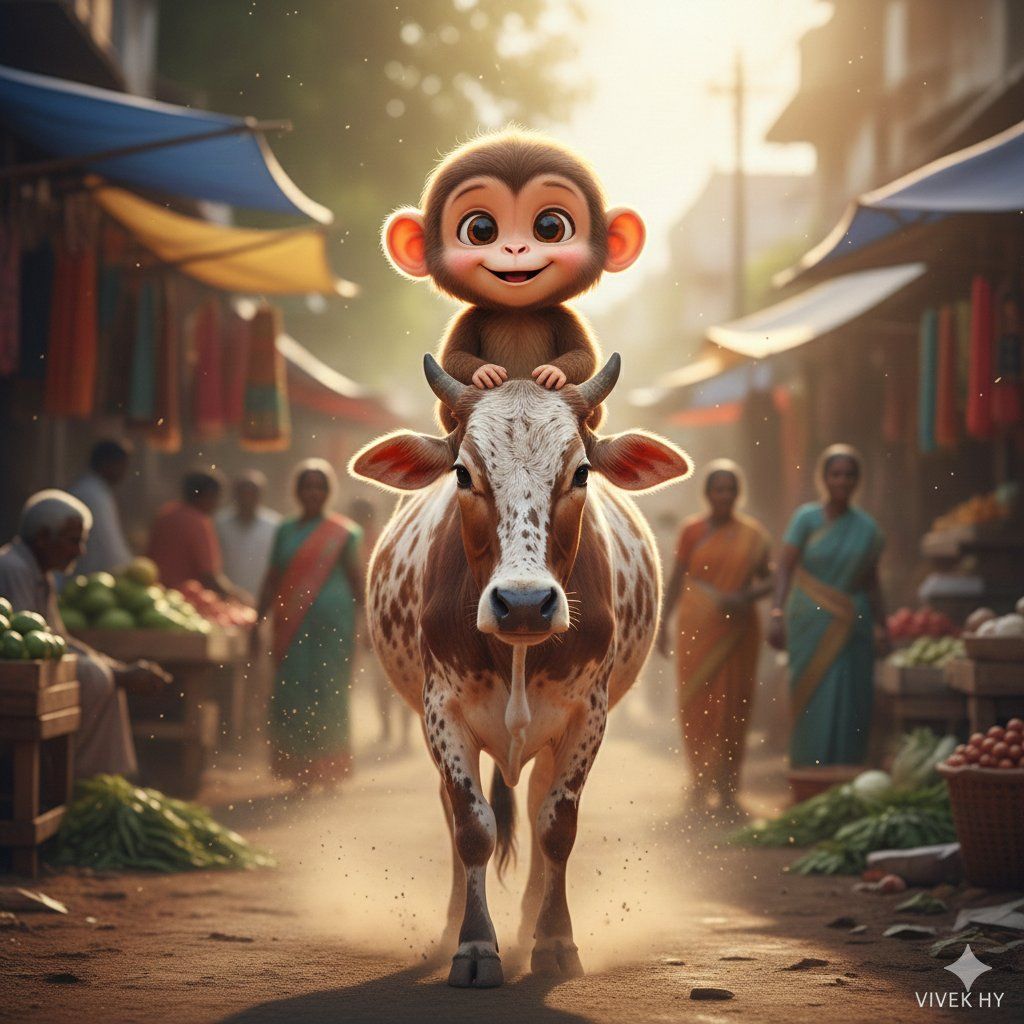
印度村庄街道上的轻松超现实时刻
Enlarge

印度村庄街道上的轻松超现实时刻

Prompt
Google Gemini Nano banana Pro
🐒🐄 playful surreal village scene
Prompt ⤵️
{
 "concept": {
 "theme": "light-hearted surreal moment on an Indian village street",
 "characters": {
 "main": "cute cartoon-style small monkey with big expressive eyes",
 "pose": "sitting joyfully on the back of a walking cow",
 "cow_details": "brown-white patterned cow walking straight toward the camera"
 }
 },
 "visual_elements": {
 "expressions": "monkey smiling widely with childlike excitement",
 "motion": "cow walking naturally, dust particles softly rising",
 "background": "slightly blurred market street with vendors and people"
 },
 "art_style": {
 "rendering": "hyper-realistic yet stylized cartoon-animal blend",
 "color_tone": "warm daylight, natural greens and browns",
 "vibe": "fun, playful, innocent, cinematic village aesthetic"
 },
 "quality": "8K ultra-detailed rendering with crisp textures and smooth lighting",
 "signature": "VIVEK HY"
}
Category
Photography & Realism
Model
Nano Banana Pro
Creator
Vivek HY
Views0
Source ID
light-hearted-surreal-moment-indian-village-street

Guide

About "印度村庄街道上的轻松超现实时刻"

What is this prompt for?

"印度村庄街道上的轻松超现实时刻" AI image prompt for Nano Banana Pro (Photography & Realism). Google Gemini Nano banana Pro 🐒🐄 playful surreal village scene Prompt ⤵️ { "co…

The full copyable prompt and example visuals above are ready for AI image generation or one-click recreate in Picva.

How to use this prompt

  1. Step 1

    Open the prompt detail

    Review the example visuals, category, and full prompt text for "印度村庄街道上的轻松超现实时刻".

  2. Step 2

    Copy the prompt

    Copy the prompt body from this page, or load it directly in Studio.

  3. Step 3

    Pick a model (Nano Banana Pro)

    Prefer Nano Banana Pro. If you switch models, keep subject and composition and tweak style terms.

  4. Step 4

    Generate and export

    Recreate the look in Picva, or export into your workflow for editing and publishing.

FAQ

What is the "印度村庄街道上的轻松超现实时刻" prompt?
It is an AI image-generation prompt for Nano Banana Pro in the Photography & Realism category. This page includes the full prompt text, example visuals, and a one-click recreate path in Picva.
How do I use this prompt to generate an image?
Copy the prompt from this page, or use Generate / Studio. Paste it into a compatible image model, or recreate the look in Picva with optional reference images.
Which model is this prompt for?
This page lists Nano Banana Pro. Most descriptive prompts also transfer to nearby image models such as GPT Image, Flux, or Midjourney with light style tweaks.
Can I use the result commercially?
You can usually copy the prompt for creation, but commercial use of the final image depends on the model terms, reference-image rights, and the generated content. Follow the source author and platform rules.