19

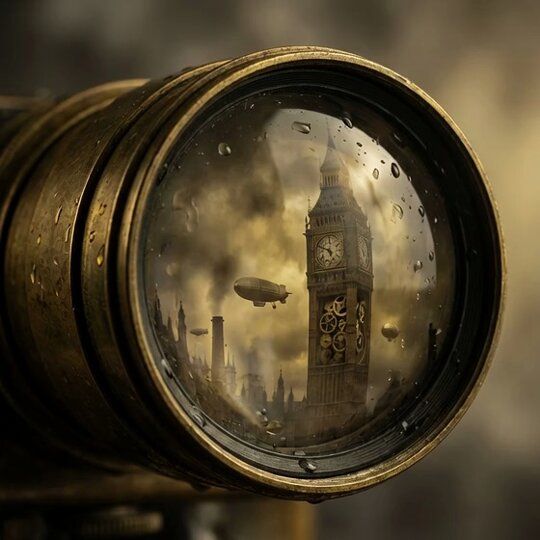
蒸汽朋克相机镜头特写
Enlarge

蒸汽朋克相机镜头特写

Prompt
Love steampunk prompts. This one was done with Nano Banana Pro. My video prompt is not that great but I didn't have much time to work on it.
Nano Banana Pro prompt: {Subject: extreme close-up of a brass Victorian camera lens; captured within the glass curvature is a reflection that acts as a portal to a steampunk London; Big Ben is a clockwork tower with gears exposed; zeppelins float in the smoky sky reflected in the glass; rain droplets on the lens surface distort the edges of the image; Style: steampunk, industrial vintage, macro reflection photography; Lighting: moody gaslight yellow and fog grey; Composition: centered lens, reflection is the focal point; Output quality: ray-traced reflections, metallic textures.}
Category
Photography & Realism
Model
Nano Banana Pro
Creator
Gadgetify
Views0
Source ID
steam-punk-camera-lens-close-up

Guide

About "蒸汽朋克相机镜头特写"

What is this prompt for?

"蒸汽朋克相机镜头特写" AI image prompt for Nano Banana Pro (Photography & Realism). Love steampunk prompts. This one was done with Nano Banana Pro. My video prompt is no…

The full copyable prompt and example visuals above are ready for AI image generation or one-click recreate in Picva.

How to use this prompt

  1. Step 1

    Open the prompt detail

    Review the example visuals, category, and full prompt text for "蒸汽朋克相机镜头特写".

  2. Step 2

    Copy the prompt

    Copy the prompt body from this page, or load it directly in Studio.

  3. Step 3

    Pick a model (Nano Banana Pro)

    Prefer Nano Banana Pro. If you switch models, keep subject and composition and tweak style terms.

  4. Step 4

    Generate and export

    Recreate the look in Picva, or export into your workflow for editing and publishing.

FAQ

What is the "蒸汽朋克相机镜头特写" prompt?
It is an AI image-generation prompt for Nano Banana Pro in the Photography & Realism category. This page includes the full prompt text, example visuals, and a one-click recreate path in Picva.
How do I use this prompt to generate an image?
Copy the prompt from this page, or use Generate / Studio. Paste it into a compatible image model, or recreate the look in Picva with optional reference images.
Which model is this prompt for?
This page lists Nano Banana Pro. Most descriptive prompts also transfer to nearby image models such as GPT Image, Flux, or Midjourney with light style tweaks.
Can I use the result commercially?
You can usually copy the prompt for creation, but commercial use of the final image depends on the model terms, reference-image rights, and the generated content. Follow the source author and platform rules.