Futuristic Luxury Watch Ad
Prompt
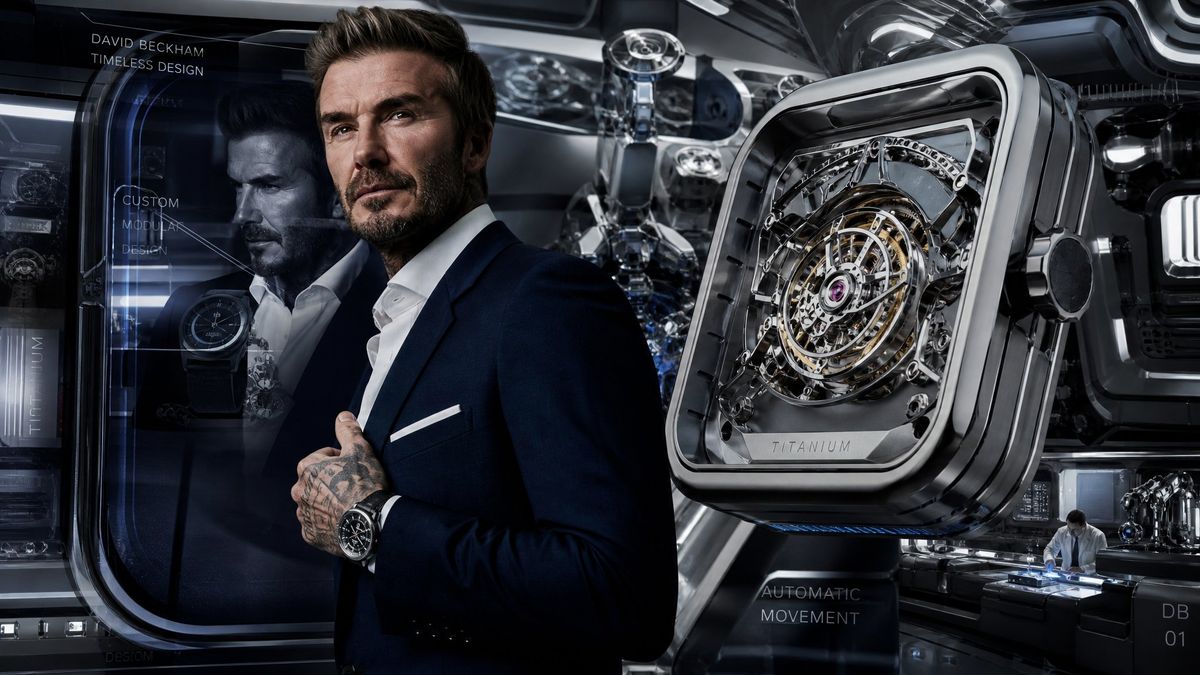
Goal: Create a cinematic luxury watch advertisement concept for {argument name="brand ambassador" default="David Beckham"}, blending a high-fashion male portrait with a futuristic watchmaking laboratory and oversized mechanical product hero shot.

Canvas: Wide 16:9 banner, dark metallic palette, ultra-detailed photorealistic CGI, glossy black chrome, blue-gray reflections, high contrast studio lighting, shallow depth of field.

Layout: Place the male ambassador slightly left of center, cropped from mid-thigh upward, wearing a tailored dark navy suit, white open-collar shirt, white pocket square, visible tattooed hands clasping the jacket, and a black luxury wristwatch on his left wrist. His face is intentionally obscured by exactly 2 solid censor blocks: 1 large warm brown square over the upper face/head area and 1 smaller dark blue-gray rectangle over the lower-left face area. On the right half, show 1 enormous floating square-cushion titanium watch case angled in perspective, with rounded corners, thick polished bezel, side crown, transparent skeleton dial, tourbillon-like circular mechanism, gold rings, chrome bridges, purple jewel center, and the engraved word “TITANIUM” on the bottom plate.

Background: Futuristic watch design studio with layered glass panels, curved transparent display pods, robotic machinery, precision tools, reflections, blue holographic UI lines, and dark industrial luxury ambience. Include a small watchmaker scene in the lower right: exactly 1 technician in a white coat seated at a workstation under cool blue light, assembling a watch beside miniature mechanical components.

Visible product and design elements to include: exactly 4 prominent watch-related objects: 1 giant floating skeleton watch on the right, 1 wristwatch worn by the ambassador, 1 smaller watch displayed inside the left glass module, and 1 small mechanical watch assembly on the lower-right workbench.

Text content: Add exactly 7 visible text elements in thin uppercase futuristic sans-serif typography: 1) “{argument name="headline name" default="DAVID BECKHAM"}” at top left, 2) “{argument name="tagline" default="TIMELESS DESIGN"}” directly below it, 3) “CUSTOM MODULAR DESIGN” stacked inside the left glass panel with a fine leader line, 4) vertical “TITANIUM” along the far-left display edge, 5) engraved “TITANIUM” on the giant watch, 6) “AUTOMATIC MOVEMENT” near the lower center-right, and 7) “{argument name="model code" default="DB 01"}” at bottom right.

Style constraints: Premium automotive-inspired horology advertisement, moody reflections, crisp micro-mechanical detail, realistic suit fabric and skin tattoos, no extra logos, no watermark, no additional text beyond the 7 specified text elements.- Category
- Charts & Infographics
- Model
- GPT Image 2
- Creator
- Cherry 2.O
- Source ID
- 24690
- Published
- Jun 7, 2026
Views1.7K