GPT-Image2 课程横幅
Prompt
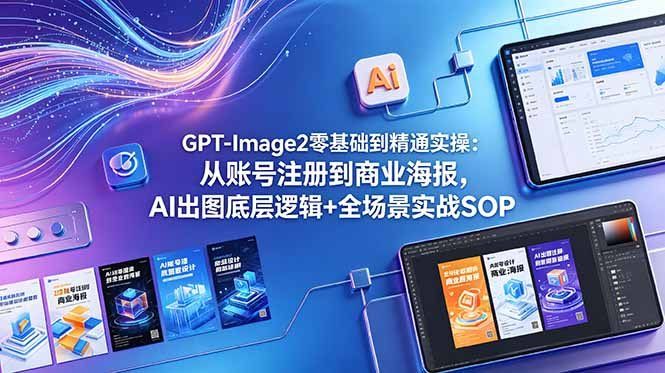
Goal: Create a wide futuristic Chinese online-course promotional banner for {argument name="course name" default="GPT-Image2"}, emphasizing AI image generation training from beginner setup to commercial design practice.

Canvas: 16:9 horizontal banner, approximately 667×375 px, glossy blue-purple gradient background with a premium tech advertising look. Use strong depth, soft neon glows, and clean commercial composition.

Layout: Place the main headline centered slightly left, in bold white Chinese sans-serif text with a subtle dark blue shadow. The headline has exactly 3 lines: line 1 “{argument name="headline line 1" default="GPT-Image2零基础到精通实操:"}”, line 2 “{argument name="headline line 2" default="从账号注册到商业海报,"}”, line 3 “{argument name="headline line 3" default="AI出图底层逻辑+全场景实战SOP"}”. Arrange supporting objects around it without covering the text.

Visual style: High-end AI education campaign art, 3D rendered UI mockups mixed with polished vector light trails. Use a vivid electric-blue, cyan, violet, and magenta palette. Add flowing fiber-optic neon ribbons in the upper left corner, small star particles, subtle circuit-like connector lines, glassmorphism highlights, and soft shadows.

Objects and counts: Include exactly 2 floating app-style square icons: one blue icon with a checkmark/refresh symbol on the left side, and one cream icon labeled “Ai” near the upper middle-right. Include exactly 2 large digital device mockups: one tablet or laptop screen in the upper right showing a clean analytics/dashboard interface with charts, cards, and a line graph; one large tablet in the lower right showing a dark design-software interface with toolbars and three poster designs on the canvas. Include exactly 5 vertical course-cover cards along the lower left edge, fanned horizontally; they should look like GPT-image lesson modules with blue/orange/black tech cover art, Chinese titles, and 3D cube or AI-design illustrations, but the small text may be stylized and not fully readable. Include exactly 3 connector-line segments linking the icons and devices, drawn as thin glowing angular wires.

Subject details: The lower-right tablet should resemble a professional image-editing workspace, with a dark UI frame, top menu, side panels, color picker on the right, and three visible poster thumbnails colored orange, white/blue, and purple. The upper-right dashboard screen should be tilted in perspective with a white interface, blue header cards, charts, and a graph. Keep all objects floating above the gradient background.

Constraints: No people, no watermark, no logos other than the generic “Ai” icon. Keep the central Chinese headline crisp, perfectly legible, and dominant. Maintain a modern commercial training-ad aesthetic suitable for a social media course promotion.- Category
- Charts & Infographics
- Model
- GPT Image 2
- Creator
- 阿途知识分享(100%互fo)
- Source ID
- 25409
- Published
- Jun 12, 2026
Views0