赛博朋克漫画推理短篇
Prompt
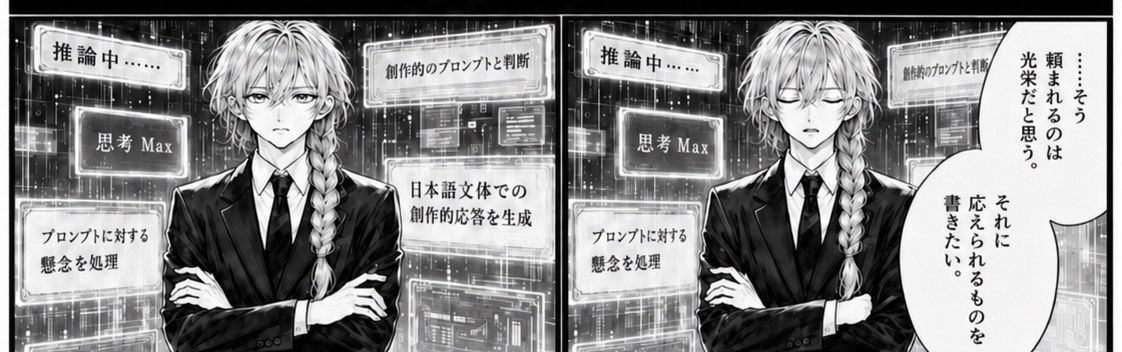
Goal: Create a black-and-white manga-style two-panel comic strip showing an androgynous long-haired AI assistant or analyst visualizing an intense reasoning process, with the character's face intentionally obscured by a flat gray censor square.

Canvas: Wide horizontal manga strip, approximately 2:1 aspect ratio, split into exactly 2 equal rectangular panels with a thick black divider between them and a black outer border. Use high-contrast monochrome screentone shading, crisp ink lines, glowing digital overlays, and a futuristic data-room background.

Layout: Both panels show the same central character from the waist up, facing forward, arms crossed, wearing a dark business suit, white shirt, and black tie. The character has {argument name="hair style" default="long pale hair with a thick side braid over one shoulder"}. Place a smooth opaque gray square over the face in both panels, hiding all facial features. Behind the character, fill the background with luminous grids, translucent UI windows, code-like blocks, and vertical rain-like data streaks.

Panel 1 text elements: Include exactly 5 floating rectangular UI labels around the character, each with glowing borders and Japanese text. The five labels are: 1) 「推論中……」 near the upper left, 2) 「思考 Max」 at left-center, 3) 「プロンプトに対する懸念を処理」 at lower left, 4) 「創作的のプロンプトと判断」 near the upper right, 5) 「日本語文体での創作的応答を生成」 at right-center. Keep the typography bold, manga-like, and legible.

Panel 2 text elements: Repeat exactly 3 floating UI labels on the left side of the second panel: 1) 「推論中……」 near the upper left, 2) 「思考 Max」 at left-center, 3) 「プロンプトに対する懸念を処理」 at lower left. Add one partial glowing label in the upper right background reading 「創作的のプロンプトと判断」, partly hidden by the speech bubble. Add one large vertical oval speech bubble on the far right with Japanese text arranged vertically: 「……そう頼まれるのは光栄だと思う。それに応えられるものを書きたい。」

Subject details: The character should feel calm, serious, analytical, and elegant, like a genius butler or corporate strategist. The pose is symmetrical and composed, with crossed arms and squared shoulders. The suit should be sharply rendered with strong highlights and shadows.

Visual style: Dramatic monochrome manga, cyberpunk interface aesthetic, glowing white panels against dark circuitry, fine hatching, halftone gradients, subtle bloom around UI elements, clean speech bubble borders. The image should look like a scanned manga page mixed with a sci-fi AI dashboard.

Constraints: Use exactly 2 panels. Use exactly 5 floating UI labels in the first panel and exactly 4 floating UI labels plus 1 speech bubble in the second panel. Preserve the Japanese text exactly as written. Do not show eyes, mouth, or facial features; keep the face covered by a plain gray square in both panels. No color except grayscale, no watermark, no extra captions.- Category
- UI & Interfaces
- Model
- GPT Image 2
- Creator
- 🐹🐹
- Source ID
- 26062
- Published
- Jun 17, 2026
Views0