中式婚礼邀请函海报
Prompt
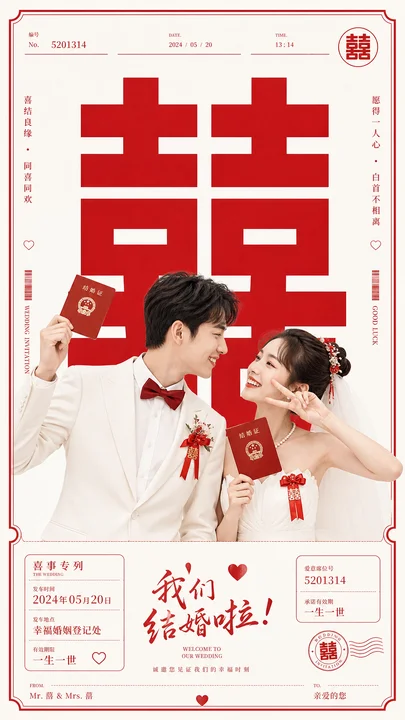
Goal: Create a vertical Chinese wedding invitation poster with a joyful modern-traditional red-and-ivory aesthetic, featuring a photographed bride and groom in front of an enormous red double-happiness character.

Canvas: Tall 9:16 portrait invitation, warm ivory/off-white background, thin vintage red border with clipped ornamental corners and fine line details. Use a clean editorial layout with strong red accents and lots of negative space.

Main visual: Place a huge bold red Chinese double-happiness wedding character “囍” centered in the upper and middle background, occupying most of the poster width. In the foreground, show a smiling young Chinese couple from the waist up: the groom on the left in a white suit jacket, white shirt, and deep red bow tie, wearing a red wedding boutonniere; he holds up a small red marriage booklet in his left hand and looks affectionately at the bride. The bride on the right wears an off-shoulder white wedding dress, pearl necklace, delicate hair accessories, and a red floral hairpiece; she holds a red marriage booklet near her chest and makes a playful peace sign while smiling at the groom. Both red booklets have gold Chinese wedding emblem styling.

Top header details: Add a minimal form-like header with exactly 3 small fields: “No. 5201314”, “DATE 2024 / 05 / 20”, and “TIME 13:14”. Add a small circular red “囍” seal at the top right.

Side decorations: Add vertical red microtext and ornaments on both sides. Left side includes Chinese vertical wedding blessing text, a small heart icon, a barcode-like stripe, and the English words “WEDDING INVITATION”. Right side includes Chinese vertical blessing text, a small heart icon, a barcode-like stripe, and the English words “GOOD LUCK”. Keep these thin and decorative.

Bottom invitation panel: Create a separated lower information area with fine red lines and three columns. Count and include exactly 3 information blocks: left block with “喜事专列”, “THE WEDDING”, date “2024年05月20日”, and vow-style Chinese text; center block with large red brush-calligraphy headline “我们结婚啦!” plus a small red heart above it and the English subtitle “WELCOME TO OUR WEDDING”; right block with “爱情密码 5201314” and Chinese text “一生一世”. Add a red circular “囍” postmark stamp and wavy postal lines on the lower right.

Footer: Add thin footer labels reading “FROM Mr. 雷 & Mrs. 雷” on the lower left and “TO 亲爱的您” on the lower right, with a small red heart centered at the very bottom.

Text customization: Use {argument name="couple surname" default="雷"} for the couple surname, {argument name="wedding date" default="2024年05月20日"} for the date, {argument name="invitation number" default="5201314"} for the invitation number, {argument name="main headline" default="我们结婚啦!"} for the central calligraphy headline, and {argument name="footer recipient" default="亲爱的您"} for the recipient.

Visual style: Photorealistic couple integrated into a graphic invitation design, crisp studio lighting, cheerful romantic mood, luxury Chinese wedding stationery, red and ivory color palette, high contrast typography, elegant thin-line borders, realistic fabric and skin detail.

Constraints: Keep the composition clean and symmetrical, preserve exactly one large background “囍”, exactly one small top-right circular “囍” seal, exactly one lower-right circular “囍” postmark, exactly 2 red marriage booklets, exactly 2 visible hearts in the side decorations, and exactly 3 bottom information blocks. No watermark, no extra people, no clutter.- Category
- Charts & Infographics
- Model
- GPT Image 2
- Creator
- 小小东
- Source language
- en
- Source ID
- 26785
- Published
- Jun 26, 2026
Views0