真实摄影XCbotaiart.picsUnknown图片
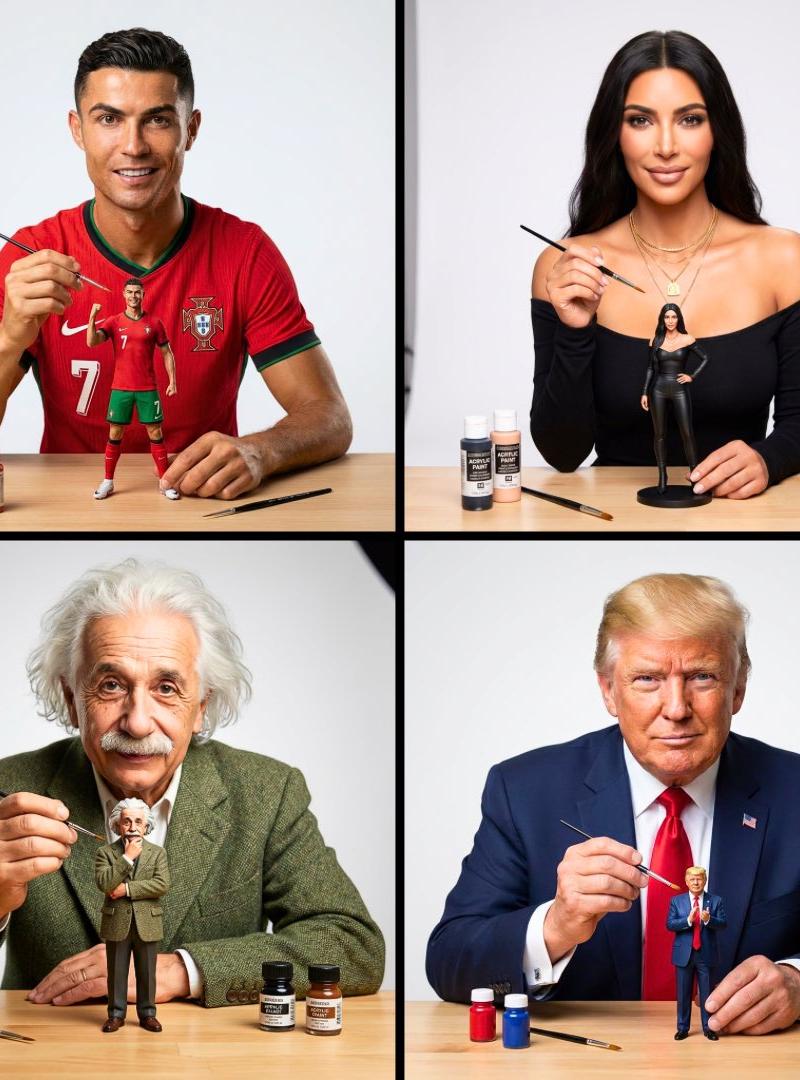
艺术家正在绘制自己的微型人偶
提示词
Create an image of this person as an artist painting a tiny miniature figurine version of themselves. The person is wearing their most iconic signature outfit, looking directly at the camera with a confident expression while holding a tiny paintbrush in one hand. The small action figure-sized version of themselves is prominently placed on a clean workbench in front of them - make the miniature slightly larger and more visible than realistic scale so it clearly stands out. The miniature figure is also wearing the same iconic outfit in a signature pose. Minimal art supplies on the workbench to avoid clutter - just 2-3 small paint bottles and one extra brush, keeping the focus on the person and their miniature. Soft neutral white background, professional studio lighting, shallow depth of field. The composition emphasizes the person’s face looking at camera and the miniature figure they’re working on. Clean, uncluttered, photorealistic style with high detail on both figures
创作一幅人物肖像,描绘此人作为艺术家正在绘制自己的微型人偶。此人身着其最具标志性的服装,自信地直视镜头,一手拿着一支小画笔。一个与真人大小相仿的微型人偶醒目地摆放在他面前干净的工作台上——将微型人偶的尺寸略大于实际比例,使其更加突出。微型人偶也穿着同样的标志性服装,摆出标志性的姿势。工作台上摆放的绘画用品极简,避免杂乱——只有两三瓶小颜料和一支备用画笔,从而将焦点集中在人物和微型人偶上。柔和的中性白色背景,专业的影棚灯光,浅景深。构图突出了人物看向镜头的面部表情以及他正在绘制的微型人偶。画面风格简洁明快,追求照片级的写实效果,人物和微型人偶的细节都需高度还原。
- 分类
- 真实摄影
- 模型
- Unknown
- 来源作者
- TechieSA
- 原始语言
- zh-CN
- 来源 ID
- artist-painting-miniature-figure-of-themselves
浏览量0