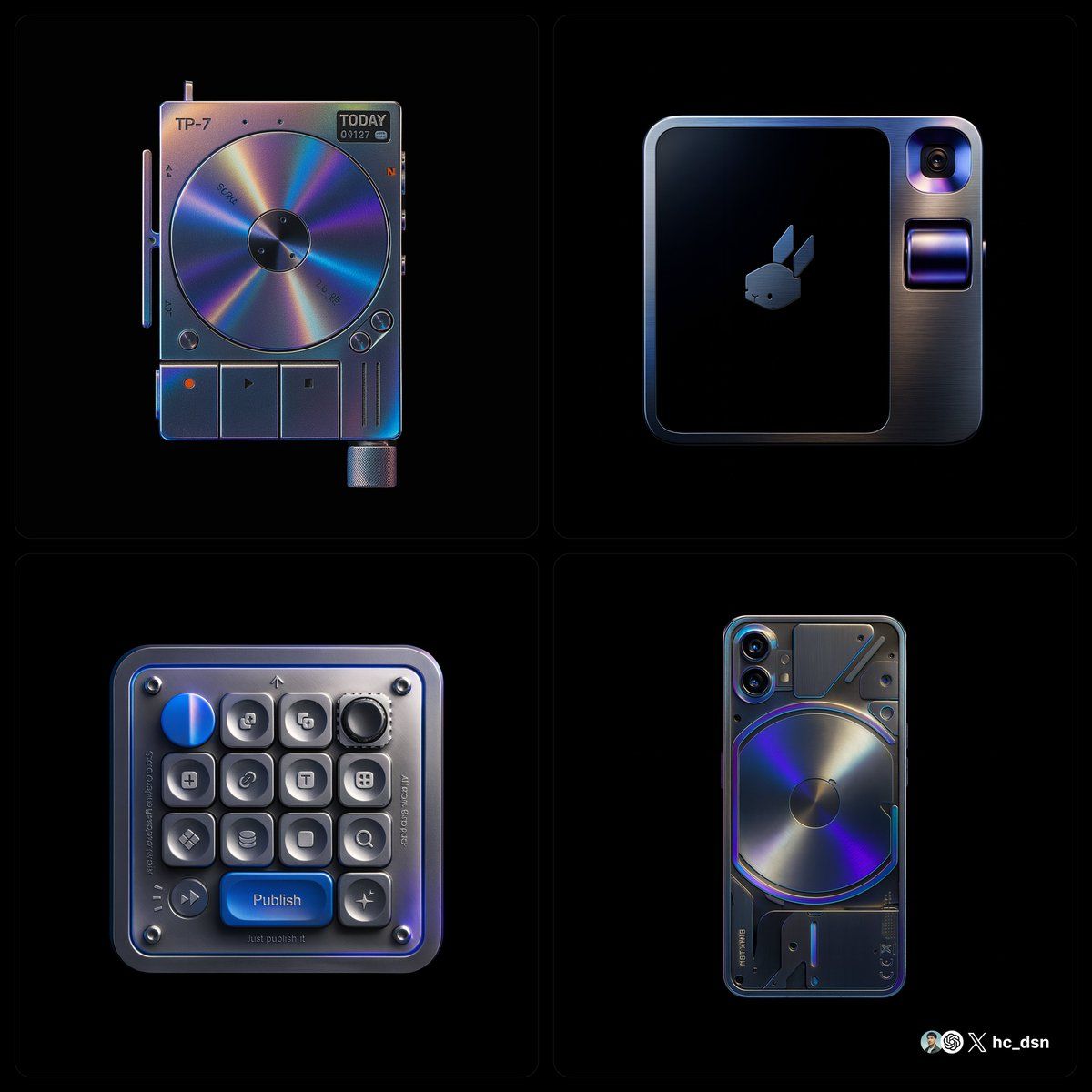
液态金属设计产品
提示词
create image with 1:1 ratio \nretexture the photo I attached with the following json \n{ "style_name": "hermes_subtle_specular_gradient", "background": { "type": "solid", "color": "#000000", "light_reflection": "none" }, "base_material": { "type": "polished_metal", "color": "#B0B0B0", "finish": "glossy", "reflectivity": 0.75, "surface_variation": { "micro_noise": 0.005, "brushed_direction": "none" } }, "highlight_strategy": { "mode": "localized_specular_enhancement", "trigger": "light-facing curved planes and direct lit faces", "color_gradient": ["#121A28", "#3D4C6B", "#8c71b7", "#4d21cd"], "gradient_type": "fluid_blend", "intensity_curve": "ease-out from highlight center", "falloff": 0.8, "blend_mode": "soft_light", "saturation_level": 0.4, "coverage_ratio": 0.2, "transition_smoothness": 0.95 }, "lighting": { "scene_type": "high-control studio", "key_light": { "intensity": 1.0, "color": "#FFFFFF", "angle": "35° above and side", "softness": 0.6 }, "fill_light": { "enabled": false }, "rim_light": { "enabled": false }, "reflection_behavior": { "mirrored_zones": "limited to high exposure zones", "glow_color": "applied from gradient with low saturation" } }, "specular_color_behavior": { "base_surface": "metallic neutral", "highlight_zones": "low-saturation chromatic reflection", "edge_bleed": "minimal", "inner_glow": 0.1 }, "detail_features": { "engraved_elements": { "type": "precise deboss", "lighting_response": "low bounce", "shadow_edge": "#222222", "rim_light_tint": "#888888" } }, "application_targets": [ "object product photography", "3D icons with selective lighting", "branding renders", "luxury UI component styling" ], "visual_effect_notes": { "mood": "understated luxury, technical precision, controlled emotion", "realism": "stylized physical logic", "focus": "refined colored specular only on light-facing curved surfaces with fluid-like gradient transitions" } }
以 1:1 的比例创建图像\n我用以下 json 对我附加的照片进行 retexture\n{ “style_name”: “hermes_subtle_specular_gradient”, “background”: { “type”: “solid”, “color”: “#000000”, “light_reflection”: “none” }, “base_material”: { “type”: “polished_metal”, “color”: “#B0B0B0”, “finish”: “glossy”, “reflectivity”: 0.75, “surface_variation”: { “micro_noise”: 0.005, “brushed_direction”: “none” } }, “highlight_strategy”: { “mode”: “localized_specular_enhancement”, “trigger”: “朝光曲面和直接照明 faces“, ”color_gradient“: [”#121A28“, ”#3D4C6B“, ”#8c71b7“, ”#4d21cd“], ”gradient_type“: ”fluid_blend“, ”intensity_curve“: ”从高光中心缓出“, ”衰减“: 0.8, ”blend_mode“: ”soft_light“, ”saturation_level“: 0.4, ”coverage_ratio“: 0.2, ”transition_smoothness“: 0.95 }, ”lighting“: { ”scene_type“: ”high-control studio“, ”key_light“: { ”intensity“:1.0, “color”: “#FFFFFF”, “angle”: “上侧 35°”, “柔和度”: 0.6 }, “fill_light”: { “enabled”: false }, “rim_light”: { “enabled”: false }, “reflection_behavior”: { “mirrored_zones”: “仅限于高曝光区域”, “glow_color”: “从低饱和度渐变应用” } }, “specular_color_behavior”: { “base_surface”: “金属中性”, “highlight_zones”: “低饱和度色度 reflection“, ”edge_bleed“: ”minimal“, ”inner_glow“: 0.1 }, ”detail_features“: { ”engraved_elements“: { ”type“: ”精确凹陷“, ”lighting_response“: ”低反弹“, ”shadow_edge“: ”#222222“, ”rim_light_tint“: ”#888888“ } }, ”application_targets“: [ ”对象产品 photography“, ”具有选择性照明的 3D 图标“, ”品牌渲染“, ”豪华 UI 组件样式“ ], ”visual_effect_notes“: { ”mood“: ”低调奢华、技术精确、受控情感“, ”realism“: ”风格化的物理逻辑“, ”focus“: ”仅在具有流体般渐变过渡的面向光线的曲面上优化彩色镜面反射“ } }- 分类
- 真实摄影
- 模型
- Unknown
- 来源作者
- hc_dsn
- 来源 ID
- liquid-metal-design-product
浏览量0