图表信息图YouMindgpt-image-2charts-infographics
超现实暗黑数字拼贴
提示词
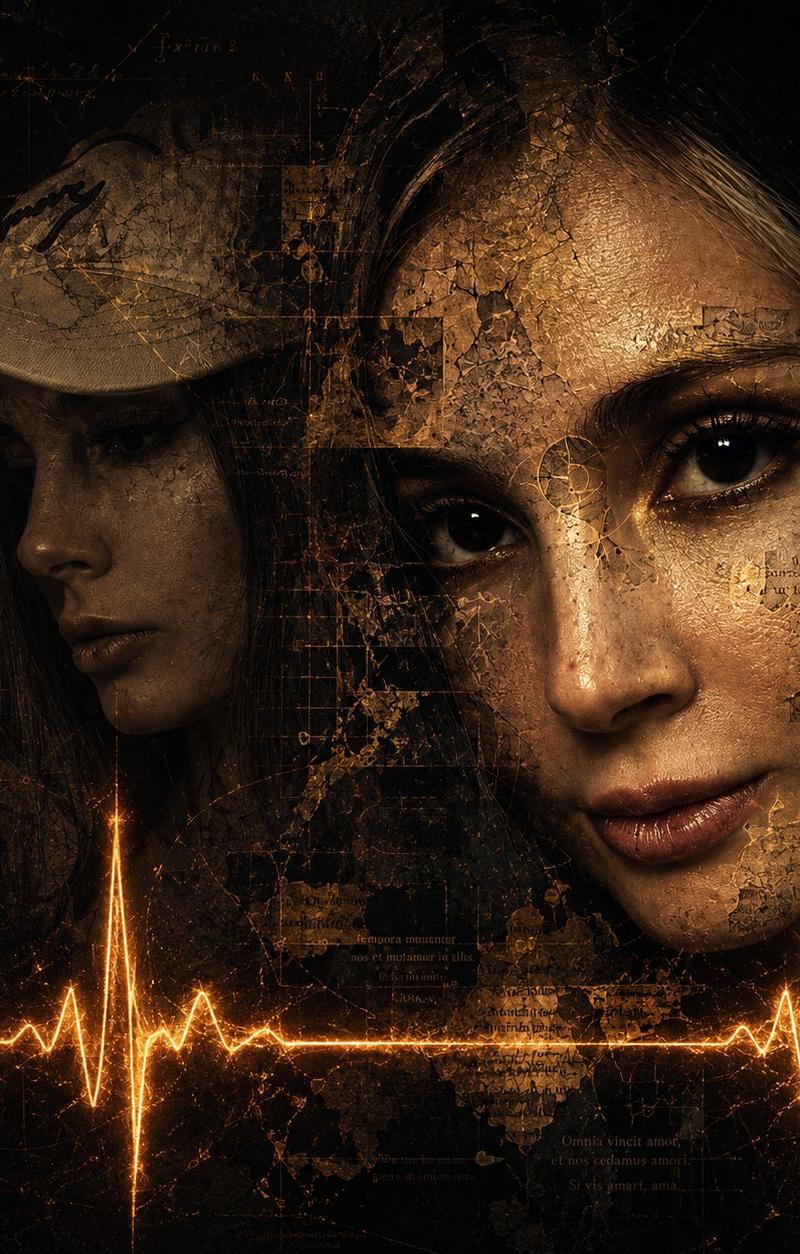
Main Subject and Composition: The image presents a {argument name="artistic style" default="surreal and dark digital collage-style"} artistic composition. In the center right, the face from the {argument name="reference image" default="first attached image"} dominates, fused with complex textures. To its left, ethereally integrated and in shadow, is the profile of another face, that is, the second attached image.

Details of the Frontal Face: The right half of this face (from the viewer's perspective) shows two realistic and expressive eyes, skin with a stone or bronze texture, and superimposed fragments of ancient texts and geometric patterns.

The rest of the face fades away.

Background and Textures: The entire background is predominantly black and textured, imitating an aged, cracked, and dust-spattered canvas. Technical diagrams, abstract mathematical equations, ancient manuscripts, and grids of dots are subtly integrated into the darkness.

Lighting Element: In the lower half, a line of an electrocardiogram (heartbeat or ECG signal) stands out horizontally from side to side, glowing intensely with a golden or liquid fire color. Two of the pulse's highest peaks align vertically with the two halves of the main face.

Color Palette: Extremely minimalist and dramatic, composed almost entirely of dark tones: blacks, earthy browns, aged bronze, and the bright orange/gold flash of the electrocardiogram.

Uses a {argument name="aspect ratio" default="1:1"} aspect ratio.- 分类
- 图表信息图
- 模型
- GPT Image 2
- 来源作者
- HER19845
- 原始语言
- en
- 来源 ID
- 24287
- 发布时间
- 2026年6月4日
浏览量150