图表信息图YouMindgpt-image-2charts-infographics
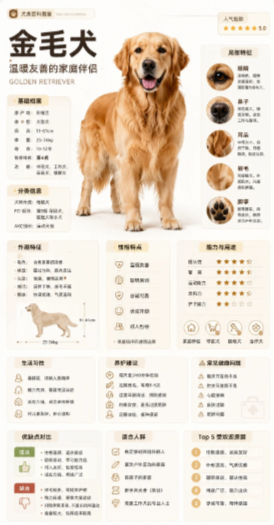
金毛寻回犬百科卡片
提示词
Goal: Create a vertical modular encyclopedia card about {argument name="animal breed" default="Golden Retriever"}, designed like a polished Chinese science-popularization pet profile poster.

Canvas: Tall portrait infographic, about 9:16 aspect ratio, warm off-white background, soft beige and cream rounded cards, subtle shadows, plenty of white space, clean grid alignment, high-resolution print-ready look.

Main layout: Place a large realistic full-body golden retriever in the center-left, standing and facing forward, happy open mouth, visible tongue, fluffy golden coat, natural paws, soft studio lighting. At the top-left, use a small brand/tag pill, then a large bold Chinese headline for the breed name and a short subtitle meaning “gentle and friendly family companion.” Add the English text “GOLDEN RETRIEVER” below the subtitle in small uppercase letters.

Top area elements: Include exactly 3 compact information blocks around the title and dog: 1 small breed-origin/specification card on the left with multiple short rows of stats, 1 small popularity or rating card at the top-right with star rating, and 1 small introduction card below the left stats with brief descriptive text.

Right detail column: Create exactly 5 stacked rounded detail cards, each with a circular close-up photo and short Chinese explanatory text. The 5 close-ups are: 1 eye/face detail, 2 ear or muzzle detail, 3 coat/fur detail, 4 tail or body coat detail, 5 paw pad detail. Keep these cards aligned vertically on the right side of the dog.

Middle and lower modules: Use a neat dashboard of exactly 10 rounded rectangular content cards below and around the dog. The 10 cards are: 1 physical characteristics card with a small side-view dog silhouette and bullet text, 2 personality traits card with five small line icons, 3 ability/rating card with exactly 5 rows of star ratings, 4 lifestyle habits card with four icon bullets, 5 care advice card with multiple short bullet rows, 6 safety or warning card with triangle alert icons, 7 strengths and weaknesses comparison card split into green “advantages” and red “disadvantages” areas, 8 suitable owners card with five icon bullets, 9 Top 5 key facts card with exactly five numbered orange circles, 10 small bonus profile/knowledge card if needed to balance the grid.

Visual style: Professional encyclopedia-card aesthetic, clean Chinese editorial layout, soft warm palette of cream, beige, pale gold, muted orange, light brown, and gentle green/red accents. Use thin line icons, circular photo crops, small gold star ratings, rounded corners, subtle drop shadows, and consistent margins. The central dog should be the most visually dominant element; all text should look dense but organized.

Text content: Use Chinese UI-style labels and short Chinese paragraphs throughout, with the main title set to {argument name="headline text" default="金毛犬"}. Use a warm subtitle set to {argument name="subtitle text" default="温暖友善的家庭伴侣"}. Keep text legible-looking but do not overcrowd; use placeholder-like short Chinese bullet lines where tiny text is not readable.

Customization: Set the overall palette to {argument name="color palette" default="warm cream, beige, golden brown, muted orange"} and the illustration/photo style to {argument name="visual style" default="realistic pet photography combined with clean infographic design"}.

Constraints: Exactly one main dog, exactly 5 right-column close-up detail cards, exactly 10 lower/middle information cards, exactly 5 rows in the star-rating card, exactly 5 numbered items in the Top 5 card. No people, no watermark, no messy background, no extra animals.- 分类
- 图表信息图
- 模型
- GPT Image 2
- 来源作者
- 自学Ai的鱼头叔叔
- 原始语言
- en
- 来源 ID
- 24321
- 发布时间
- 2026年6月5日
浏览量123