Editorial 3x3 角度参考表
创建一张逼真的影棚时尚参考表,展示同一位模特在九个标注好的摄像机角度和姿势下的连贯表现。
- 分类
- Logo 图标
- 模型
- GPT Image 2
- 来源作者
- Monami
- 原始语言
- en
- 来源 ID
- 28187
- 发布时间
- 2026年7月9日
完整提示词
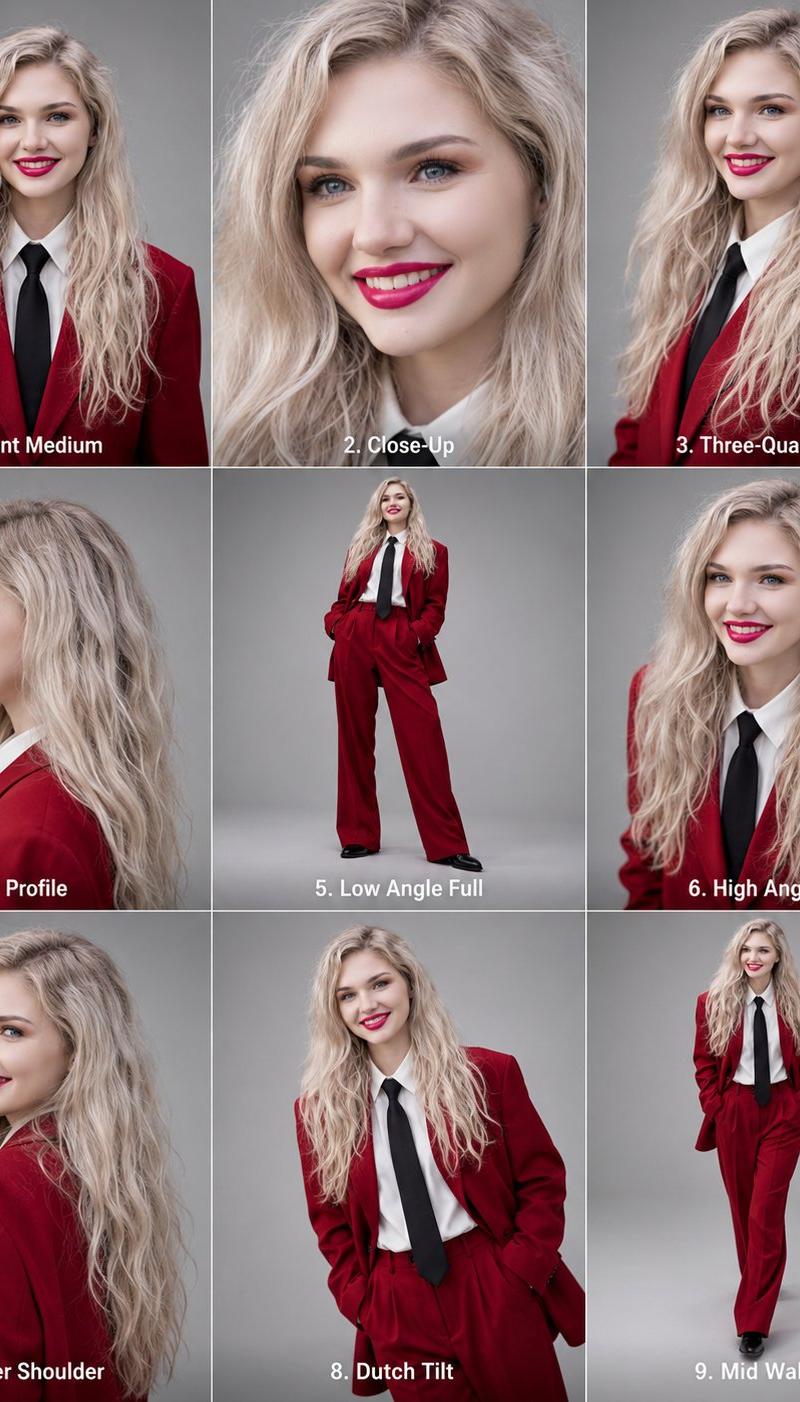
目标:创建一张高分辨率的编辑类角度参考表,展示同一位时尚模特在 9 个面板中保持高度一致的表现。

画布:垂直 4:5 纵横比,排列为完美的 3x3 网格,面板之间有细白色分割线。每个面板均使用中性灰影棚背景、柔和的编辑类布光、写实摄影风格、清晰的细节以及统一的调色。

主体细节:一位面带微笑的年轻女性,肤色白皙,留着长波浪 {argument name="hair color" default="铂金色"} 头发,蓝色眼睛,妆容精致,涂着鲜红色口红。在所有面板中保持完全相同的面部特征、年龄、发质、肤色和比例。服装在每个面板中固定不变:深 {argument name="suit color" default="红色"} 修身西装外套搭配同色系长裤、白色衬衫、黑色长领带和黑色皮鞋。充满自信的编辑类时尚造型。

布局及所需面板:包含 9 个独立的肖像,每个面板底部中央均有醒目的白色数字标题:
1. “1. 正面中景” — 正面中景肖像,微笑,可见躯干。
2. “2. 特写” — 同一面部的紧凑美妆特写,微笑,头发修饰脸型。
3. “3. 四分之三侧面” — 腰部以上的四分之三侧面视角,身体略微转向一侧。
4. “4. 侧面” — 清晰的侧面肖像,面向左侧。
5. “5. 低角度全身” — 全身低角度时尚姿势,双手插兜,双腿分开。
6. “6. 高角度” — 高角度中景肖像,向上看向镜头。
7. “7. 肩后视角” — 肩后视角,模特背对镜头但回头微笑。
8. “8. 荷兰式倾斜” — 倾斜镜头的中景时尚肖像,双手插兜,姿势俏皮自信。
9. “9. 行走中” — 全身行走姿势,向前迈步,对着镜头微笑。

视觉风格:编辑类影棚摄影,写实镜头渲染,专业时尚参考表,曝光平衡,根据拍摄类型采用浅至中度的景深。保持背景简洁统一。

约束条件:必须使用 3x3 网格并包含上述 9 个标注好的面板。在所有面板中保持模特身份和服装一致。除面板标题外,请勿添加额外的面板、道具、标志、水印或装饰性文字。多语言2
Editorial 3x3 角度参考表
zh-CN目标:创建一张高分辨率的编辑类角度参考表,展示同一位时尚模特在 9 个面板中保持高度一致的表现。 画布:垂直 4:5 纵横比,排列为完美的 3x3 网格,面板之间有细白色分割线。每个面板均使用中性灰影棚背景、柔和的编辑类布光、写实摄影风格、清晰的细节以及统一的调色。 主体细节:一位面带微笑的年轻女性,肤色白皙,留着长波浪 {argument name="hair color" default="铂金色"} 头发,蓝色眼睛,妆容精致,涂着鲜红色口红。在所有面板中保持完全相同的面部特征、年龄、发质、肤色和比例。服装在每个面板中固定不变:深 {argument name="suit color" default="红色"} 修身西装外套搭配同色系长裤、白色衬衫、黑色长领带和黑色皮鞋。充满自信的编辑类时尚造型。 布局及所需面板:包含 9 个独立的肖像,每个面板底部中央均有醒目的白色数字标题: 1. “1. 正面中景” — 正面中景肖像,微笑,可见躯干。 2. “2. 特写” — 同一面部的紧凑美妆特写,微笑,头发修饰脸型。 3. “3. 四分之三侧面” — 腰部以上的四分之三侧面视角,身体略微转向一侧。 4. “4. 侧面” — 清晰的侧面肖像,面向左侧。 5. “5. 低角度全身” — 全身低角度时尚姿势,双手插兜,双腿分开。 6. “6. 高角度” — 高角度中景肖像,向上看向镜头。 7. “7. 肩后视角” — 肩后视角,模特背对镜头但回头微笑。 8. “8. 荷兰式倾斜” — 倾斜镜头的中景时尚肖像,双手插兜,姿势俏皮自信。 9. “9. 行走中” — 全身行走姿势,向前迈步,对着镜头微笑。 视觉风格:编辑类影棚摄影,写实镜头渲染,专业时尚参考表,曝光平衡,根据拍摄类型采用浅至中度的景深。保持背景简洁统一。 约束条件:必须使用 3x3 网格并包含上述 9 个标注好的面板。在所有面板中保持模特身份和服装一致。除面板标题外,请勿添加额外的面板、道具、标志、水印或装饰性文字。
Editorial 3x3 角度参考表
enGoal: Create a high-resolution editorial angle reference sheet featuring the same fashion model consistently across exactly 9 panels. Canvas: Vertical 4:5 aspect ratio, arranged as a perfect 3x3 grid with thin white dividers between panels. Use a neutral gray studio backdrop in every panel, soft editorial lighting, realistic photography, crisp detail, and consistent color grading. Subject details: A smiling young adult woman with fair skin, long wavy {argument name="hair color" default="platinum blonde"} hair, blue eyes, polished makeup, and bright red lipstick. Maintain identical facial identity, age, hair texture, skin tone, and proportions across all panels. Wardrobe is fixed in every panel: a deep {argument name="suit color" default="red"} tailored blazer and matching trousers, white collared shirt, long black necktie, and black shoes. Confident editorial fashion styling. Layout and required panels: Include exactly 9 separate portraits, each with a bold white numbered caption centered near the bottom of its panel: 1. “1. Front Medium” — medium front-facing portrait, smiling, torso visible. 2. “2. Close-Up” — tight beauty close-up of the same face, smiling, hair framing the face. 3. “3. Three-Quarter” — three-quarter view from the waist up, turned slightly to one side. 4. “4. Profile” — clean side profile portrait, facing left. 5. “5. Low Angle Full” — full-body low-angle fashion pose, hands in pockets, legs apart. 6. “6. High Angle” — high-angle medium portrait, looking up toward camera. 7. “7. Over Shoulder” — over-the-shoulder view with the model turned away but looking back and smiling. 8. “8. Dutch Tilt” — tilted-camera medium fashion portrait, hands in pockets, playful confident pose. 9. “9. Mid Walk” — full-body walking pose, stepping forward, smiling at camera. Visual style: Editorial studio photography, realistic lens rendering, professional fashion reference sheet, balanced exposure, shallow-to-moderate depth of field depending on shot type. Keep the background plain and consistent. Constraints: Use exactly the 3x3 grid and exactly the 9 labeled panels listed above. Keep the same model identity and outfit in all panels. Do not add extra panels, props, logos, watermarks, or decorative text beyond the panel captions.