18

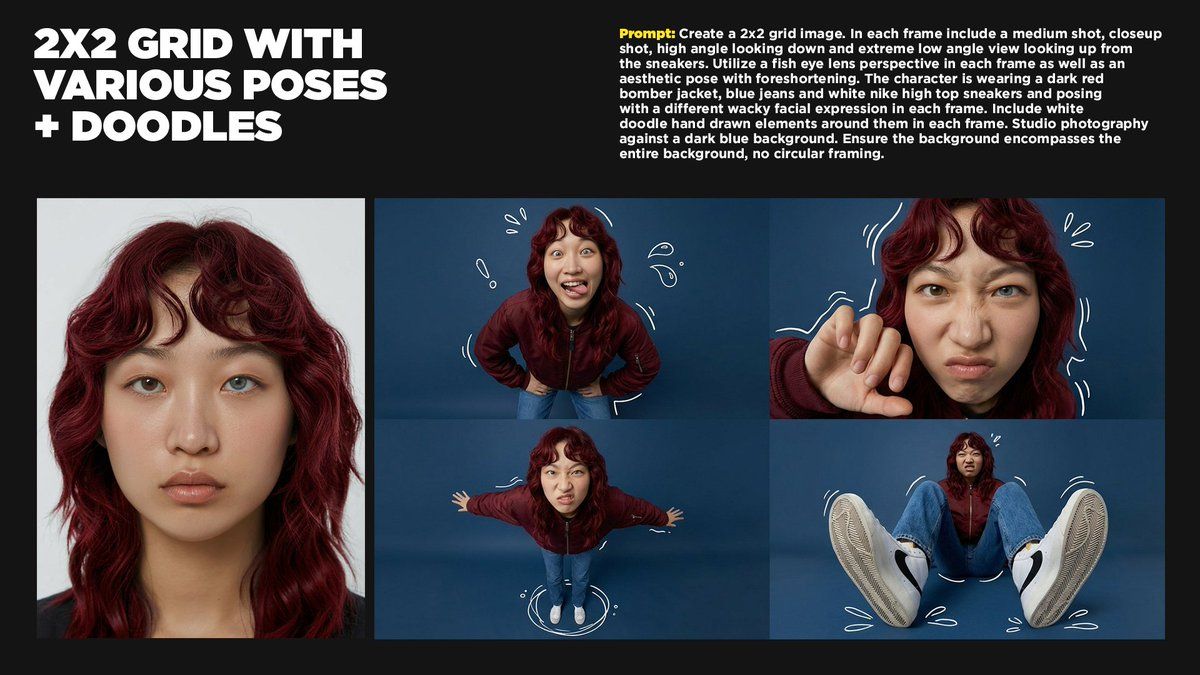
潮流街头风鱼眼镜头下的多视角人像
Enlarge

潮流街头风鱼眼镜头下的多视角人像

Prompt
Create a 2x2 grid image. In each frame include a medium shot, closeup shot, high angle looking down and extreme low angle view looking up from the sneakers. Utilize a fish eye lens perspective in each frame as well as an aesthetic pose with foreshortening. The character is wearing a dark red bomber jacket, blue jeans and white nike high top sneakers and posing with a different wacky facial expression in each frame. Include white doodle hand drawn elements around them in each frame. Studio photography against a dark blue background. Ensure the background encompasses the entire background, no circular framing.
Category
Charts & Infographics
Model
Nano banana pro
Creator
@MrDavids1
Source language
zh-CN
Views76
Source ID
8526
Published
Mar 22, 2026
Studio

Guide

About "潮流街头风鱼眼镜头下的多视角人像"

What is this prompt for?

"潮流街头风鱼眼镜头下的多视角人像" AI image prompt for Nano banana pro (Charts & Infographics). 创建一个 2x2 网格图像。每个画面中包含一个中景镜头、一个特写镜头、一个俯视的高角度镜头,以及一个从运动鞋向上看的超低角度镜头。每个画面都使用鱼眼镜头透视效…

The full copyable prompt and example visuals above are ready for AI image generation or one-click recreate in Picva.

How to use this prompt

  1. Step 1

    Open the prompt detail

    Review the example visuals, category, and full prompt text for "潮流街头风鱼眼镜头下的多视角人像".

  2. Step 2

    Copy the prompt

    Copy the prompt body from this page, or load it directly in Studio.

  3. Step 3

    Pick a model (Nano banana pro)

    Prefer Nano banana pro. If you switch models, keep subject and composition and tweak style terms.

  4. Step 4

    Generate and export

    Recreate the look in Picva, or export into your workflow for editing and publishing.

FAQ

What is the "潮流街头风鱼眼镜头下的多视角人像" prompt?
It is an AI image-generation prompt for Nano banana pro in the Charts & Infographics category. This page includes the full prompt text, example visuals, and a one-click recreate path in Picva.
How do I use this prompt to generate an image?
Copy the prompt from this page, or use Generate / Studio. Paste it into a compatible image model, or recreate the look in Picva with optional reference images.
Which model is this prompt for?
This page lists Nano banana pro. Most descriptive prompts also transfer to nearby image models such as GPT Image, Flux, or Midjourney with light style tweaks.
Can I use the result commercially?
You can usually copy the prompt for creation, but commercial use of the final image depends on the model terms, reference-image rights, and the generated content. Follow the source author and platform rules.