20

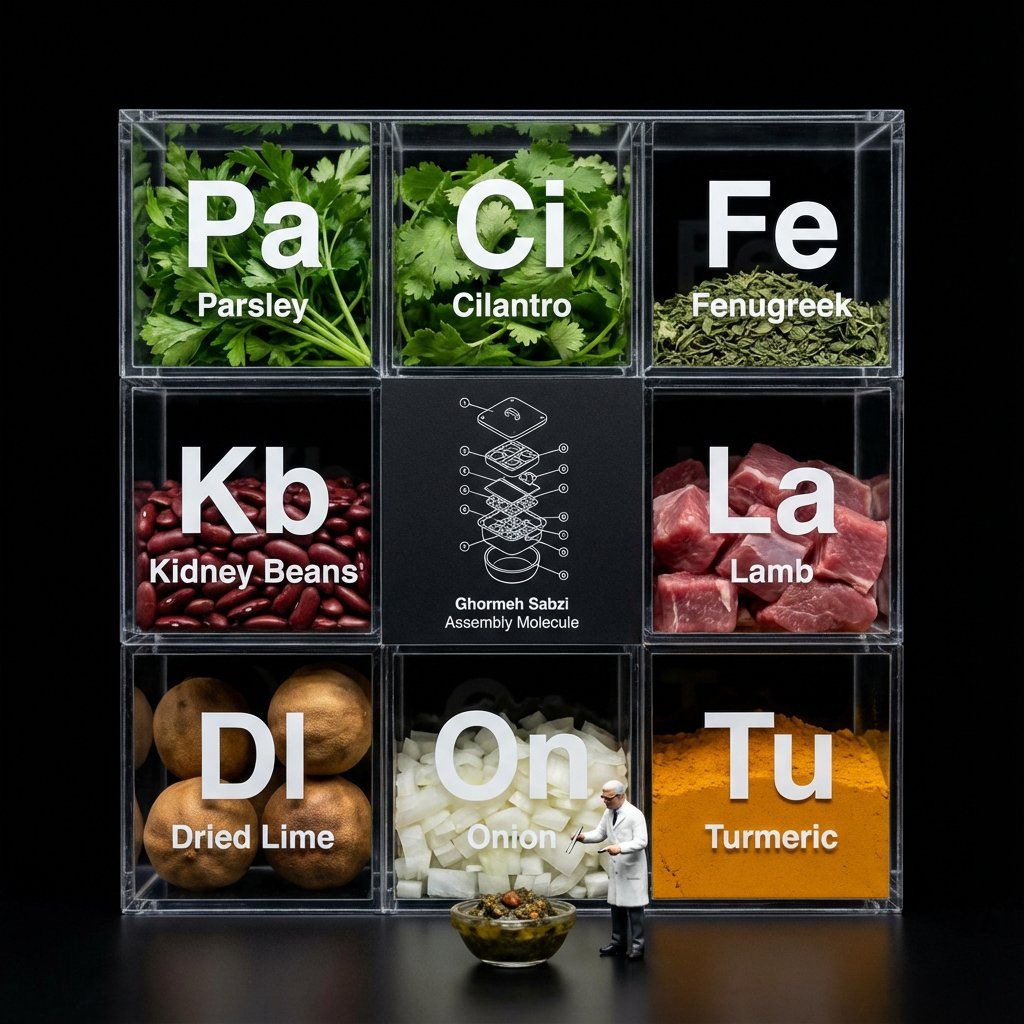
分子美食展示盒,用于美食可视化
Enlarge

分子美食展示盒,用于美食可视化

Prompt
Do this for [your meal]
Do this for {argument name="food item" default="pineapple pizza"}
<instruction>
Input A is a complex food item.
Analyze: Break the item down into raw ingredients and assign each a "Periodic Table" style abbreviation (e.g., To, Li, On).
Goal: A "Molecular Gastronomy" acrylic display box set against a void black background.
Rules:
Layout: determine layout based on # of ingredients, always round up to square or rectangle, clear acrylic grid box.
Center Slot: The center square is NOT clear; it is a matte black card featuring a white technical exploded view blueprint/wireframe of Input A labeled "[{argument name="food name" default="food name"}] Assembly Molecule."
Surrounding Slots: The outer slots contain the fresh, raw ingredients (tortillas, lime wedges, chopped onions, meat).
Typography: Large white "Periodic Table" style lettering (Symbol + Name) printed on the front glass of each compartment, floating over the ingredients.
Figure: A 1:12 scale miniature scientist in a lab coat standing on the table surface in front of the box, interacting with a miniature version of Input A.
Lighting & Atmosphere: Dark Mode aesthetic. Stark contrast lighting, pure black background, sharp reflections on the acrylic edges.
Output: ONE image, 1:1, macro photography, 8k resolution.
</instruction>
Category
创意图片
Model
Nano Banana Pro
Creator
Gadgetify
Views0
Source ID
4417763f-4050-46b1-83e7-b7d7a913a2bb
Published
Mar 8, 2026

Guide

About "分子美食展示盒,用于美食可视化"

What is this prompt for?

"分子美食展示盒,用于美食可视化" AI image prompt for Nano Banana Pro (创意图片). 一个复杂的多步骤指令提示,旨在将食物(默认为菠萝披萨)可视化为“分子美食学”亚克力展示盒,置于虚空黑色背景中。它要求将食物分解成“元素周期表”风格的成分,并包含一个微型科学家人物作为比例参考,强…

The full copyable prompt and example visuals above are ready for AI image generation or one-click recreate in Picva.

How to use this prompt

  1. Step 1

    Open the prompt detail

    Review the example visuals, category, and full prompt text for "分子美食展示盒,用于美食可视化".

  2. Step 2

    Copy the prompt

    Copy the prompt body from this page, or load it directly in Studio.

  3. Step 3

    Pick a model (Nano Banana Pro)

    Prefer Nano Banana Pro. If you switch models, keep subject and composition and tweak style terms.

  4. Step 4

    Generate and export

    Recreate the look in Picva, or export into your workflow for editing and publishing.

FAQ

What is the "分子美食展示盒,用于美食可视化" prompt?
It is an AI image-generation prompt for Nano Banana Pro in the 创意图片 category. This page includes the full prompt text, example visuals, and a one-click recreate path in Picva.
How do I use this prompt to generate an image?
Copy the prompt from this page, or use Generate / Studio. Paste it into a compatible image model, or recreate the look in Picva with optional reference images.
Which model is this prompt for?
This page lists Nano Banana Pro. Most descriptive prompts also transfer to nearby image models such as GPT Image, Flux, or Midjourney with light style tweaks.
Can I use the result commercially?
You can usually copy the prompt for creation, but commercial use of the final image depends on the model terms, reference-image rights, and the generated content. Follow the source author and platform rules.










