18

YouTube 缩略图概念:新武器
Enlarge

YouTube 缩略图概念:新武器

Prompt
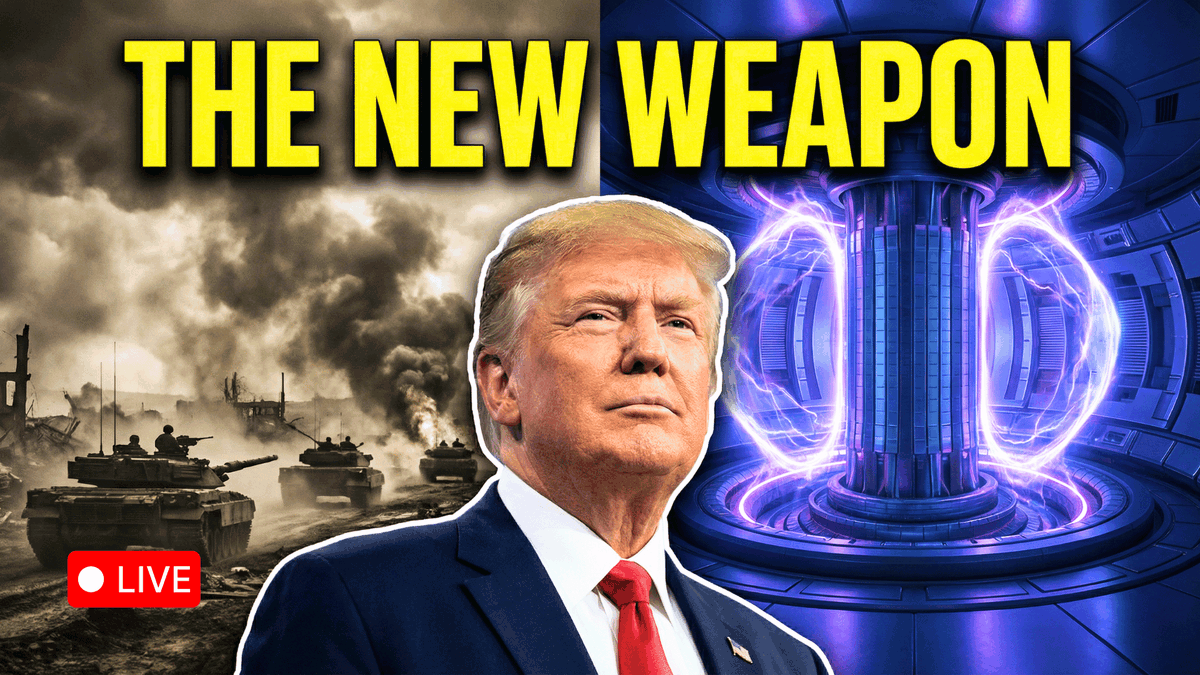
Youtube thumbnail Concept:
Background (Split 50/50):

Left Side (War): Grayscale or desaturated sepia tone. Shows a chaotic background of smoke or tanks.
Right Side (Fusion): High-saturation, deep blues and glowing purples. Shows a futuristic tokamak reactor core.
Subject: A large, shoulder up cutout of Trump placed dead center, acting as the divider between the two worlds. He should look confident/determined, facing slightly toward the "Fusion" side.
Text (Top, full width):

"{argument name="main text" default="THE NEW WEAPON"}" (in large, blocky #FFFF00 Yellow font).
Note: Add a heavy black drop shadow or a dark gradient vignette at the very top to ensure the yellow text is readable against the glowing background."
Category
创意图片
Model
Nano Banana Pro
Views0
Source ID
30c87d91-0dd1-45ab-b2f2-fe98669f184a
Published
Mar 8, 2026

Guide

About "YouTube 缩略图概念:新武器"

What is this prompt for?

"YouTube 缩略图概念:新武器" AI image prompt for Nano Banana Pro (创意图片). 一个用于生成 YouTube 缩略图概念的提示,缩略图分为两部分,各占 50%:一边是灰度的“战争”主题,另一边是高饱和度的“融合”主题。特朗普的中央剪影作为分隔线,并配有大号黄色文字“TH…

The full copyable prompt and example visuals above are ready for AI image generation or one-click recreate in Picva.

How to use this prompt

  1. Step 1

    Open the prompt detail

    Review the example visuals, category, and full prompt text for "YouTube 缩略图概念:新武器".

  2. Step 2

    Copy the prompt

    Copy the prompt body from this page, or load it directly in Studio.

  3. Step 3

    Pick a model (Nano Banana Pro)

    Prefer Nano Banana Pro. If you switch models, keep subject and composition and tweak style terms.

  4. Step 4

    Generate and export

    Recreate the look in Picva, or export into your workflow for editing and publishing.

FAQ

What is the "YouTube 缩略图概念:新武器" prompt?
It is an AI image-generation prompt for Nano Banana Pro in the 创意图片 category. This page includes the full prompt text, example visuals, and a one-click recreate path in Picva.
How do I use this prompt to generate an image?
Copy the prompt from this page, or use Generate / Studio. Paste it into a compatible image model, or recreate the look in Picva with optional reference images.
Which model is this prompt for?
This page lists Nano Banana Pro. Most descriptive prompts also transfer to nearby image models such as GPT Image, Flux, or Midjourney with light style tweaks.
Can I use the result commercially?
You can usually copy the prompt for creation, but commercial use of the final image depends on the model terms, reference-image rights, and the generated content. Follow the source author and platform rules.