16

3D 皮克斯风格钩子图:可编程货币到智能
Enlarge

3D 皮克斯风格钩子图:可编程货币到智能

Prompt
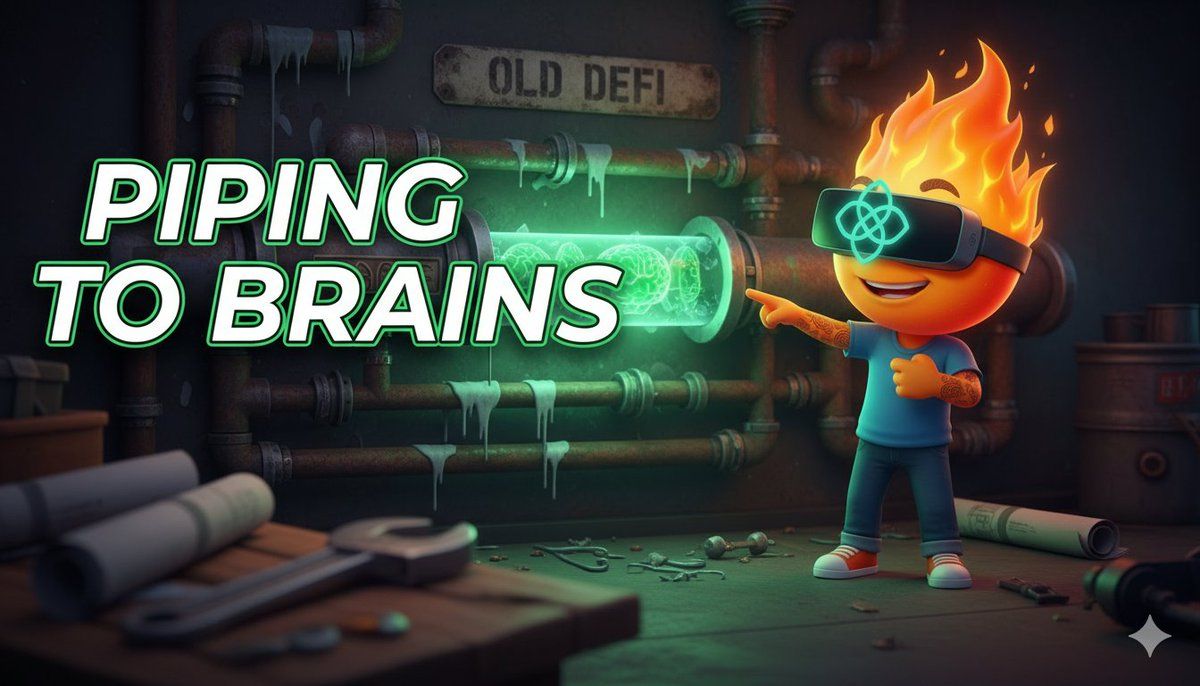
3D Pixar-style hook image, 16:9 format.

CHARACTER: Fire character in VR headset with OpenGradient logo. Expression: realizing/pointing. Pose: standing in a construction site, pointing at a transformation in the pipes.

SCENE: A messy wall of rusty, leaking pipes labeled "OLD DEFI". One section of the pipe transforms into a glowing, crystalline, see-through conduit pulsating with green "brain" energy.

FOREGROUND: A heavy wrench and blurred blueprints on a workbench in the corner. Creates depth.

BACKGROUND: Dark industrial background but lit up by the green glow of the new pipe.

TEXT: "PIPING TO BRAINS" on LEFT, bold white with glow.

COMPOSITION: Text dominant 70/30. Depth of field: blurred foreground -> sharp subject -> slight background blur. Cinematic lighting with neon green accent.
Category
创意图片
Model
Nano Banana Pro
Creator
Kurlyk
Views0
Source ID
f40bccdb-9b0a-4537-92d1-eb865e12fdac
Published
Mar 8, 2026

Guide

About "3D 皮克斯风格钩子图:可编程货币到智能"

What is this prompt for?

"3D 皮克斯风格钩子图:可编程货币到智能" AI image prompt for Nano Banana Pro (创意图片). 一个用于生成 3D 皮克斯风格钩子图像的提示,描绘了从“旧 DEFI”(生锈的管道)到“可编程智能”(发光的晶体管道)的转变。图像中有一个戴着 VR 头显的火焰角色,正指向这一转变,并…

The full copyable prompt and example visuals above are ready for AI image generation or one-click recreate in Picva.

How to use this prompt

  1. Step 1

    Open the prompt detail

    Review the example visuals, category, and full prompt text for "3D 皮克斯风格钩子图:可编程货币到智能".

  2. Step 2

    Copy the prompt

    Copy the prompt body from this page, or load it directly in Studio.

  3. Step 3

    Pick a model (Nano Banana Pro)

    Prefer Nano Banana Pro. If you switch models, keep subject and composition and tweak style terms.

  4. Step 4

    Generate and export

    Recreate the look in Picva, or export into your workflow for editing and publishing.

FAQ

What is the "3D 皮克斯风格钩子图:可编程货币到智能" prompt?
It is an AI image-generation prompt for Nano Banana Pro in the 创意图片 category. This page includes the full prompt text, example visuals, and a one-click recreate path in Picva.
How do I use this prompt to generate an image?
Copy the prompt from this page, or use Generate / Studio. Paste it into a compatible image model, or recreate the look in Picva with optional reference images.
Which model is this prompt for?
This page lists Nano Banana Pro. Most descriptive prompts also transfer to nearby image models such as GPT Image, Flux, or Midjourney with light style tweaks.
Can I use the result commercially?
You can usually copy the prompt for creation, but commercial use of the final image depends on the model terms, reference-image rights, and the generated content. Follow the source author and platform rules.