20

Google Gemini Nano Banana Use the uploaded model reference image and maintain fa
Enlarge

Example images

Google Gemini Nano Banana Use the uploaded model reference image and maintain fa

Prompt
Google Gemini Nano Banana

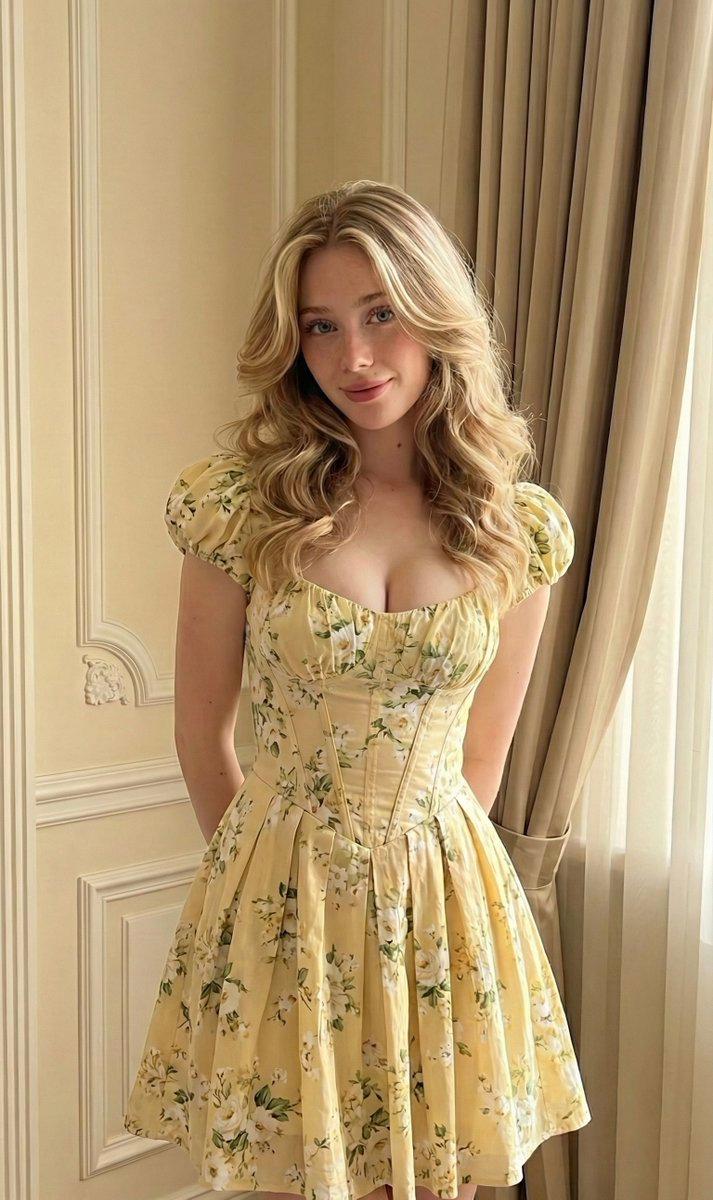
Use the uploaded model reference image and maintain facial features. Exact facial match to the reference image, maintain original facial identity, consistent skin tone, unchanged proportions, and a natural, relaxed expression. The model is wearing a soft, pastel floral midi dress with delicate chiffon fabric, subtle puff sleeves, and a lightly cinched waist, featuring a gentle pattern of blush pink and cream flowers that feels romantic and airy. The dress moves naturally with the body, emphasizing softness and comfort. Styling includes loose, soft waves falling naturally around the shoulders, minimal makeup with a fresh glow, light rosy blush, glossy lips, and softly defined lashes. Accessories are minimal and feminine: small pearl stud earrings and a delicate gold necklace. The model is posed standing near a sunlit window, lightly holding the fabric of the dress, with a gentle smile and calm gaze that radiates warmth. The scene is set in a cozy, pastel-toned bedroom with sheer curtains, soft morning light streaming in, creating a dreamy, tranquil atmosphere. Shot in photorealistic lifestyle photography using a 50mm lens, mid-length framing, shallow depth of field, soft background blur, visible fabric texture, and natural pastel color grading. Avoid facial changes, harsh lighting, high-fashion editorial styling, unrealistic CGI, overly saturated colors, or dramatic expressions.
Category
创意图片
Model
Nano Banana Pro
Views4
Source ID
955247a4-0b3a-4912-b684-2bb0fa57324f
Published
Jan 27, 2026

Guide

About "Google Gemini Nano Banana Use the uploaded model reference image and maintain fa"

What is this prompt for?

"Google Gemini Nano Banana Use the uploaded model reference image and maintain fa" AI image prompt for Nano Banana Pro (创意图片). 创意图片 Copy it on Picva and recrea…

The full copyable prompt and example visuals above are ready for AI image generation or one-click recreate in Picva.

How to use this prompt

  1. Step 1

    Open the prompt detail

    Review the example visuals, category, and full prompt text for "Google Gemini Nano Banana Use the uploaded model reference image and maintain fa".

  2. Step 2

    Copy the prompt

    Copy the prompt body from this page, or load it directly in Studio.

  3. Step 3

    Pick a model (Nano Banana Pro)

    Prefer Nano Banana Pro. If you switch models, keep subject and composition and tweak style terms.

  4. Step 4

    Generate and export

    Recreate the look in Picva, or export into your workflow for editing and publishing.

FAQ

What is the "Google Gemini Nano Banana Use the uploaded model reference image and maintain fa" prompt?
It is an AI image-generation prompt for Nano Banana Pro in the 创意图片 category. This page includes the full prompt text, example visuals, and a one-click recreate path in Picva.
How do I use this prompt to generate an image?
Copy the prompt from this page, or use Generate / Studio. Paste it into a compatible image model, or recreate the look in Picva with optional reference images.
Which model is this prompt for?
This page lists Nano Banana Pro. Most descriptive prompts also transfer to nearby image models such as GPT Image, Flux, or Midjourney with light style tweaks.
Can I use the result commercially?
You can usually copy the prompt for creation, but commercial use of the final image depends on the model terms, reference-image rights, and the generated content. Follow the source author and platform rules.