20

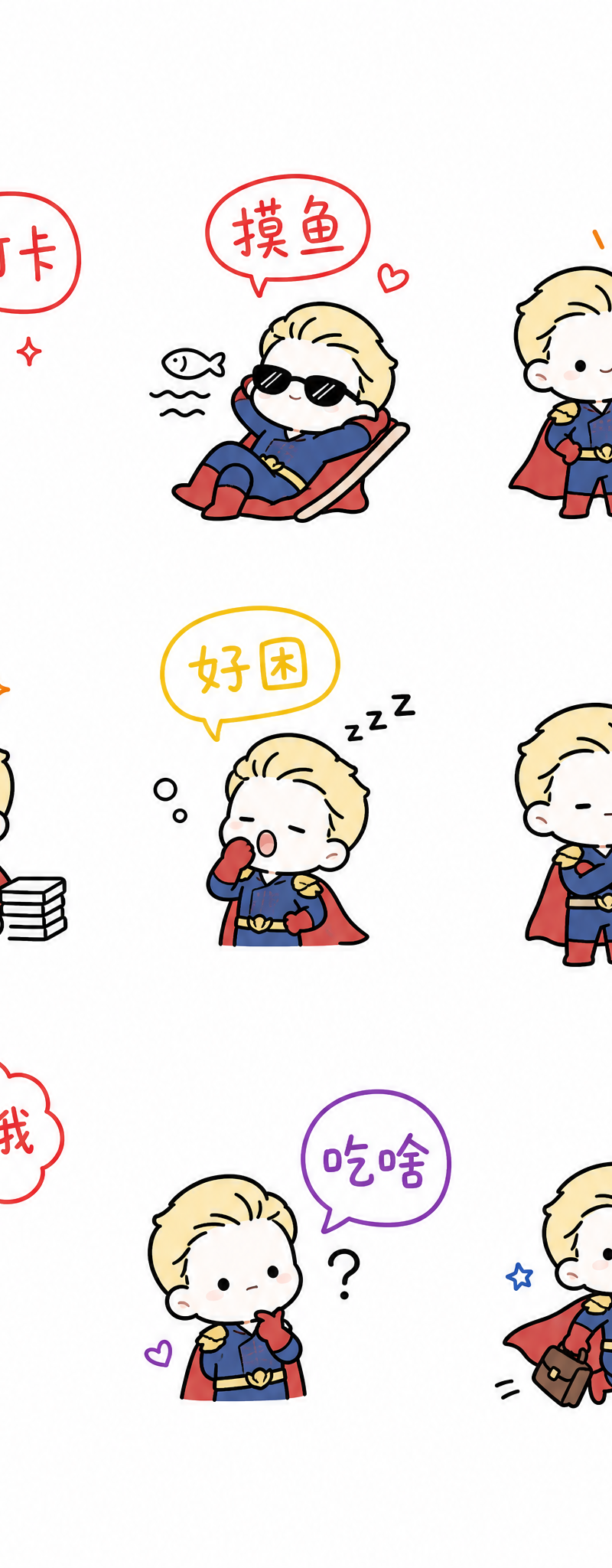
一张可爱、治愈风格的手绘贴纸页,背景为纯白色。整体构图为整洁的 3x3 网格,共 9 个独立贴纸单元,以均匀间距排列,不显示可见网格线,并保留充足的留白空间。
Enlarge

Example images

一张可爱、治愈风格的手绘贴纸页,背景为纯白色。整体构图为整洁的 3x3 网格,共 9 个独立贴纸单元,以均匀间距排列,不显示可见网格线,并保留充足的留白空间。

Prompt
一张可爱、治愈风格的手绘贴纸页,背景为纯白色。整体构图为整洁的 3x3 网格,共 9 个独立贴纸单元,以均匀间距排列,不显示可见网格线,并保留充足的留白空间。

每个单元格中都包含一个风格统一的极简祖国人卡通角色:极简的抽象一下主要特征。角色的表情极简;
每个单元格中的角色都呈现不同的动作或姿态,并搭配一句简短的手写中文短语(例如:打卡、摸鱼、开会、加班、好困、无语、好饿、吃啥、没钱、迟到、下班、加油、画饼、拒绝、开摆),通过对话气泡、小牌子或手势互动来表现内容。

配色方面:每个单元格使用一种主导色,颜色从 红、橙、黄、绿、蓝、紫 中选择,色调柔和但饱和度较高,且仅应用于文字、对话框或少量小装饰元素。黑色线稿保持不变。不要使用渐变,全部为纯色平涂。

角色和文字位于每个单元格的中央或略微偏中心的位置,整体保留充足的呼吸感和留白。阴影要么完全没有,要么极其轻微。文字风格类似于小孩子随手写的字,俏皮可爱但仍然清晰易读。线条略微圆润。

整体风格:可爱(kawaii)、治愈、极简、手绘、Q版、扁平插画、贴纸包、表情包合集。

负面提示词(Negative Prompt):
写实、3D、复杂背景、渐变、厚重阴影、可见网格边框、标准印刷字体、细致五官、凌乱排版、文字错误。
Category
UI & Interfaces
Model
GPT Image 2
Creator
xie underwood
Source language
zh-CN
Views300
Source ID
2446
Published
May 2, 2026
Studio

Guide

About "一张可爱、治愈风格的手绘贴纸页,背景为纯白色。整体构图为整洁的 3x3 网格,共 9 个独立贴纸单元,以均匀间距排列,不显示可见网格线,并保留充足的留白空间。 "

What is this prompt for?

"一张可爱、治愈风格的手绘贴纸页,背景为纯白色。整体构图为整洁的 3x3 网格,共 9 个独立贴纸单元,以均匀间距排列,不显示可见网格线,并保留充足的留白空间。 " AI image prompt for GPT Image 2 (UI & Interfaces). 一张可爱、治愈风格的手绘贴纸页,背景为纯白色。整体…

The full copyable prompt and example visuals above are ready for AI image generation or one-click recreate in Picva.

How to use this prompt

  1. Step 1

    Open the prompt detail

    Review the example visuals, category, and full prompt text for "一张可爱、治愈风格的手绘贴纸页,背景为纯白色。整体构图为整洁的 3x3 网格,共 9 个独立贴纸单元,以均匀间距排列,不显示可见网格线,并保留充足的留白空间。 ".

  2. Step 2

    Copy the prompt

    Copy the prompt body from this page, or load it directly in Studio.

  3. Step 3

    Pick a model (GPT Image 2)

    Prefer GPT Image 2. If you switch models, keep subject and composition and tweak style terms.

  4. Step 4

    Generate and export

    Recreate the look in Picva, or export into your workflow for editing and publishing.

FAQ

What is the "一张可爱、治愈风格的手绘贴纸页,背景为纯白色。整体构图为整洁的 3x3 网格,共 9 个独立贴纸单元,以均匀间距排列,不显示可见网格线,并保留充足的留白空间。 " prompt?
It is an AI image-generation prompt for GPT Image 2 in the UI & Interfaces category. This page includes the full prompt text, example visuals, and a one-click recreate path in Picva.
How do I use this prompt to generate an image?
Copy the prompt from this page, or use Generate / Studio. Paste it into a compatible image model, or recreate the look in Picva with optional reference images.
Which model is this prompt for?
This page lists GPT Image 2. Most descriptive prompts also transfer to nearby image models such as GPT Image, Flux, or Midjourney with light style tweaks.
Can I use the result commercially?
You can usually copy the prompt for creation, but commercial use of the final image depends on the model terms, reference-image rights, and the generated content. Follow the source author and platform rules.