18

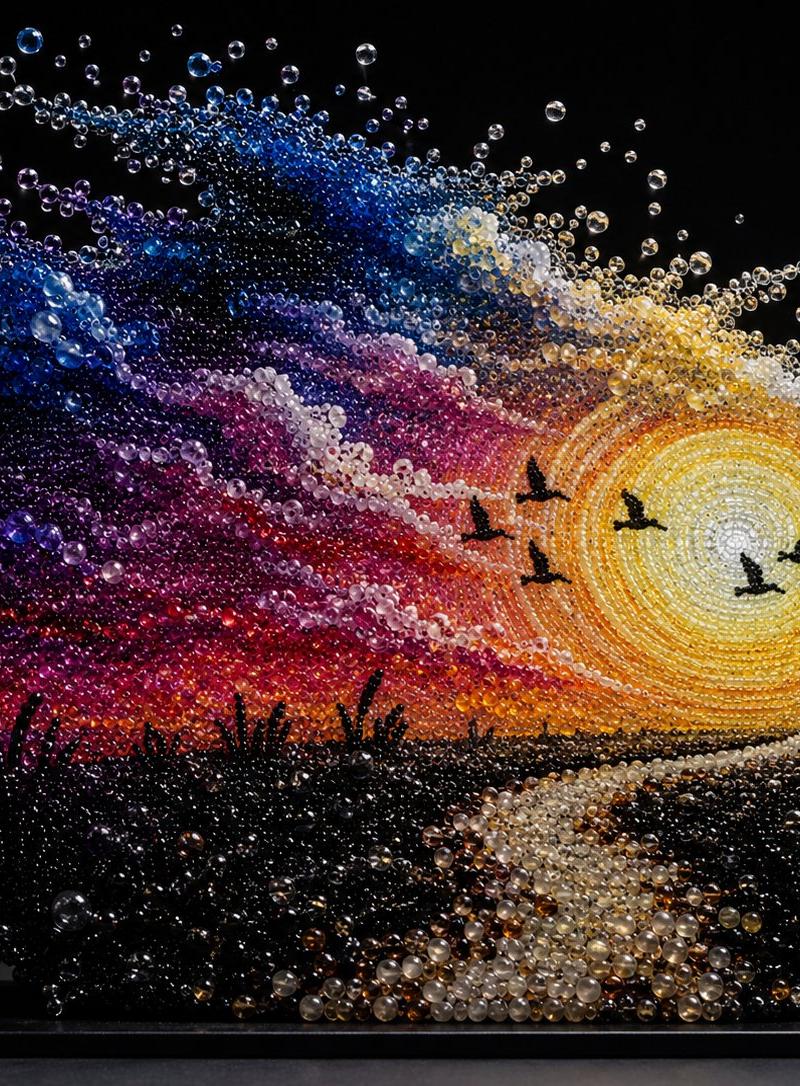
Pearlescent Bead Sunset Sculpture
Enlarge

Example images

Pearlescent Bead Sunset Sculpture

Prompt
Create a dreamy pearlescent bead sculpture of a sunset landscape, as if the entire scene is built from thousands of glossy translucent glass pearls, bubbles, and tiny crystal spheres suspended in space on a black rectangular display base. The artwork shows {argument name="scene theme" default="a romantic riverside sunset landscape"}: a huge glowing sun on the right made from concentric rings of yellow, gold, white, and amber beads, with radiant bead spray around it; a winding reflective river or path starts at the bottom center and curves toward the horizon; dark silhouetted reeds and marsh grasses fill the lower foreground; two tiny human silhouettes stand together near the right horizon; exactly 5 black bird silhouettes fly across the sunlit sky. The sky is a dramatic swirl of bead colors: deep navy and cobalt at upper left, violet and purple clouds, magenta and crimson bands, orange near the horizon, and pearly white cloud streaks around the sun. Use {argument name="dominant material" default="iridescent glass pearls and crystal bubbles"} with strong specular highlights, transparent refractions, and pearl-like luster. Background is pure black studio darkness, making the floating beads sparkle; the sculpture sits on a flat black plinth with subtle reflection and shadow. Style is ultra-detailed macro product photography of a handmade jewel-like installation, high contrast, cinematic lighting, crisp focus on the bead texture, magical and dreamlike, no text, no watermark.
Category
Charts & Infographics
Model
GPT Image 2
Creator
TWnese
Source language
en
Views75
Source ID
24660
Published
Jun 7, 2026
Studio

Guide

About "Pearlescent Bead Sunset Sculpture"

What is this prompt for?

"Pearlescent Bead Sunset Sculpture" AI image prompt for GPT Image 2 (Charts & Infographics). Generates a dreamy glass-pearl sculpture of a romantic sunset land…

The full copyable prompt and example visuals above are ready for AI image generation or one-click recreate in Picva.

How to use this prompt

  1. Step 1

    Open the prompt detail

    Review the example visuals, category, and full prompt text for "Pearlescent Bead Sunset Sculpture".

  2. Step 2

    Copy the prompt

    Copy the prompt body from this page, or load it directly in Studio.

  3. Step 3

    Pick a model (GPT Image 2)

    Prefer GPT Image 2. If you switch models, keep subject and composition and tweak style terms.

  4. Step 4

    Generate and export

    Recreate the look in Picva, or export into your workflow for editing and publishing.

FAQ

What is the "Pearlescent Bead Sunset Sculpture" prompt?
It is an AI image-generation prompt for GPT Image 2 in the Charts & Infographics category. This page includes the full prompt text, example visuals, and a one-click recreate path in Picva.
How do I use this prompt to generate an image?
Copy the prompt from this page, or use Generate / Studio. Paste it into a compatible image model, or recreate the look in Picva with optional reference images.
Which model is this prompt for?
This page lists GPT Image 2. Most descriptive prompts also transfer to nearby image models such as GPT Image, Flux, or Midjourney with light style tweaks.
Can I use the result commercially?
You can usually copy the prompt for creation, but commercial use of the final image depends on the model terms, reference-image rights, and the generated content. Follow the source author and platform rules.