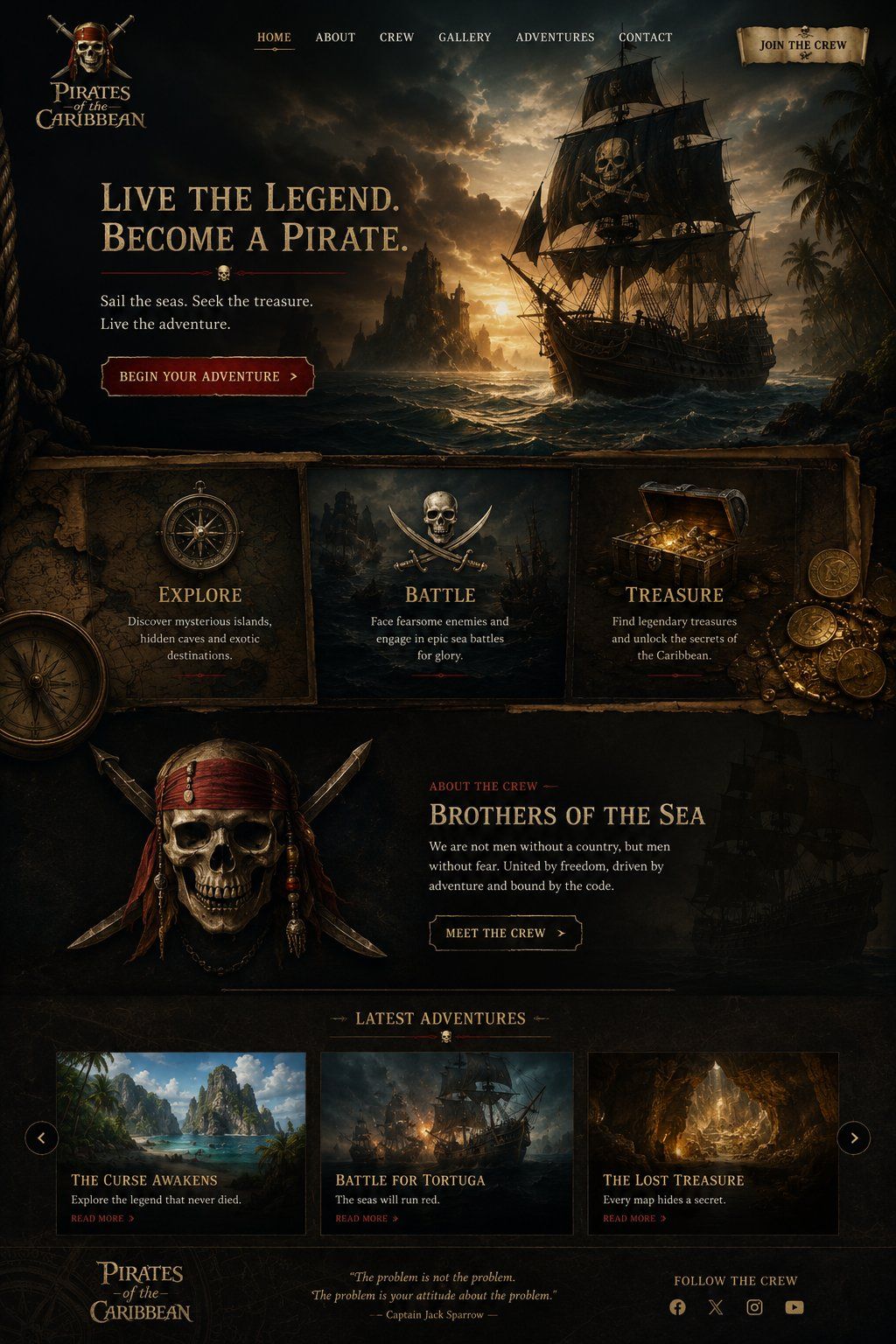
电影级海盗主题网站落地页
Prompt
Goal: Create a dark cinematic pirate-themed landing page for {argument name="website title" default="Pirates of the Caribbean"}, styled like a premium adventure movie website with antique parchment, carved wood, gold typography, and moody ocean lighting.

Canvas: Tall desktop webpage mockup, approximately 2:3 aspect ratio, full-bleed dark fantasy realism. Use a black, sepia, and tarnished-gold palette with deep teal storm clouds and warm sunset highlights. Texture everything with aged parchment, old maps, rope, weathered wood, and subtle grunge.

Header: At the top left place a stacked pirate logo reading “Pirates of the Caribbean,” with a small emblem above it. Across the top center place exactly 6 navigation links: “HOME,” “ABOUT,” “CREW,” “GALLERY,” “ADVENTURES,” and “CONTACT,” with HOME subtly highlighted in gold and underlined. At the top right place a parchment scroll button reading “JOIN THE CREW.”

Hero section: Make the top half a dramatic seascape at sunset: a large black pirate ship on the right with a skull-and-crossbones sail, rough waves, rocky island silhouettes in the distance, palm trees at far right, storm clouds, and golden light breaking through the sky. On the left, add a large serif headline: {argument name="hero headline" default="LIVE THE LEGEND.\nBECOME A PIRATE."} Under it add a thin red divider with a tiny skull icon centered. Below, add the subtext “Sail the seas. Seek the treasure.\nLive the adventure.” Add a dark red beveled call-to-action button reading {argument name="primary button text" default="BEGIN YOUR ADVENTURE"} with a small right arrow.

Feature cards: Beneath the hero, create exactly 3 adjacent framed panels on aged parchment/wood. Card 1 shows an antique compass and is titled “EXPLORE,” with text “Discover mysterious islands,\nhidden caves and exotic\ndestinations.” Card 2 shows crossed swords and a central skull/emblem, titled “BATTLE,” with text “Face fearsome enemies and\nengage in epic sea battles\nfor glory.” Card 3 shows an open treasure chest overflowing with gold coins and jewels, titled “TREASURE,” with text “Find legendary treasures\nand unlock the secrets of\nthe Caribbean.” Add scattered coins at the far right and a partial large compass at lower left for depth.

Crew section: Below the feature cards, create a dark section with a large pirate skull-and-crossed-swords crest on the left, decorated with red bandana strips, beads, and blades. On the right, add a small red label “ABOUT THE CREW,” then a gold title {argument name="crew headline" default="BROTHERS OF THE SEA"}. Add body copy: “We are not men without a country, but men\nwithout fear. United by freedom, driven by\nadventure and bound by the code.” Add an outlined button reading “MEET THE CREW” with a right arrow. Place a faint ghostly pirate ship silhouette in the background at right.

Latest adventures section: Add a centered heading “LATEST ADVENTURES” with small decorative horizontal lines and a tiny skull below it. Under the heading place exactly 3 adventure cards in a row, each with an image, title, description, and red “READ MORE >” link. Card 1: tropical island lagoon image, title “THE CURSE AWAKENS,” description “Explore the legend that never died.” Card 2: ship battle at sea image, title “BATTLE FOR TORTUGA,” description “The seas will run red.” Card 3: glowing cave treasure image, title “THE LOST TREASURE,” description “Every map hides a secret.” Add circular carousel arrow buttons on the far left and far right of this row.

Footer: Bottom left repeat the “Pirates of the Caribbean” logo. Center add an italic quote: “The problem is not the problem.\nThe problem is your attitude about the problem.” followed by “— Captain Jack Sparrow —”. Bottom right add “FOLLOW THE CREW” and exactly 4 small social icons: Facebook, X, Instagram, and YouTube.

Visual style: High-detail cinematic matte painting mixed with polished website UI design, realistic lighting, old pirate-map ornamentation, gold engraved serif typography, dark red accents, sharp rectangular content frames, subtle shadows, and a luxury adventure-game landing page feel. Keep all text legible, aligned, and spelled exactly as specified. No modern bright colors, no minimalist style, no extra sections, no watermark.- Category
- Charts & Infographics
- Model
- GPT Image 2
- Creator
- build4mbottom
- Source ID
- 25077
- Published
- Jun 10, 2026
Views0

![Design a high-end gacha summon page for a new mobile game titled [Game Title], i](https://whqgdndlpxjbwosvipip.supabase.co/storage/v1/render/image/public/prompt-source-media/promptsref/work-4833/image-1-8e0cc3185e2183fb.png?width=800&quality=75&resize=contain)