GPT-Image2 电商课程横幅
Prompt
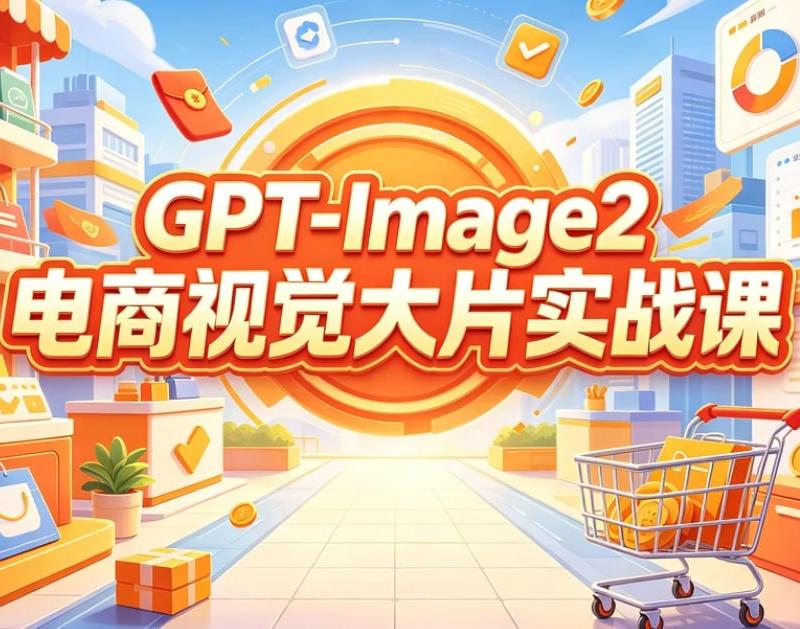
Goal: Create a bright horizontal promotional poster for an AI e-commerce visual design course, in a cheerful 3D cartoon commercial illustration style.

Canvas: 970×563 landscape banner, full-bleed, high saturation, warm orange-yellow center glow, clean vector-like 3D rendering, crisp edges, no photo realism.

Layout: Put a huge circular orange target/sunburst badge in the exact center background, radiating rings and light rays. Overlay the main course title in the middle with two stacked lines: top line reads {argument name="English title text" default="GPT-Image2"}, bottom line reads {argument name="Chinese headline text" default="电商视觉大片实战课"}. Use very large bold rounded display lettering, white fill with red-orange shadow, thick orange outline, and a subtle yellow highlight glow so the text dominates the composition.

Scene: Build a stylized e-commerce shopping street or mall corridor receding toward the glowing center. On the left, show a storefront shelf with product bottles and multiple shopping bags. On the right, show analytics dashboards and retail display counters. Include a shopping cart in the lower right foreground filled with orange product boxes and gold coins. Use a tiled walkway leading into the center for depth.

Discrete visible elements to include: exactly 1 central orange circular sunburst badge; exactly 2 main text lines; exactly 1 shopping cart in the lower right; exactly 3 dashboard/report panels on the right side, including one large pie-chart panel at the top right, one large line-and-bar chart panel at mid right, and one orange chart card near the lower right; exactly 7 prominent shopping bags total, including 4 on the left shelves/counters, 1 orange flying bag near upper left-center, 1 small orange flying bag mid-left, and 1 orange bag/card on the lower right counter; exactly 2 visible product bottles on the upper-left shelf; exactly 2 gift boxes on the floor/counters, one orange gift box at the bottom center-left and one small blue-orange gift box on a right display; exactly 1 potted green plant near the lower left-center; exactly 3 floating app icons above the headline, including a blue upload/cloud icon, an orange checkmark icon, and a red wallet/card icon; exactly 5 gold coins scattered through the scene.

Visual style: Use a polished Chinese e-commerce advertising aesthetic, playful isometric perspective, soft shadows, glossy highlights, orange-red-yellow brand palette with sky-blue accents, blue city buildings in the background, fluffy white clouds, confetti streaks, coins, and motion arcs. Make the atmosphere optimistic, efficient, and course-launch oriented.

Constraints: Text must be perfectly legible and centered. Keep the composition balanced, with the shopping objects framing the headline rather than blocking it. Do not add people, faces, watermarks, QR codes, or extra small unreadable text.- Category
- Charts & Infographics
- Model
- GPT Image 2
- Creator
- h
- Source language
- en
- Source ID
- 25553
- Published
- Jun 13, 2026
Views0