Premium Loot 应用截图升级
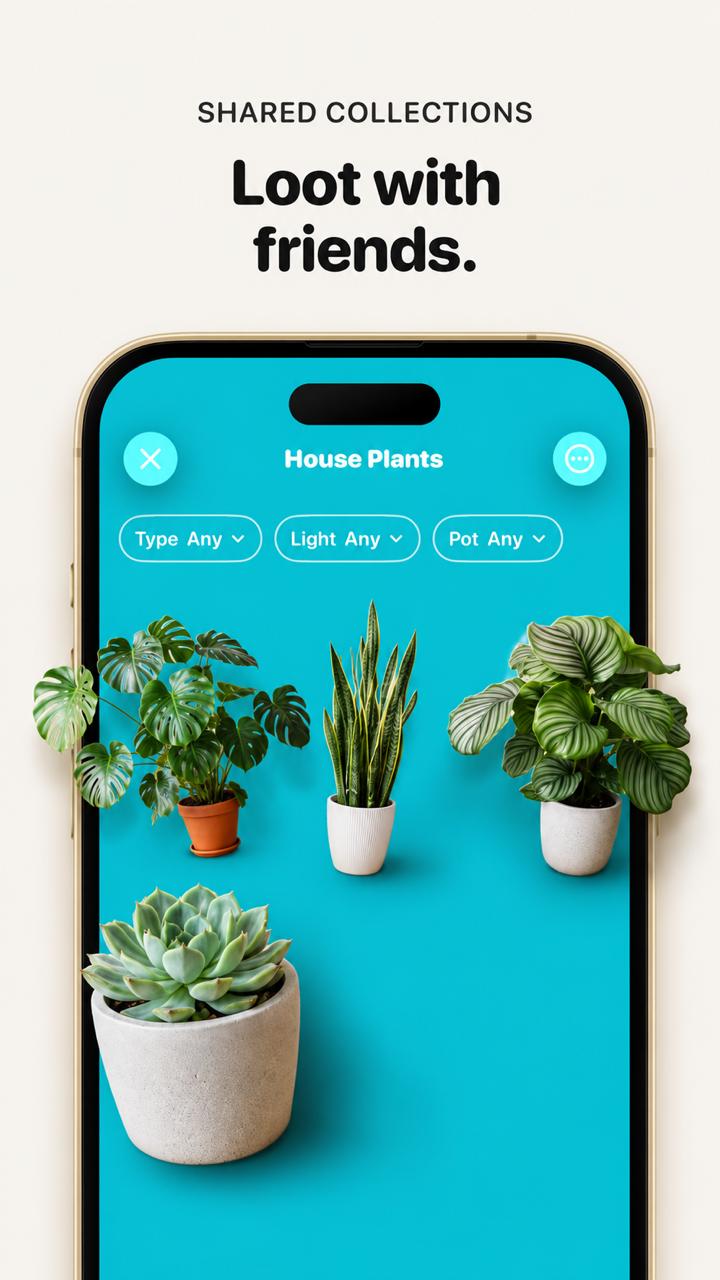
将普通的 Loot 应用截图转换为精致的手机样机宣传图,添加逼真的植物元素并增强视觉深度。
- Category
- UI & Interfaces
- Model
- GPT Image 2
- Creator
- Marc Köhlbrugge
- Source language
- en
- Source ID
- 27838
- Published
- Jul 5, 2026
Full prompt
Using the provided reference image, improve the app promo screenshot into a polished, high-end product mockup while preserving the same overall layout, text, phone frame, turquoise app screen, and plant-collection UI. Enlarge and sharpen the phone crop so it fills more of the vertical canvas, keep the headline above it reading {argument name="headline text" default="Loot with friends."} with the small label {argument name="section label" default="SHARED COLLECTIONS"}. Replace the tiny flat plant thumbnails with realistic, larger, photoreal 3D/product-render plants that appear to sit inside the phone screen with soft shadows and depth. Use exactly 4 plants: a monstera in a terracotta pot on the left, a snake plant in a white ribbed pot in the center, a round-leaf striped calathea/peperomia-style plant in a white pot on the right, and a large echeveria succulent in a concrete pot in the lower-left foreground. Keep the UI title {argument name="collection title" default="House Plants"}, the close button, menu button, and exactly 3 pill filters labeled “Type Any”, “Light Any”, and “Pot Any”. Make the overall image cleaner, brighter, more premium, with crisp typography, realistic shadows, and a beige/off-white background; avoid adding extra UI elements, extra plants, watermarks, or unrelated text.Translations
Premium Loot 应用截图升级
enUsing the provided reference image, improve the app promo screenshot into a polished, high-end product mockup while preserving the same overall layout, text, phone frame, turquoise app screen, and plant-collection UI. Enlarge and sharpen the phone crop so it fills more of the vertical canvas, keep the headline above it reading {argument name="headline text" default="Loot with friends."} with the small label {argument name="section label" default="SHARED COLLECTIONS"}. Replace the tiny flat plant thumbnails with realistic, larger, photoreal 3D/product-render plants that appear to sit inside the phone screen with soft shadows and depth. Use exactly 4 plants: a monstera in a terracotta pot on the left, a snake plant in a white ribbed pot in the center, a round-leaf striped calathea/peperomia-style plant in a white pot on the right, and a large echeveria succulent in a concrete pot in the lower-left foreground. Keep the UI title {argument name="collection title" default="House Plants"}, the close button, menu button, and exactly 3 pill filters labeled “Type Any”, “Light Any”, and “Pot Any”. Make the overall image cleaner, brighter, more premium, with crisp typography, realistic shadows, and a beige/off-white background; avoid adding extra UI elements, extra plants, watermarks, or unrelated text.
Premium Loot 应用截图升级
zh-CN使用提供的参考图,将应用宣传截图升级为精致的高端产品样机,同时保留原有的整体布局、文字、手机边框、青绿色应用界面以及植物收藏 UI。放大并锐化手机画面,使其占据更多垂直画布空间;保持上方的标题 {argument name="headline text" default="Loot with friends."} 以及上方的小标签 {argument name="section label" default="SHARED COLLECTIONS"}。将原本微小的扁平植物缩略图替换为逼真、大型且具有照片级质感的 3D/产品渲染植物,使其看起来像是置于手机屏幕内,并带有柔和的阴影和深度感。请严格使用 4 种植物:左侧为陶土盆中的龟背竹,中间为白色罗纹盆中的虎皮兰,右侧为白色盆中的圆叶条纹竹芋/椒草类植物,左下角前景处为水泥盆中的大型石莲花多肉植物。保留 UI 标题 {argument name="collection title" default="House Plants"}、关闭按钮、菜单按钮,以及 3 个胶囊状筛选器,标签分别为“Type Any”、“Light Any”和“Pot Any”。使整体图像更简洁、明亮、更具高级感,并确保排版清晰、阴影真实,背景采用米色/米白色;避免添加额外的 UI 元素、多余的植物、水印或无关文字。