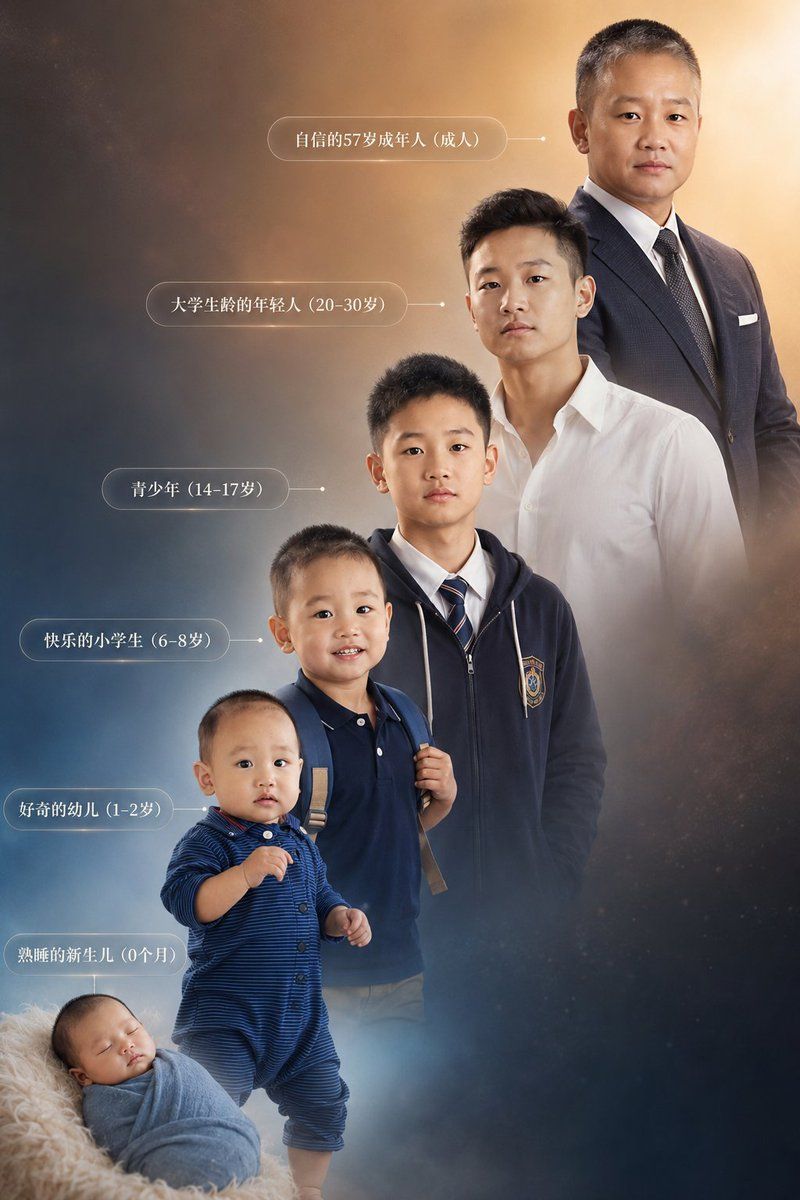
Creates a vertical photorealistic timeline composite showing one male subject from newborn to mature adult with Chinese age-stage labels.
Highlight product features and key ingredients
Use soft natural lighting to enhance texture
Clean hierarchy for posters, ads, and ecommerce banners
Customize subject, brand, and scene details
Example results
Prompt (Multi-language)
Goal: Create a highly detailed vertical composite photo showing the life progression of {argument name="subject description" default="the same Chinese male"} from birth to adulthood, with six separate age-stage figures arranged in a rising diagonal timeline. Maintain strong facial-structure continuity across all six versions of the same person, while making age, body size, clothing, posture, and hairstyle appropriate for each stage.
Canvas: Vertical 2:3 portrait composition, cinematic studio-photography quality, warm golden light in the upper right fading into cool blue-gray mist in the lower left, subtle starry dust and smoky atmospheric background, soft depth of field, elegant inspirational tone.
Layout: Arrange exactly 6 figures from bottom-left to top-right, increasing in age and height. The youngest baby is at the bottom-left foreground, the toddler stands above and slightly right, the elementary-school child stands behind, the teenager stands higher in the center, the young adult is upper-right center, and the mature adult is tallest at the top-right. Use overlapping bodies and scale changes to create a continuous life staircase.
Subjects: Exactly 6 visible versions of the same male:
1. Newborn, 0 months: sleeping infant wrapped in a pale blue swaddle, lying on a fluffy cream blanket at the bottom-left.
2. Curious toddler, 1–2 years: standing child in a dark blue striped one-piece outfit, small hands raised slightly, short black hair.
3. Happy elementary-school student, 6–8 years: child wearing a navy polo shirt and backpack straps, standing confidently.
4. Teenager, 14–17 years: school-age boy wearing a navy zip-up hoodie with a school crest, white shirt, striped tie, neat short hair.
5. College-life young adult, 20–30 years: young man wearing a crisp white open-collar shirt, modern short black hair, relaxed posture.
6. Confident mature adult, 57 years: tall mature man in a dark business suit, white shirt, tie, pocket square, standing upright and dignified.
Text content: Add exactly 6 translucent rounded-rectangle Chinese labels on the left side, each connected to the matching figure by a thin horizontal line and small dot. Use white serif-style Chinese text. The labels must read, from top to bottom: 「自信的57岁成年人(成人)」, 「大学生络的年轻人(20-30岁)」, 「青少年(14-17岁)」, 「快乐的小学生(6-8岁)」, 「好奇的幼儿(1-2岁)」, 「熟睡的新生儿(0个月)」.
Visual style: Photorealistic composite portrait, high-end commercial retouching, soft rim light, realistic clothing texture, natural skin tones, coherent lighting across all age stages, gentle mist around the lower figures, warm halo around the adult at the top-right.
Constraints: Keep exactly six figures and exactly six matching labels. Do not add extra people, panels, borders, logos, watermarks, or unrelated objects. The faces should be visible and consistent unless intentionally anonymized with {argument name="face treatment" default="plain skin-tone rectangular blur masks over each face"}.
How to use this template
Choose this template
Browse templates and select this one.
Edit the prompt
Adjust product, brand, language, and details.
Generate image
Create a consistent AI image.
Download and use
Export a high-resolution asset for publishing.
Frequently asked questions
Can I use this template commercially?
Yes. Confirm final usage rights against your plan and model provider terms.
Do I need design skills?
No. Replace the product, scene, and copy in the prompt.
What image sizes are supported?
Common ratios such as 9:16, 4:5, 1:1, and 16:9 are supported.
Can I modify the prompt?
Yes. The template is designed for reusable composition, lighting, and style.