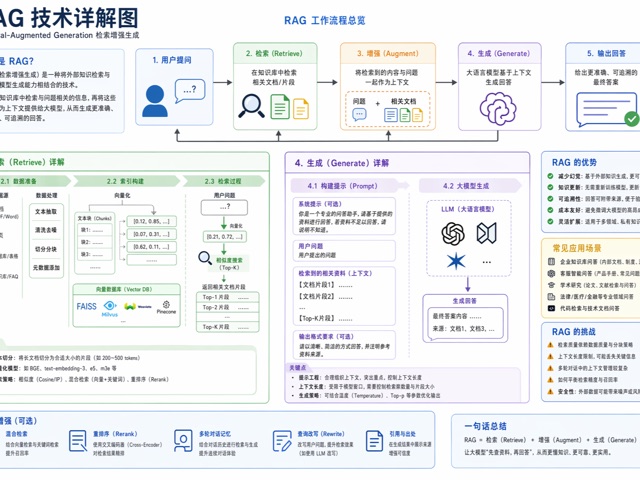
图表与信息可视化awesome-gpt-image-2GPT Image 2industrial-template

图表与信息可视化 - JSON 进阶模板(推荐给 Agent 调用)

{

Best used for
awesome-gpt-image-2, GPT Image 2, industrial-template, charts-infographics
Aspect ratios
9:16, 4:5, 1:1, 16:9
Styles
信息图表模板, awesome-gpt-image-2, GPT Image 2, industrial-template, charts-infographics
Model
GPT Image 2
Language
Multi-language prompts supported

About this template

{

  • Highlight product features and key ingredients
  • Use soft natural lighting to enhance texture
  • Clean hierarchy for posters, ads, and ecommerce banners
  • Customize subject, brand, and scene details

Example results

图表与信息可视化 - JSON 进阶模板(推荐给 Agent 调用) example 1

Prompt (Multi-language)

{ "type": "Infographic", "topic": "Urban Metabolism", "audience": "General Public", "structure": { "title_area": "城市生命系统图谱", "layout": "Isometric cutaway, 12 numbered panels", "modules": [ {"title": "能源", "icon": "lightning", "text": "Power flows"}, {"title": "水循环", "icon": "water_drop", "text": "Water flows"} ] }, "style": { "aesthetic": "Scientific atlas", "colors": "Low saturation, color-coded flows", "background": "Light paper texture" }, "constraints": "No cyberpunk, no gibberish text, strict structural layout" }

How to use this template

Choose this template

Browse templates and select this one.

Edit the prompt

Adjust product, brand, language, and details.

Generate image

Create a consistent AI image.

Download and use

Export a high-resolution asset for publishing.

Frequently asked questions

Can I use this template commercially?

Yes. Confirm final usage rights against your plan and model provider terms.

Do I need design skills?

No. Replace the product, scene, and copy in the prompt.

What image sizes are supported?

Common ratios such as 9:16, 4:5, 1:1, and 16:9 are supported.

Can I modify the prompt?

Yes. The template is designed for reusable composition, lighting, and style.