
Minimalist food shot: GPT Image 2 prompt
Prompt
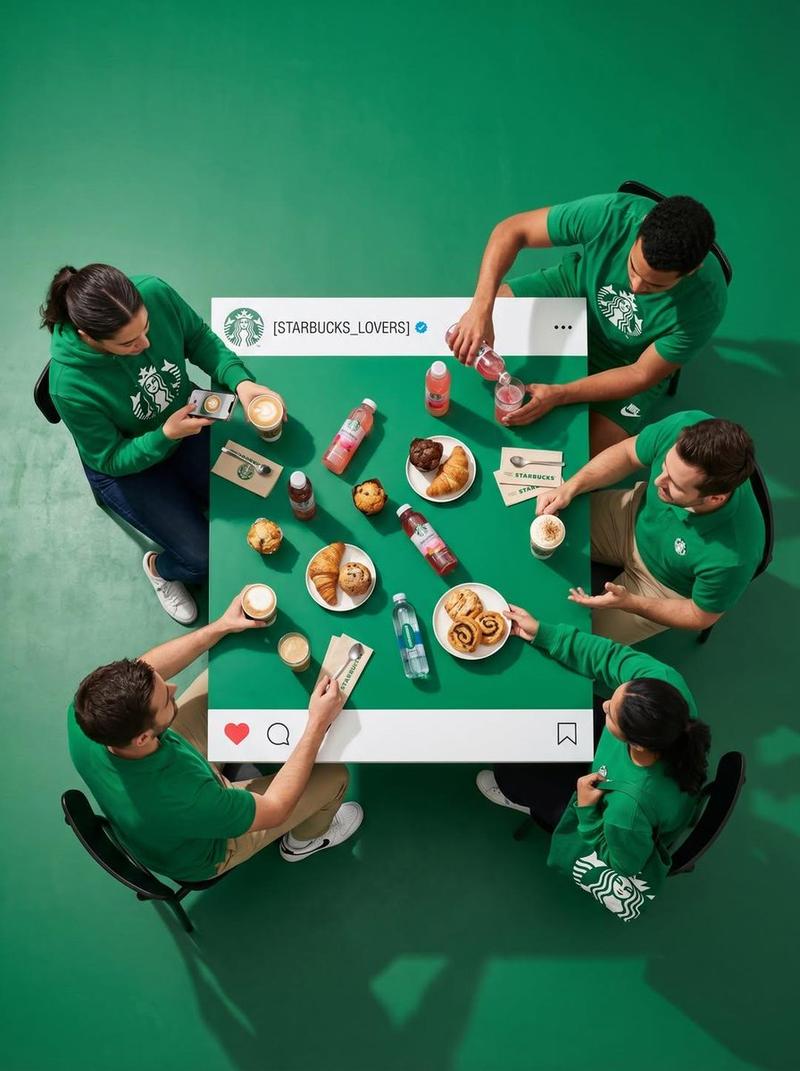
Ultra-wide-angle hyper-realistic shooting in top-down mode. A group of 4 real people sitting at a square dining table. The camera is pushed far back, creating a significant negative space (empty floor area) around the people and the table, which provides a clear, minimalistic composition. Scene [ATMOSPHERE AND CLOTHING]: Four people are dressed in [STYLE OF CLOTHING]. Their interaction is specific: [DESCRIBE EACH PERSON'S ACTIONS]. The table is a custom-made physical prop, designed as an Instagram post: it has a solid white stripe ONLY along the top and bottom edges (no white frames on the left or right). - The upper white stripe shows a drawn profile photo with [LOGO DESCRIPTION], the username "[USERNAME]", followed by a small blue icon with a confirmed check mark, and "..." on the right. - Red hearts, comment and share icons are painted on the bottom white stripe on the left, and a Bookmarks icon on the right. The center of the table is filled in [THE EXACT COLOR OF THE CENTER and the hexadecimal CODE]. The table shows [FOOD ITEMS/ITEM DESCRIPTIONS]. important: ALL food, beverages, objects, and hands that interact with them must be located strictly within this central area, colored in [COLOR]. NOTHING should go beyond the white stripes or beyond the table. The background of the floor is made in [THE COLOR OF THE FLOOR] to create a visual separation. Professional studio lighting with clear shadows. 8k, clear focus.
- Category
- Brand & Logos
- Model
- GPT Image 2
- Creator
- Saul Goodman
- Source language
- en
- Source ID
- 2045009725218226475
- Published
- Apr 17, 2026
Views0


![[Character] in his iconic pose, [Universe Name], standing on a shattered rock ba](https://whqgdndlpxjbwosvipip.supabase.co/storage/v1/render/image/public/prompt-source-media/promptsref/work-43965/image-1-c1a7c6acb20a7434.png?width=800&quality=75&resize=contain)