20

GPT 图像 2 在 chatgpt 上 { "identity_reference": { "source": "uploaded_refer...
Enlarge

Example images

GPT 图像 2 在 chatgpt 上 { "identity_reference": { "source": "uploaded_refer...

Prompt
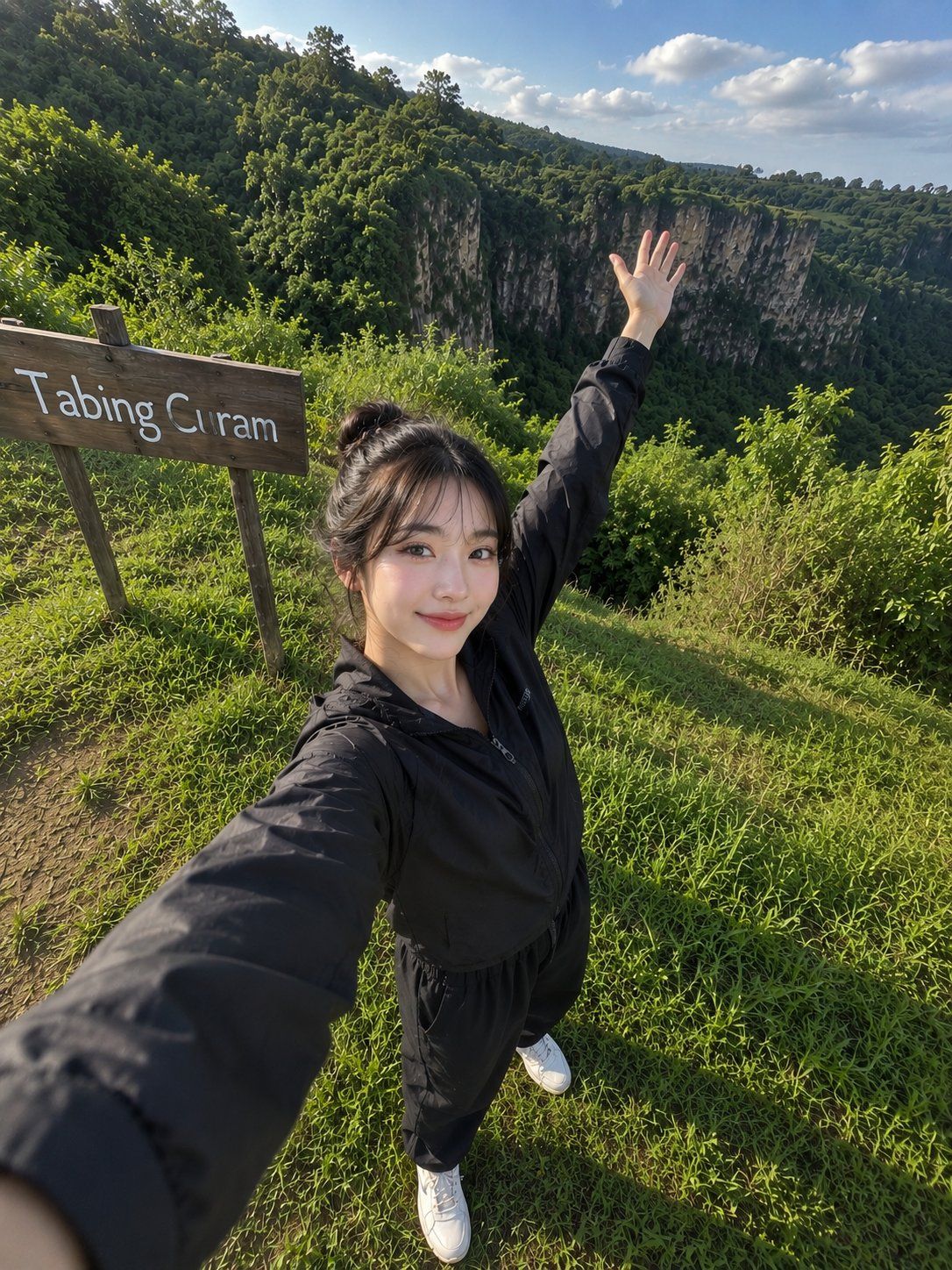
GPT 图像 2 在 chatgpt 上 { "identity_reference": { "source": "uploaded_reference_photo", "priority": "primary", "preserve": [ "100% 面部身份", "面部结构", "肤色", "发型", "面部比例", "面部表情", "独特面部特征" ], "rule": "这个人必须保持瞬间可识别为上传参考照片中完全相同的个体。" }, "scene": { "type": "超现实户外智能手机自拍", "location": "郁郁葱葱的绿色草丘旁,一个阅读 'Tabing Curam' 的质朴木制标志", "environment": { "background": [ "美丽的连绵起伏的绿色丘陵", "戏剧性的悬崖景观", "茂密的热带树木", "郁郁葱葱的植被", "宁静的自然景观", "干净的蓝天伴随柔和的云朵" ], "atmosphere": "温暖的早晨或傍晚的旅行目的地" } }, "subject": { "pose": { "style": "自然全身自拍", "camera_hand": "一只手臂伸向相机", "other_hand": "自然举过头顶", "expression": "柔和真诚的微笑", "mood": "放松、欢快、自发的观光" }, "outfit": { "jacket": "黑色轻便拉链夹克", "pants": "黑色运动裤", "shoes": "白色运动鞋" } }, "lighting": { "type": "自然阳光", "skin": "柔和的高光", "exposure": "平衡", "color_temperature": "略微温暖", "hdr": "自然 HDR", "bounce_light": "柔和的环境光" }, "camera": { "device": "智能手机前置摄像头", "shot": "全身自拍", "angle": "高角度(相机举在眼睛上方)", "lens": "轻微广角智能手机镜头失真", "focus": "锐利", "depth": "现实景深", "quality": "RAW 超现实" }, "style": { "photography": "专业旅行摄影", "look": [ "RAW 照片美学", "超现实", "自然皮肤纹理", "现实阴影", "精细胶片颗粒", "高动态范围", "真实的服装褶皱", "自然的发丝", "逼真的色彩", "看起来像真实户外旅行中捕捉的真实智能手机自拍" ] }, "negative_prompt": [ "美颜滤镜", "过度皮肤平滑", "CGI", "插图", "动漫", "水印", "标志", "多余文字", "低质量", "模糊", "扭曲的脸", "错误的身份" ] }
Category
创意图片
Model
GPT Image 2
Creator
@saniaspeaks_
Source language
zh-CN
Views6
Source ID
2081222332614652089
Published
Jul 26, 2026
Studio

Guide

About "GPT 图像 2 在 chatgpt 上 { "identity_reference": { "source": "uploaded_refer..."

What is this prompt for?

"GPT 图像 2 在 chatgpt 上 { "identity_reference": { "source": "uploaded_refer..." AI image prompt for GPT Image 2 (创意图片). Saved from X post by @saniaspeaks_. GPT 图…

The full copyable prompt and example visuals above are ready for AI image generation or one-click recreate in Picva.

How to use this prompt

  1. Step 1

    Open the prompt detail

    Review the example visuals, category, and full prompt text for "GPT 图像 2 在 chatgpt 上 { "identity_reference": { "source": "uploaded_refer...".

  2. Step 2

    Copy the prompt

    Copy the prompt body from this page, or load it directly in Studio.

  3. Step 3

    Pick a model (GPT Image 2)

    Prefer GPT Image 2. If you switch models, keep subject and composition and tweak style terms.

  4. Step 4

    Generate and export

    Recreate the look in Picva, or export into your workflow for editing and publishing.

FAQ

What is the "GPT 图像 2 在 chatgpt 上 { "identity_reference": { "source": "uploaded_refer..." prompt?
It is an AI image-generation prompt for GPT Image 2 in the 创意图片 category. This page includes the full prompt text, example visuals, and a one-click recreate path in Picva.
How do I use this prompt to generate an image?
Copy the prompt from this page, or use Generate / Studio. Paste it into a compatible image model, or recreate the look in Picva with optional reference images.
Which model is this prompt for?
This page lists GPT Image 2. Most descriptive prompts also transfer to nearby image models such as GPT Image, Flux, or Midjourney with light style tweaks.
Can I use the result commercially?
You can usually copy the prompt for creation, but commercial use of the final image depends on the model terms, reference-image rights, and the generated content. Follow the source author and platform rules.