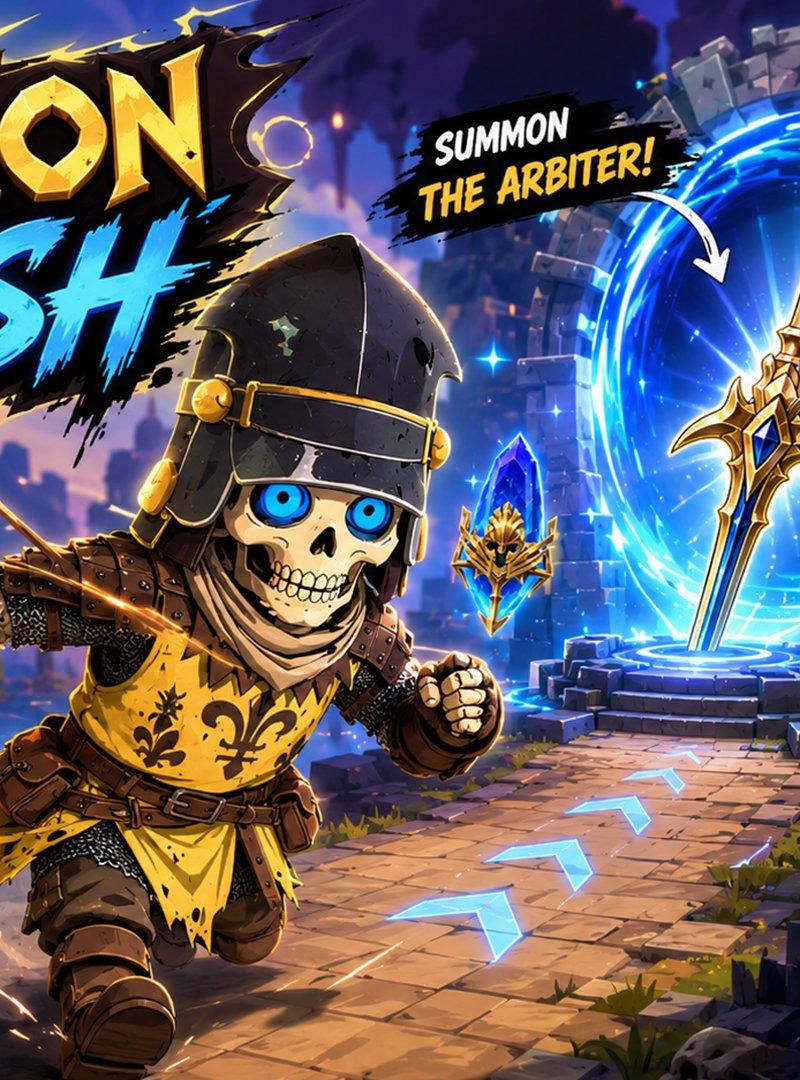
Summon Dash Roblox 奇幻风格缩略图
Prompt
Goal: Create a high-energy Roblox fantasy game thumbnail for {argument name="game title" default="SUMMON DASH"}, styled like a premium mobile RPG advertisement with bold comic action graphics.

Canvas: 16:9 widescreen thumbnail, 1200x675 composition, vibrant and highly saturated, designed to be readable at small YouTube/Roblox thumbnail size.

Layout: Place the huge game logo in the upper left, taking about one third of the image width. The logo has two words: “SUMMON” in chunky beveled gold fantasy lettering with black jagged shadow, and “DASH” underneath in bright electric-blue brush lettering. In the center foreground, show one Roblox-like armored runner charging toward the viewer on a stone path. On the right side, show a glowing circular summoning portal with a floating golden spear in front of it. Use diagonal motion lines, flying sparks, blue energy, and arrows to guide the eye from left foreground to the portal and then to the bottom-right success label.

Subject details: The central character is a short, blocky Roblox-style knight wearing a black hood, dark leather shoulder armor, brown gauntlets and boots, chainmail sleeves, and a yellow tabard with black fleur-de-lis heraldry. The character is mid-run with one fist forward and one arm back, kicking up dust behind the feet; the face is mostly hidden in shadow under the hood. The environment is a fantasy dungeon-city made of blocky stone ruins, torches, distant castle silhouettes, purple-blue evening sky, and glowing magical accents.

Counted visible elements: Include exactly 1 central running knight, exactly 1 giant summoning portal, exactly 1 floating spear, exactly 4 blue crystal objects with gold winged mask emblems, exactly 1 skull banner on the right, exactly 1 green checkmark badge, and exactly 3 blue arrow tiles on the stone path. The 4 crystal/emblem objects are: one large crystal cluster in the lower-left foreground, one small floating emblem near the center-right path, one small floating emblem near the portal, and one larger floating emblem on the far right.

Text content: Use exactly 5 text groups. Text group 1 is the main logo: {argument name="game title" default="SUMMON DASH"}. Text group 2 near the top center-right on a black brush-stroke label says “SUMMON” in white and {argument name="summon target text" default="THE ARBITER!"} in yellow, with a white curved arrow pointing toward the spear/portal. Text group 3 in the lower left says “COLLECT” in white and {argument name="collectible text" default="CRYSTALS!"} in cyan, with a white arrow pointing to the large crystal. Text group 4 in the lower right says “DELIVER” in white and {argument name="delivery target text" default="TO DEATHKNIGHT!"} in yellow, with small white arrows toward the banner. Text group 5 at the bottom right says {argument name="success text" default="LEVEL CLEAR!"} in glowing neon green next to the green checkmark badge.

Visual style: Exaggerated fantasy-action illustration, crisp 3D game-promo rendering, thick black outlines, dynamic perspective, strong rim lighting, electric blue portal glow, gold highlights, painterly sky, cinematic depth, high contrast, saturated colors, polished Roblox-inspired proportions, no photorealism.

Constraints: Keep all text large, legible, and spelled exactly as specified. Do not add extra text, UI panels, watermarks, logos, or additional characters. Maintain the thumbnail as a single dramatic action scene rather than a collage.- Category
- UI & Interfaces
- Model
- GPT Image 2
- Creator
- HONEBITO(映像クリエイター / 生成AI)
- Source language
- en
- Source ID
- 24824
- Published
- Jun 8, 2026
Views4