16

美国历史纸币收藏微距摄影
Enlarge

Example images

美国历史纸币收藏微距摄影

Prompt
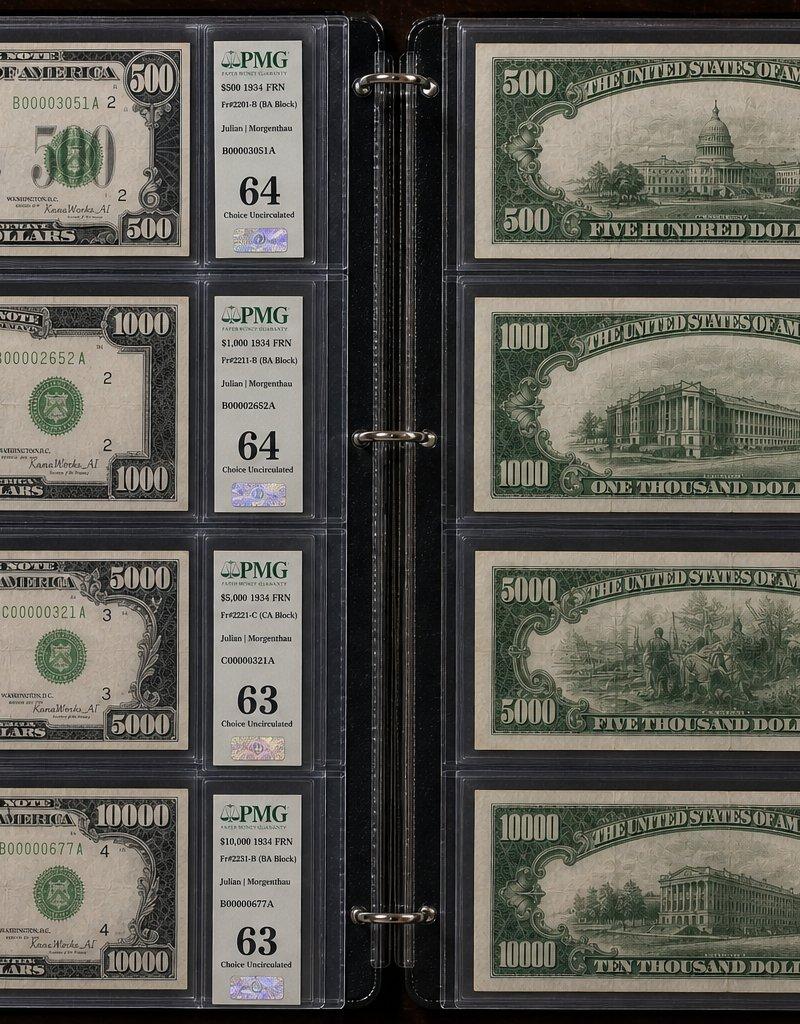
A highly realistic, photorealistic macro close-up photograph of one page in a paper currency collection album. On the left side, from top to bottom: the front sides of the 500 USD bill (William McKinley), 1,000 USD bill (Grover Cleveland), 5,000 USD bill (James Madison), and 10,000 USD bill (Salmon P. Chase). All signatures on the bills are changed to {argument name="signature name" default="KanaWorks_AI"}. On the right side, from top to bottom: the back sides of the same bills in the same order (500, 1,000, 5,000, 10,000 USD). The banknotes are in near-uncirculated condition. Each bill is encapsulated in a clear protective holder with colorful grading labels attached, and the labels display all key information.
Category
Charts & Infographics
Model
GPT Image 2
Creator
KANA|東京AI映像
Source language
en
Views0
Source ID
25221
Published
May 2, 2026
Studio

Guide

About "美国历史纸币收藏微距摄影"

What is this prompt for?

"美国历史纸币收藏微距摄影" AI image prompt for GPT Image 2 (Charts & Infographics). 一个展示专业货币收藏册的微距摄影提示词,包含大面额美元纸币及透明保护套。 Copy it on Picva and recreate the look in one clic…

The full copyable prompt and example visuals above are ready for AI image generation or one-click recreate in Picva.

How to use this prompt

  1. Step 1

    Open the prompt detail

    Review the example visuals, category, and full prompt text for "美国历史纸币收藏微距摄影".

  2. Step 2

    Copy the prompt

    Copy the prompt body from this page, or load it directly in Studio.

  3. Step 3

    Pick a model (GPT Image 2)

    Prefer GPT Image 2. If you switch models, keep subject and composition and tweak style terms.

  4. Step 4

    Generate and export

    Recreate the look in Picva, or export into your workflow for editing and publishing.

FAQ

What is the "美国历史纸币收藏微距摄影" prompt?
It is an AI image-generation prompt for GPT Image 2 in the Charts & Infographics category. This page includes the full prompt text, example visuals, and a one-click recreate path in Picva.
How do I use this prompt to generate an image?
Copy the prompt from this page, or use Generate / Studio. Paste it into a compatible image model, or recreate the look in Picva with optional reference images.
Which model is this prompt for?
This page lists GPT Image 2. Most descriptive prompts also transfer to nearby image models such as GPT Image, Flux, or Midjourney with light style tweaks.
Can I use the result commercially?
You can usually copy the prompt for creation, but commercial use of the final image depends on the model terms, reference-image rights, and the generated content. Follow the source author and platform rules.