柴犬动物园角落海报
Prompt
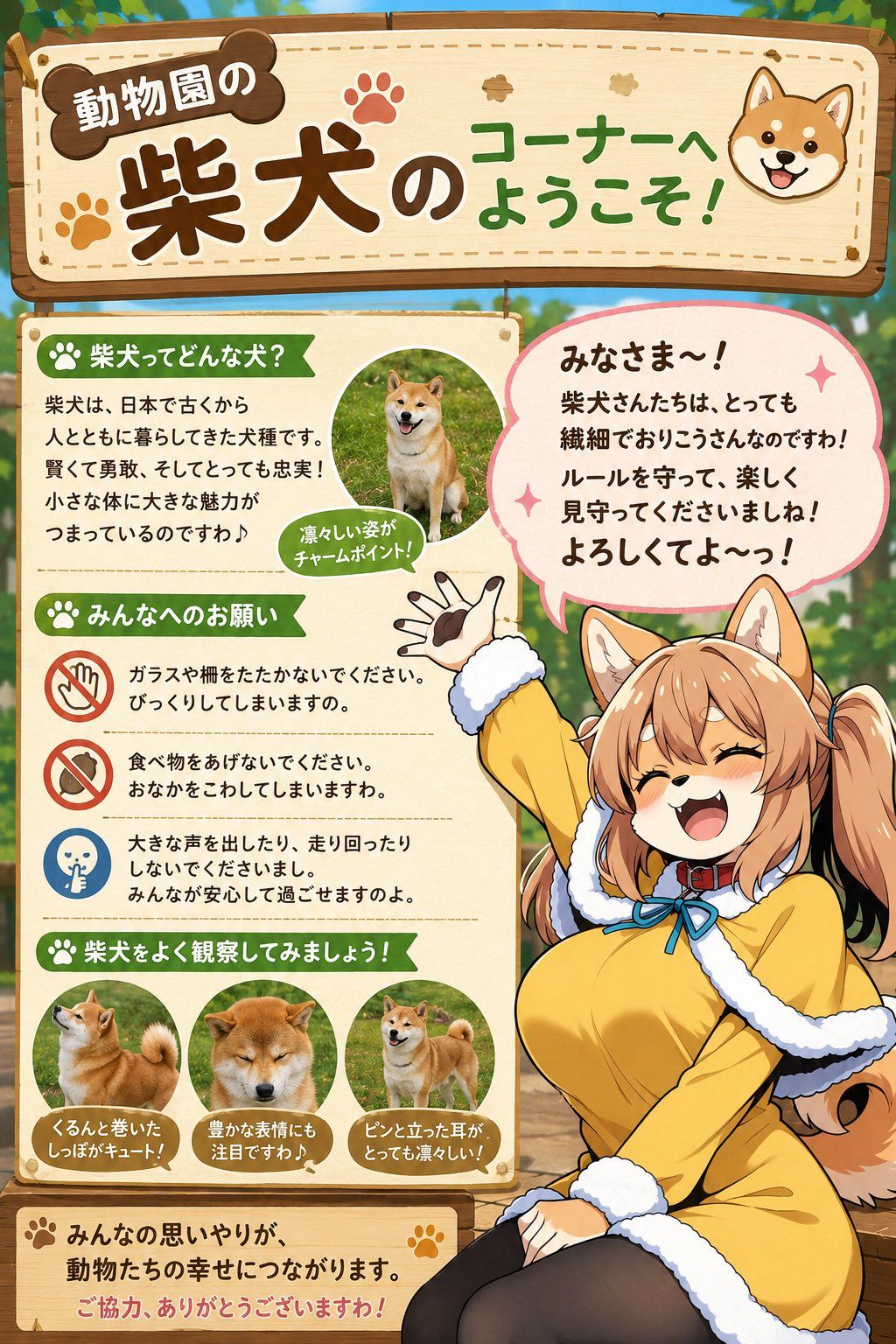
Goal: Create a cheerful vertical Japanese zoo information sign for a Shiba Inu corner, combining a cute educational infographic with an anime dog-girl mascot.

Canvas: Vertical 2:3 poster, warm daylight outdoor zoo setting with softly blurred greenery and wooden fence in the background. Use a polished gpt-image-2 anime illustration style with clean line art, bright colors, soft shading, and a friendly family-attraction atmosphere.

Main header: A large hanging wooden signboard spans the top, cream-colored center with rounded brown wooden frame, stitch-like dashed border, paw-print decorations, and a small smiling Shiba Inu face icon on the right. The headline text should be large and playful in Japanese: {argument name="headline text" default="動物園の 柴犬のコーナーへ ようこそ!"}. Make 「柴犬」 the biggest dark-brown text, with green text for the welcome phrase.

Layout: Below the header, divide the poster into two main zones. The left side is a cream educational board with green ribbon section headers and small icon bullets. The right side is dominated by a large anime mascot sitting and waving, with a big pink speech bubble above her. Keep the left board readable and the mascot overlapping slightly in front of it for depth.

Left information board content: Include exactly 4 green ribbon sections. Section 1 title: 「柴犬ってどんな犬?」 with a paw icon. Add a short Japanese paragraph explaining Shiba dogs are an ancient Japanese breed, smart, brave, loyal, and charming despite their small bodies. Add exactly 1 circular Shiba Inu photo-style illustration showing a sitting Shiba in grass, with a small green callout reading 「凛々しい姿がチャームポイント!」. Section 2 title: 「みんなへのお願い」 with a paw icon. Include exactly 3 rule rows separated by dotted lines: rule 1 has a red no-touch/no-glass icon and says not to tap glass or fences because it startles them; rule 2 has a red no-feeding icon and says not to give food because it can upset their stomach; rule 3 has a blue quiet icon and says not to shout or run because everyone should feel safe. Section 3 title: 「柴犬をよく観察してみましょう!」 with a paw icon. Include exactly 3 circular Shiba observation images with brown caption plaques: left shows a curled fluffy tail, caption 「くるんと巻いたしっぽがキュート!」; center shows a calm expressive face, caption 「豊かな表情にも注目ですわ♪」; right shows upright pointed ears, caption 「ピンと立った耳がとっても凛々しい!」. Section 4 is a bottom thank-you panel with paw icons, reading 「みんなの思いやりが、動物たちの幸せにつながります。」 and a red thank-you line 「ご協力、ありがとうございますわ!」.

Mascot character: Draw {argument name="character name" default="a cheerful Shiba Inu dog-girl zookeeper mascot"} as a cute adult anime woman with Shiba ears, fluffy Shiba tail, warm tan hair in twin ponytails, amber-brown eyes closed in a happy smile, open laughing mouth with small fang, and energetic waving pose. She wears a yellow coat or dress with thick white fluffy trim, black tights, a red collar around the neck, and a blue bow at the chest. One hand is raised high with visible paw-pad-like glove details, the other rests near her lap. Her expression is lively, welcoming, and slightly mischievous.

Speech bubble: Place a large rounded pink speech bubble above the mascot with sparkles. Use bold friendly Japanese text: {argument name="speech bubble text" default="みなさま〜!\n柴犬さんたちは、とっても繊細でおりこうさんなのですわ!\nルールを守って、楽しく見守ってくださいましね!\nよろしくてよ〜っ!"}.

Visual style: Cute zoo poster, kawaii educational signage, warm wood textures, paw-print motifs, soft cream paper panels, green section labels, brown typography, orange and red accents, glossy anime character rendering, crisp readable text, no watermark, no extra sections, no additional animals beyond the Shiba dogs shown in the specified images.- Category
- Charts & Infographics
- Model
- GPT Image 2
- Creator
- 人定@人外娘専用アカウント
- Source language
- en
- Source ID
- 25241
- Published
- Jun 11, 2026
Views0