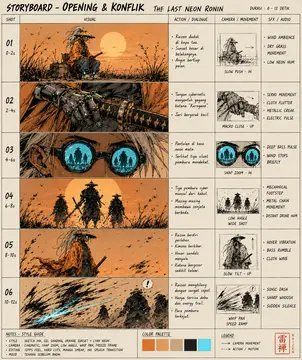
后启示录浪人分镜脚本页
Prompt
Goal: Create a vertical storyboard concept sheet for a cinematic project titled {argument name="storyboard title" default="STORYBOARD - OPENING & KONFLIK"}, with the film title {argument name="film title" default="THE LAST NEON RONIN"}. The sheet should look like a hand-drawn production storyboard page, mixing sepia ink sketches with small technical notes and shot thumbnails.

Canvas: Portrait-oriented storyboard page, slightly aged cream paper background, thin black grid lines, scanned-paper texture, rough marker and pencil ink. Use a warm burnt-orange, brown, black, and muted cyan palette. Add a small header bar at the top with fields for sequence, page, and date.

Layout: Arrange the page as a professional storyboard board with 6 horizontal shot rows numbered 01 through 06 down the left side. Each row includes a large sketch panel on the left, a middle column with action notes, and a right column with smaller reference thumbnails and camera/audio notes. The overall composition should feel dense, cinematic, and production-ready.

Visible shot count: Include exactly 6 storyboard shots:
1. Shot 01: a lone ruined hut or shrine in tall reeds under a giant low sun, orange dusk atmosphere.
2. Shot 02: a low tracking view over cracked ground, debris, and grass, leading toward the same ruined environment.
3. Shot 03: rough close-up details of rocks, cloth, or broken terrain at the left, with the central area partially obscured by a large rectangular color block.
4. Shot 04: a rugged tree trunk or cliff face in warm orange light, with diagonal brush textures.
5. Shot 05: a desert-like slope or eroded landscape with a small sword or staff stuck in the ground.
6. Shot 06: a wide shot of a solitary ronin silhouette walking through rain or wind toward dark figures in the distance.

Central overlay: Place one large vertical rectangular color-test block over the middle-left area, covering parts of shots 03 to 05. It should have a dark brown top fading into medium ochre brown at the bottom, like an intentional storyboard placeholder or masked reference area.

Right-side thumbnail count: Include exactly 6 small reference thumbnail boxes aligned with the six rows. Show miniature black-and-white/sepia sketches: a hut silhouette, a bridge or arched structure, two cyan glowing eye shapes, a lineup of four dark figures, a tiny landscape with birds or debris, and a final small terrain/figure sketch.

Text content: Use rough handwritten English notes throughout, mostly as illegible production annotations. Keep the following readable headings: “SHOT,” “ACTION / DIALOGUE,” “CAMERA / ANGLE,” and “SFX / AUDIO.” Add short note fragments like “wide ambience,” “low angle,” “slow dolly,” “wind,” “footsteps,” and “distant voices.” Do not make the text too clean; it should resemble a real messy storyboard.

Bottom area: Add a notes strip across the bottom with tiny handwritten bullet notes. Include a color palette box with exactly 5 swatches: burnt orange, tan, dark brown, charcoal black, and muted cyan. Add a small red production stamp or seal in the bottom-right corner.

Style: Gritty dystopian samurai sci-fi mood, post-apocalyptic ronin opening sequence, expressive ink hatching, watercolor wash, cinematic framing, production design sheet, rough but intentional, high detail, slightly tilted scanned document feel. Use {argument name="main color mood" default="sepia orange dusk with muted cyan accents"} and emphasize {argument name="atmosphere" default="lonely, tense, windswept, post-apocalyptic"}.

Constraints: Keep it as a single flat storyboard page, not a comic page with speech bubbles. Do not add photorealistic faces. Do not add modern UI elements. Maintain exactly 6 numbered shot rows, exactly 6 right-side thumbnails, and exactly 5 palette swatches.- Category
- UI & Interfaces
- Model
- GPT Image 2
- Creator
- ragnala92
- Source ID
- 25726
- Published
- Jun 7, 2026
Views5